page 30 of 73
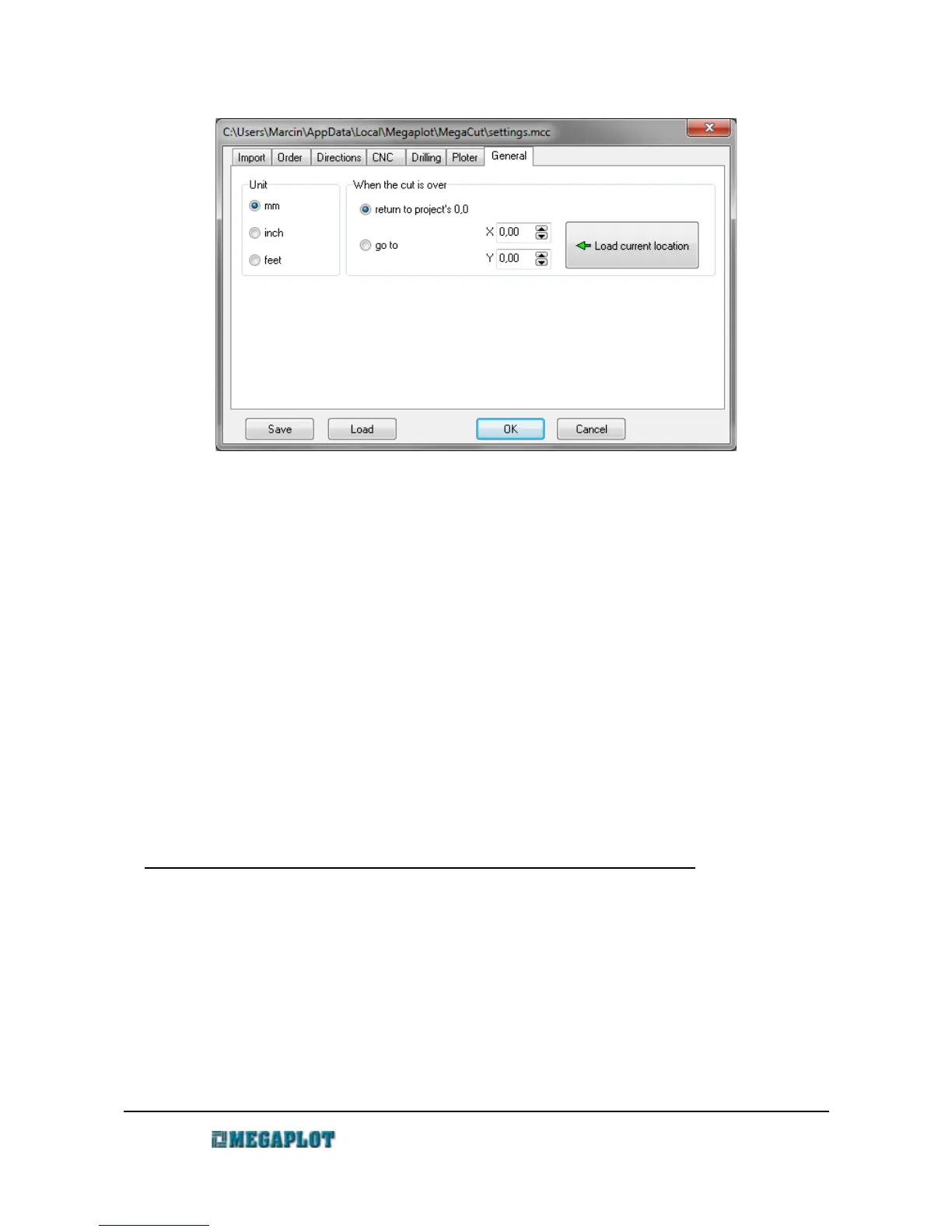
General tab
Units - set the units used in MegaCut softare
When the cut is over - specifies the place where the spindle is supposed to move after the
cutting finishes
return to project's 0,0 - when the operation ends the spindle moves back to the original
project's zero location. It will stay at the height specified in the
Configuration in the CNC Tab: Movement above the material.
go to XY - when the operation ends the spindle goes all the way up and moves to the specified
X and Y values IMPORTANT: if you use high material holders, there
is a danger of the spindle hitting those holders!
Load current location - a button to set the X and Y values to the current spindle location
Tool measurement
Tool measurement
The tool length needs to be measured every time a new tool is installed. It determines the
distance between the tool and the machine table.
The tool length measurement may be done either on the machine table, the pad under the
material or on top of the material. The chosen method needs to be set in Configuration in the Ploter
tab.
Before you measure the tool length:
• make sure correct pad thickness is set in Configuration (Configuration \ Ploter \ Pad
thickness) [this applies to automatic measurement].
www.megaplot.com phone: +48 693 707 575 office@megaplot.com



 To Next Page