www.megger.com
Megger Baker ADX User Guide
54
Assets
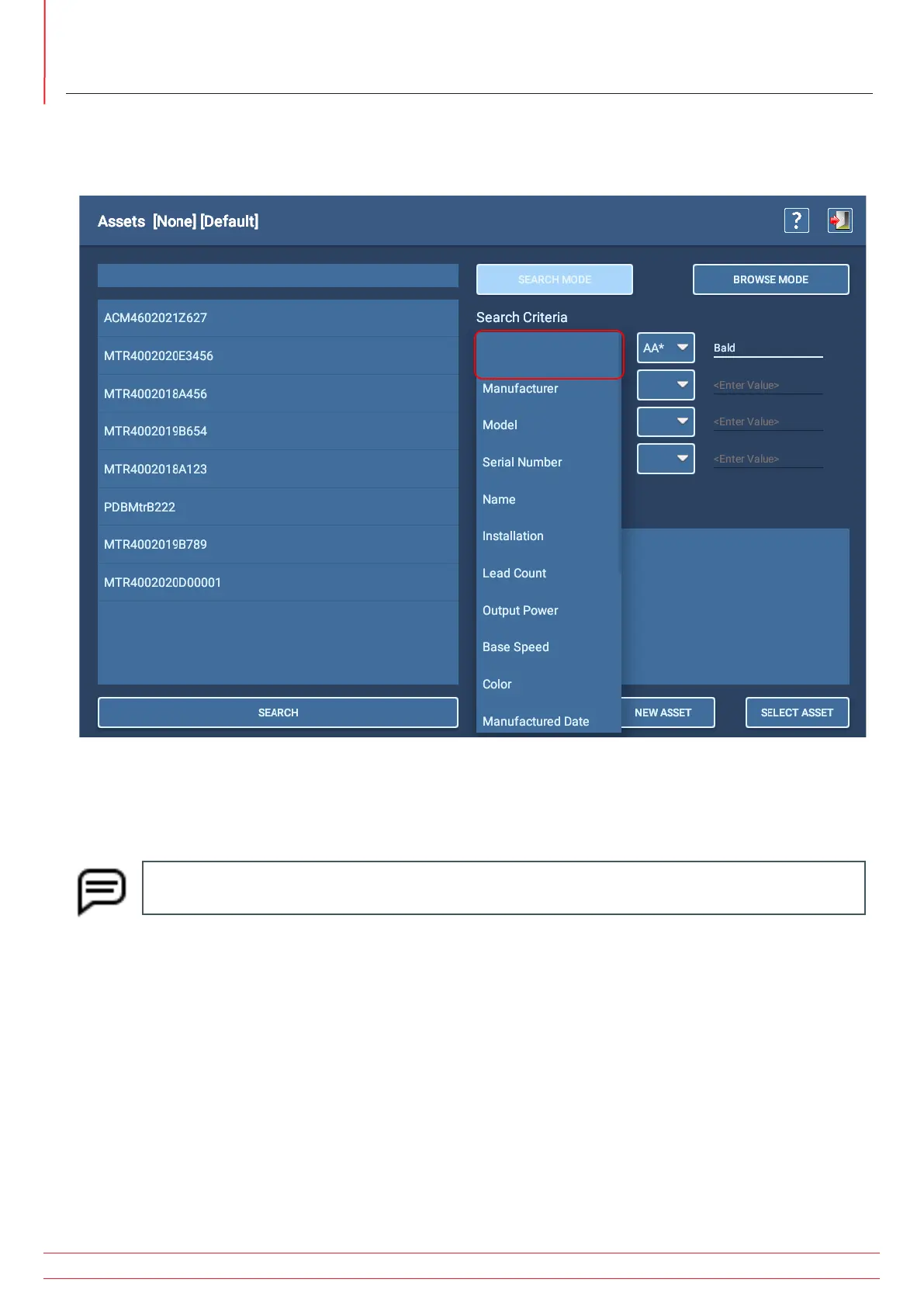
Using Search Mode, select search criteria from the drop-down lists provided to filter through the database by
characteristics such as manufacturer, model, output power, and more. The Search Criteria lists come from common
nameplate fields defined during the asset creation process, along with attributes created during that process.
Fig 50: Selecting an asset; Search mode.
Search mode has type-ahead capability—as you type, the software filters the list to display items that contain the
characters entered.
NOTE: To clear a Search of Browse field, open the Search Criteria list then select the top (blank) row as
shown in the image above.
As each criterion is selected, mathematical operators relevant to the selected data type appear in the adjacent drop-
down list. You then need to enter a value in the third column to complete the conditions for the criterion. Values
entered in this field are case-sensitive. You can add criteria as needed to further refine the search.
In the example above, the operator AA* means: Find values that start with matching characters up to the asterisk ( * )
and any or no characters following.
Similarly, *AA means: Find values that end with the matching characters.
!= Means: Not equal to. Standard operators are used for other search criteria.


 To Next Page