Realm Cloud Connection
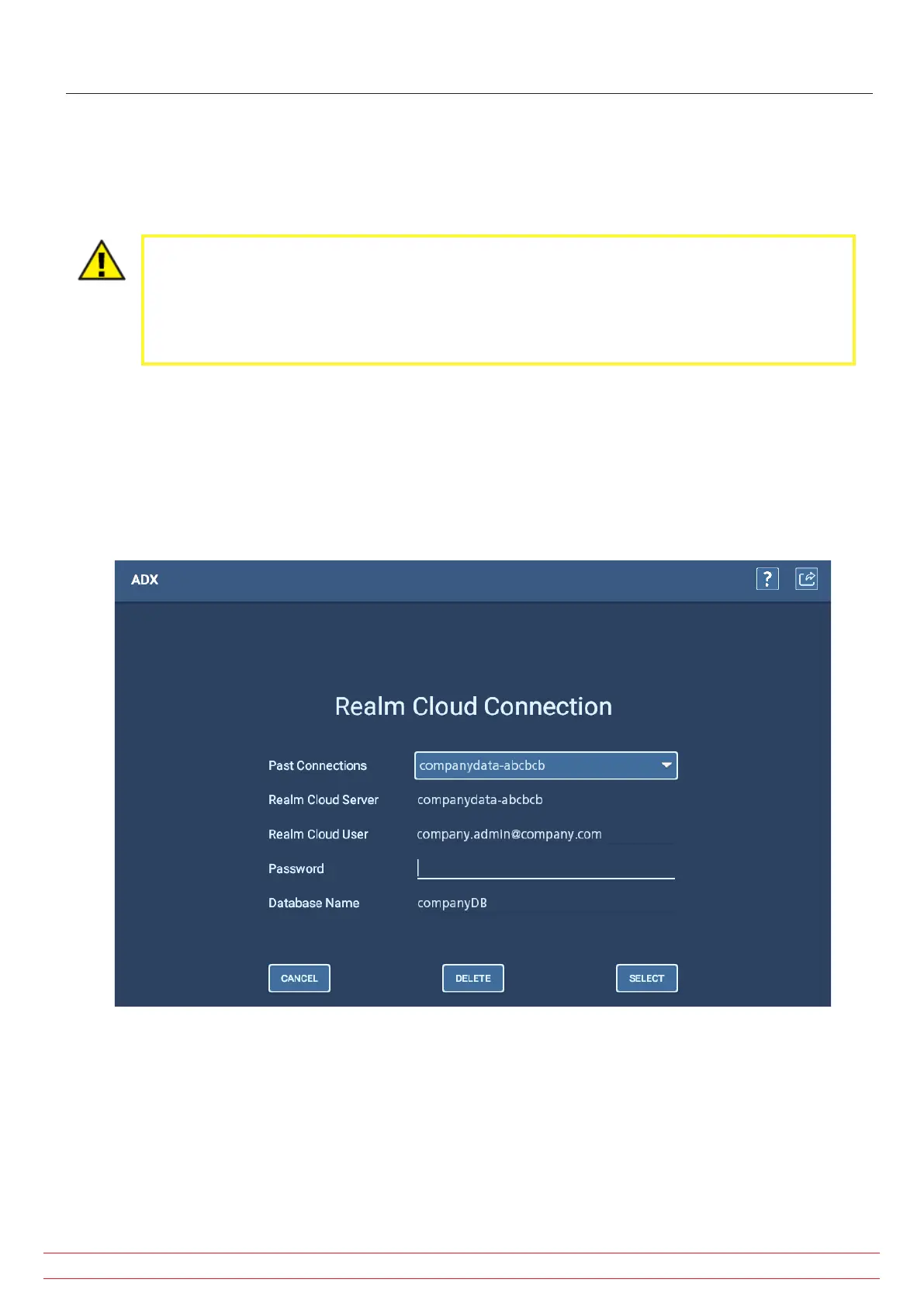
The ADX tester connects to the Realm Cloud Server (and, in turn, PowerDB Dashboard) via an internet portal, which is
defined using this screen in the user interface.
Use this screen to view the database and server currently selected for the ADX.
CAUTION: DO NOT MAKE CHANGES TO ENTRIES IN THIS SCREEN without proper permissions and
system knowledge. Errant changes can break the established connection.
In most cases, the information in this screen will not need to be changed. It is set at the factory for
your specific organization. Only qualified system administrators working directly with Megger Baker
technical support should make changes to this information.
Most organizations will use only one database, so there will be no need to make changes. If your organization has
multiple databases, they will also be set up at the factory.
In such cases, you should see the available options in the Past Connections drop-down list. If multiple databases are
used, you can change the server and database being used by selecting it from this drop-down list.
When the correct values appear in the Realm Cloud Server and Database Name fields, enter the appropriate password.
Click Select to connect to the new server/database instance.
Fig 71: Realm Cloud Connection screen.
www.megger.com
Megger Baker ADX User Guide
76
Realm Cloud Connection



 To Next Page