16 TORKEL 900-SERIES ZP-CS01E CS033663DE
4 MENU SYSTEM
You can select according to IEEE and IEC
standards or Manual setting:
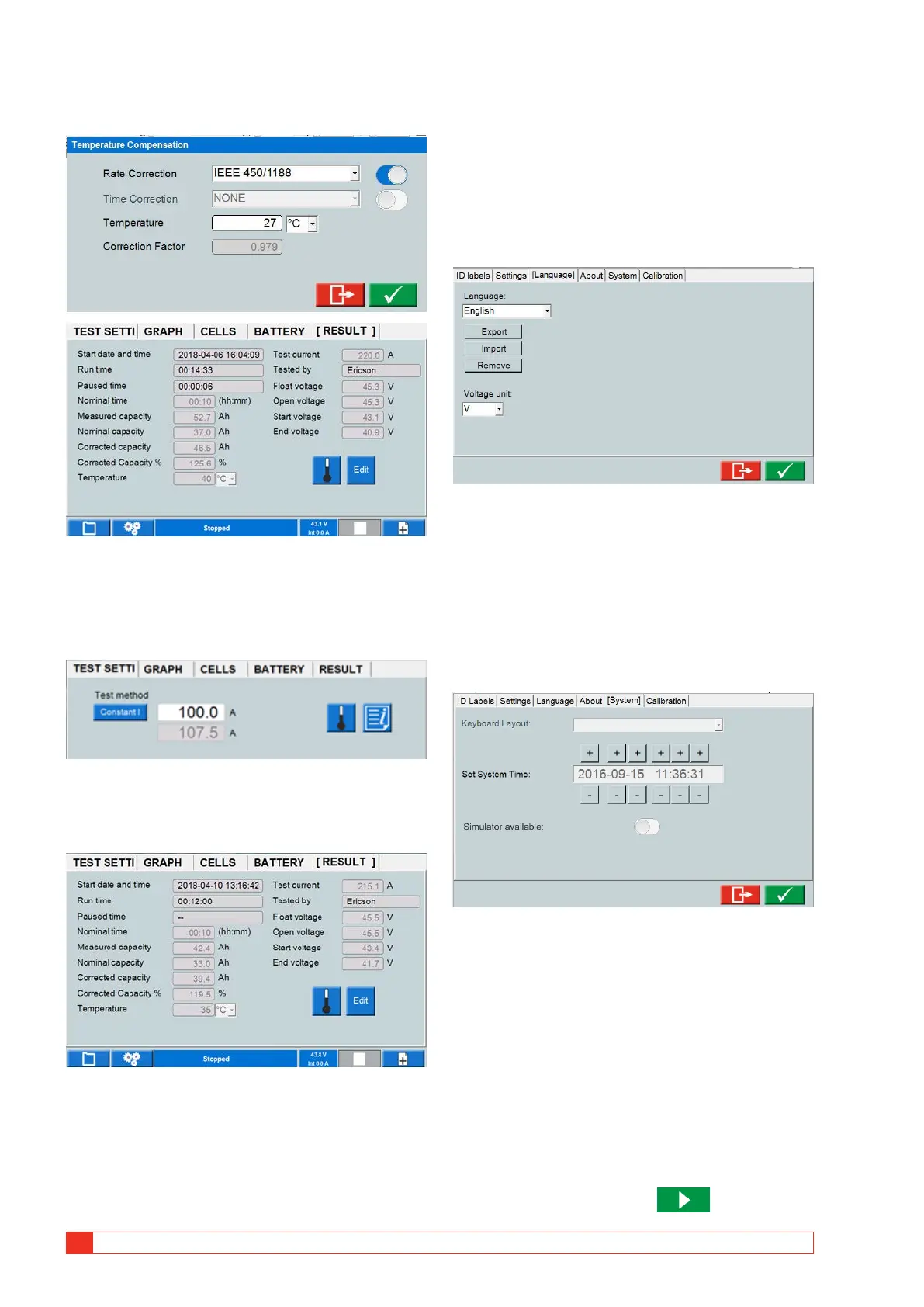
Rate Correction
The rate compensation is for capacity tests up to 1
hour. Depending on the set temperature the nominal
current will change.
It will be reflected in the “TEST SETTING” menu.
In this example 100 A is set as nominal current. The
temperature is set to 35 degrees.
It gives a compensated current discharge level on
107.5 A.
Rate compensated. 200 A nominal current, compen-
sated 215.1 A discharge current
Nominal capacity calculated on 200 A => nominal
capacity 33 Ah
measured capacity 42.4 Ah and from that get cor-
rected capacity 39.4 Ah.
Corrected capacity % => 39.4 Ah / 33 Ah = 119.5%
Time Correction
The time compensation is for tests longer than 1 hour.
Measured capacity 52.7 Ah / comp factor at 40°C
(1.134) gives corrected capacity 46.5 Ah. And cor-
rected capacity in % rel. to nom. capacity 46.5 / 37 =
1.256. Meaning 125.6%.
Language
▪ Manage language files for the internal software and select
U or V as the symbol for voltage.
About
▪ Information about software version etc.
▪ Upgrade License.
A license file is to be copied to TORKEL
Upgrade can be performed to TORKEL 930/950.
System
▪ Select external keyboard.
▪ Set the time
▪ Simulator mode
Using simulator mode you are can simulate a test
without a battery and BVM connected.
1] Enable "Simulator available".
2] Shut down and restart TORKEL.
3] During start of TORKEL select the “BVM
Simulator “ button and “Simulator”.
4] When the start menu appears, tap on the
space bar and select “Connected”
After a short while, the button gets



 To Next Page