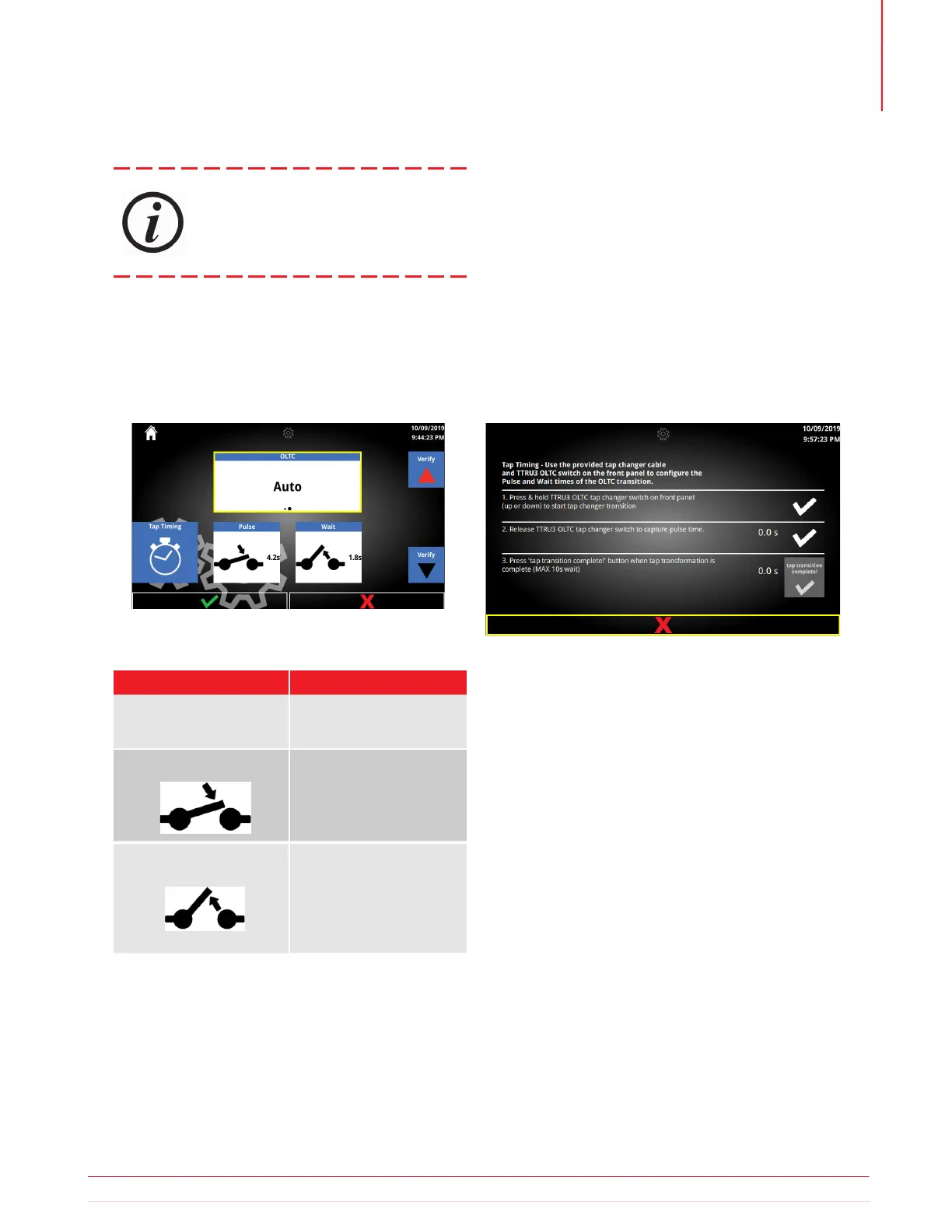
Option Availabe Settings
Manual
Auto
1.0 – 10.0
0.1 increments
1.0 – 10.0
0.1 increments
OLTC
Wait
Pulse
5.12 OLTC Settings
5.12.1 OLTC Options
OLTC Settings allow for configuration of the Pulse
and Wait time for Automatic OLTC. Pulse time is the
duration that the tap changer contact is closed. Wait
time is the time the tap changer requires to complete
its transition.
Optional SW Feature
5.12.2 OLTC Buttons
a. Buttons
i. Verify Up
ii. Verify Down
iii. Tap Timing
5.12.3 Tap Timing
Use the provided tap changer cable and TTRU3 OLTC
switch on the front panel to configure the Pulse and
Wait times of the OLTC transition.
1. Press and hold TTRU3 OLTC tap changer switch
on front panel (up or down) to start tap changer
transition.
2. Release TTRU3 OLTC tap changer switch to cap-
ture pulse time.
3. Press ‘tap transition complete!’ button when tap
transformation is complete (MAX 10s wait).
Information subject to change without notice 29
Operation



 To Next Page