24
Chapter 9
NAT Forwarding
Chapter 9. NAT Forwarding
Router’s NAT (Network Address Translation) feature makes the devices in the LAN
use the same public IP address to communicate in the internet, which protects the
local network by hiding IP addresses of the devices. However, it also brings about the
problem that external host cannot initiatively communicate with the specified device
in the local network.
With forwarding feature the router can penetrate the isolation of NAT and allows the
external hosts on the internet to initiatively communicate with the devices in the local
network, thus to realize some special functions.
The router includes four forwarding rules. If two or more rules are set, the priority of
implementation from high to low is Virtual Servers, Port Triggering, UPnP and DMZ.
9. 1. Translate Address and Port by ALG
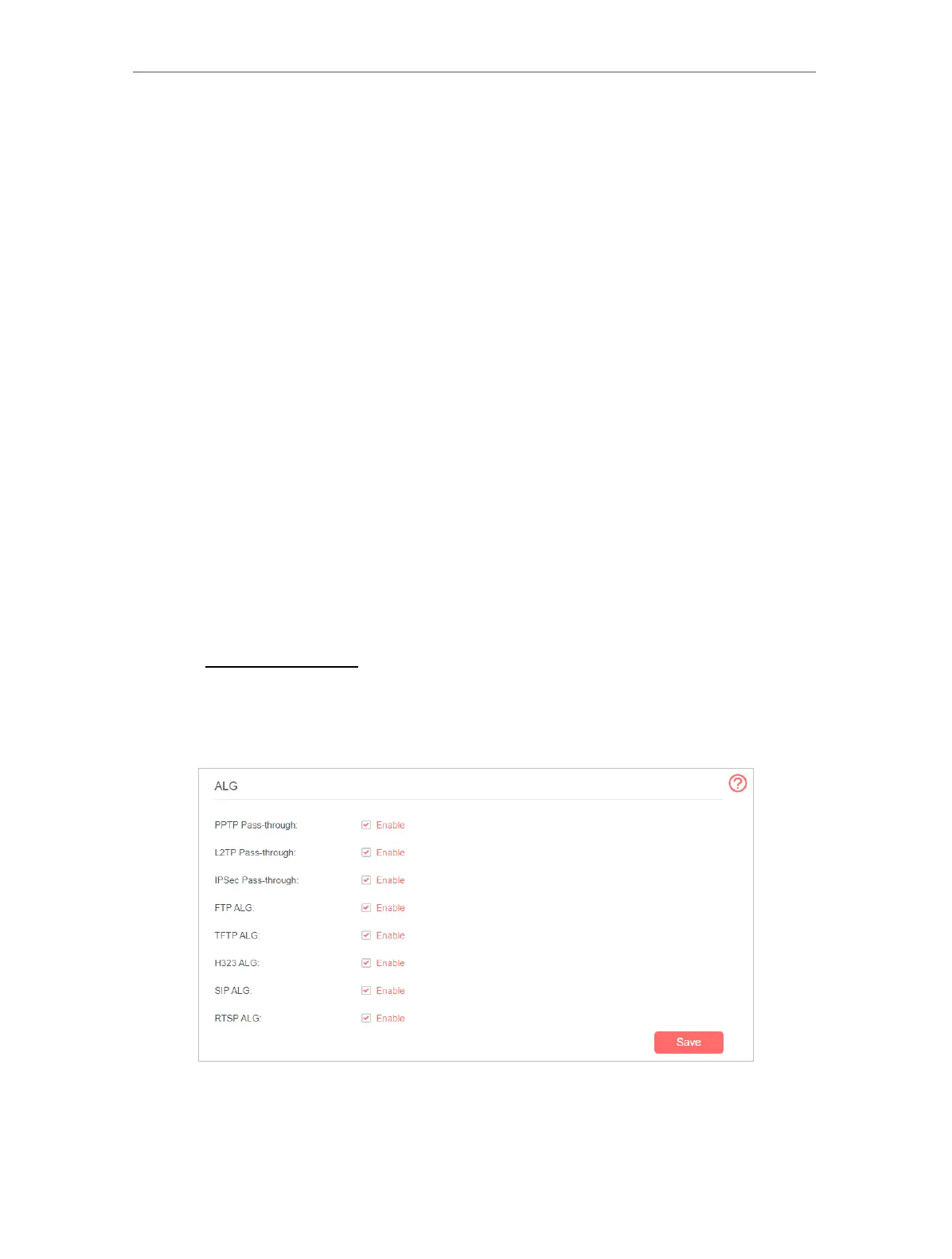
ALG (Application Layer Gateway) allows customized NAT (Network Address Translation)
traversal filters to be plugged into the gateway to support address and port translation
for certain application layer “control/data” protocols: FTP, TFTP, H323 etc. Enabling ALG
is recommended.
1. Visit http://mwlogin.net, and log in with the password you set for the router.
2. Go to Advanced > NAT Forwarding > ALG.
Note: It is recommended to keep the default settings.
• PPTP Pass-through: If enabled, it allows Point-to-Point sessions to be tunneled
through an IP network and passed through the router.



 To Next Page