38
7 Special functions
In the 'Special functions' screen you can invoke the following functions:
• Timer switch (⇒ chapter 7.1)
• Presence simulation (⇒ chapter 7.2)
• Alarm module (⇒ chapter 7.3)
• Internet browser (⇒ chapter 7.4)
7.1 Timer switch
All operating steps for lighting, sun protection systems or thermostats can
be controlled automatically via time programmes. With these a load, such
as lamp, can be switched ON or OFF, as desired on particular days, daily
or just at weekends.
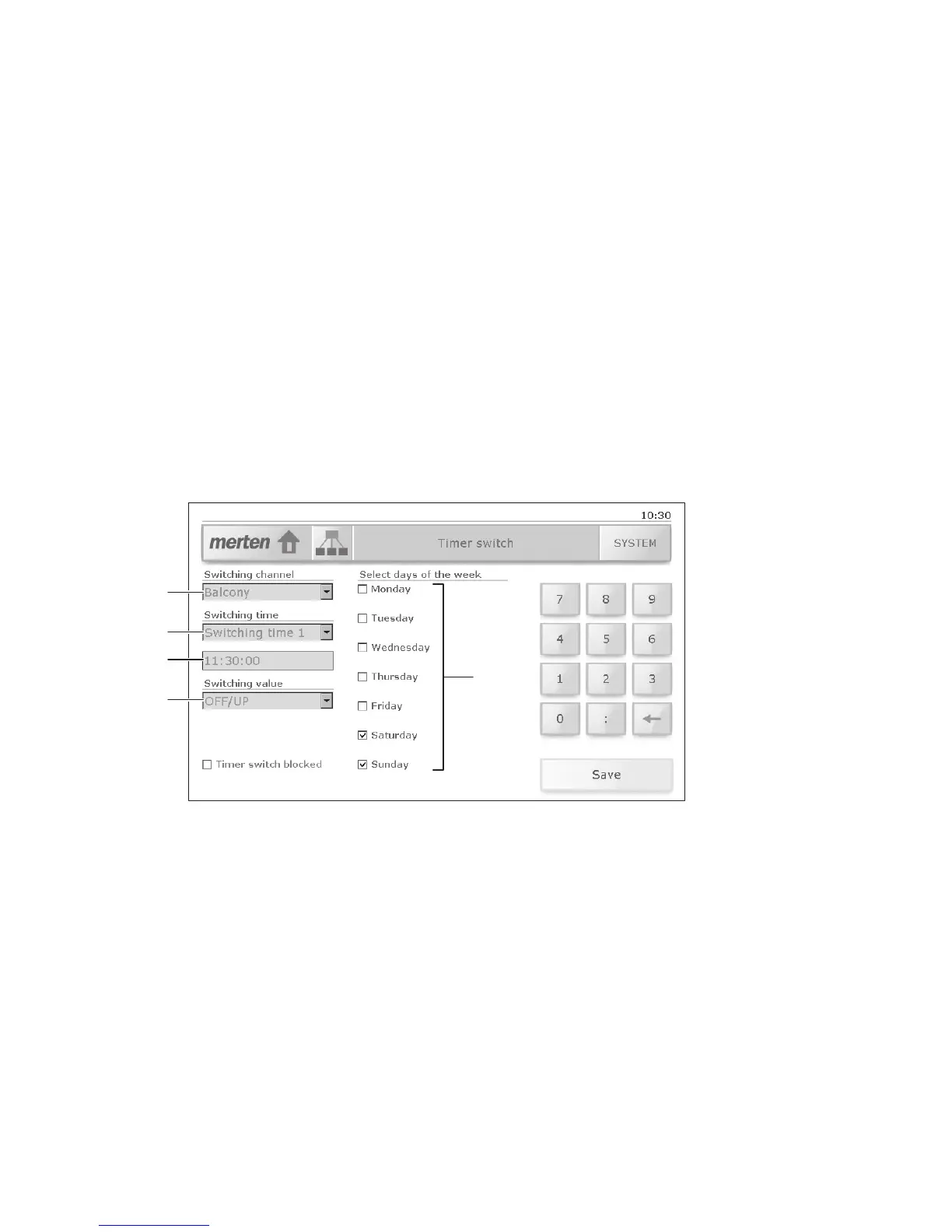
The loads assigned to a particular switching channel (e.g. 'BalconyY') and
the number of switching times will have been defined by your system in-
tegrator. Within a switching time (2) you can, however, define when (3),
how (4) and on which days of the week (5) the linked loads are switched.
A time programme is set up as follows:
1. Select the switching channel
e.g.: 'Balcony' controls the awnings of the seating area.
2. Select a switching time
e.g.: at 'Switching time 1' the awnings are lowered.
3. Enter the switching time
To do this tap the input field and enter the new time in the format
hh:mm:ss using the number pad. Use the backspace key [←] to de-
lete numbers.
e.g.: lunchtime at 11:30:00
1
2
5
3
4



 To Next Page