40
7.2 Presence simulation
In order to give the impression that your home is occupied when you are
away, you can start the presence simulation. Each operation (including by
external keys) of the assigned loads can be recorded and if necessary (dur-
ing your absence) repeated on a daily or weekly basis.
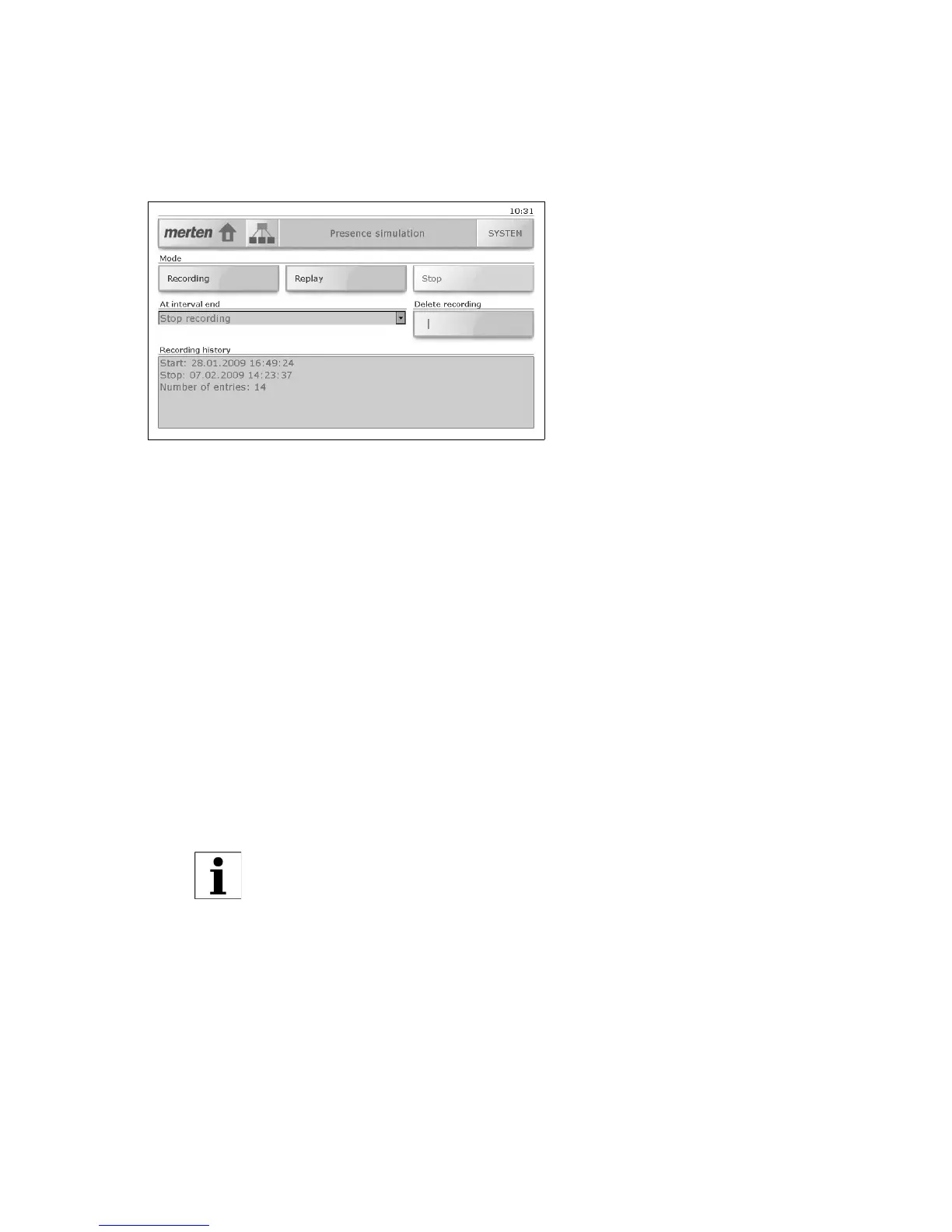
The 'Presence simulation' screen allows you to:
• Start the recording of your switching habits
Each day the switching states of the assigned loads are recorded and
stored, e.g. switching on of a ceiling lamp in the living room on Mon-
day at 20:00 hours. All switching states of an interval (day or week)
are stored in a buffer.
For the interval end you can define,
- if recording is to finish ('Stop recording' option) or
- if when the interval is repeated the recording is to be overwritten
('Overwrite existing recording' option).
• Start the replay of an existing recording, i.e. activate the presence
simulation
During the day the loads recorded are automatically controlled. If ab-
sence lasts longer than the recorded interval, then the recording is re-
peated.
• Manually stop a recording that is running;
• Delete an existing recording;
•Show the recording history (start and stop times and number of en-
tries).
If for an interval duration of 1 week, less than 7 days have
been recorded, then during play-back only the days of the
week recorded are taken into account.



 To Next Page