MI 3000 EasiPLUS Measurements
32
How to perform contact voltage measurement
Step 1 Select RCD function with the function selector switch first. Use the / keys to
select contact voltage function (Uc). The following menu will be displayed:
Figure 5.14: Contact voltage measurement menu
Step 2 Set the following measuring parameters and limit values:
Nominal residual current,
RCD type,
Limit contact voltage.
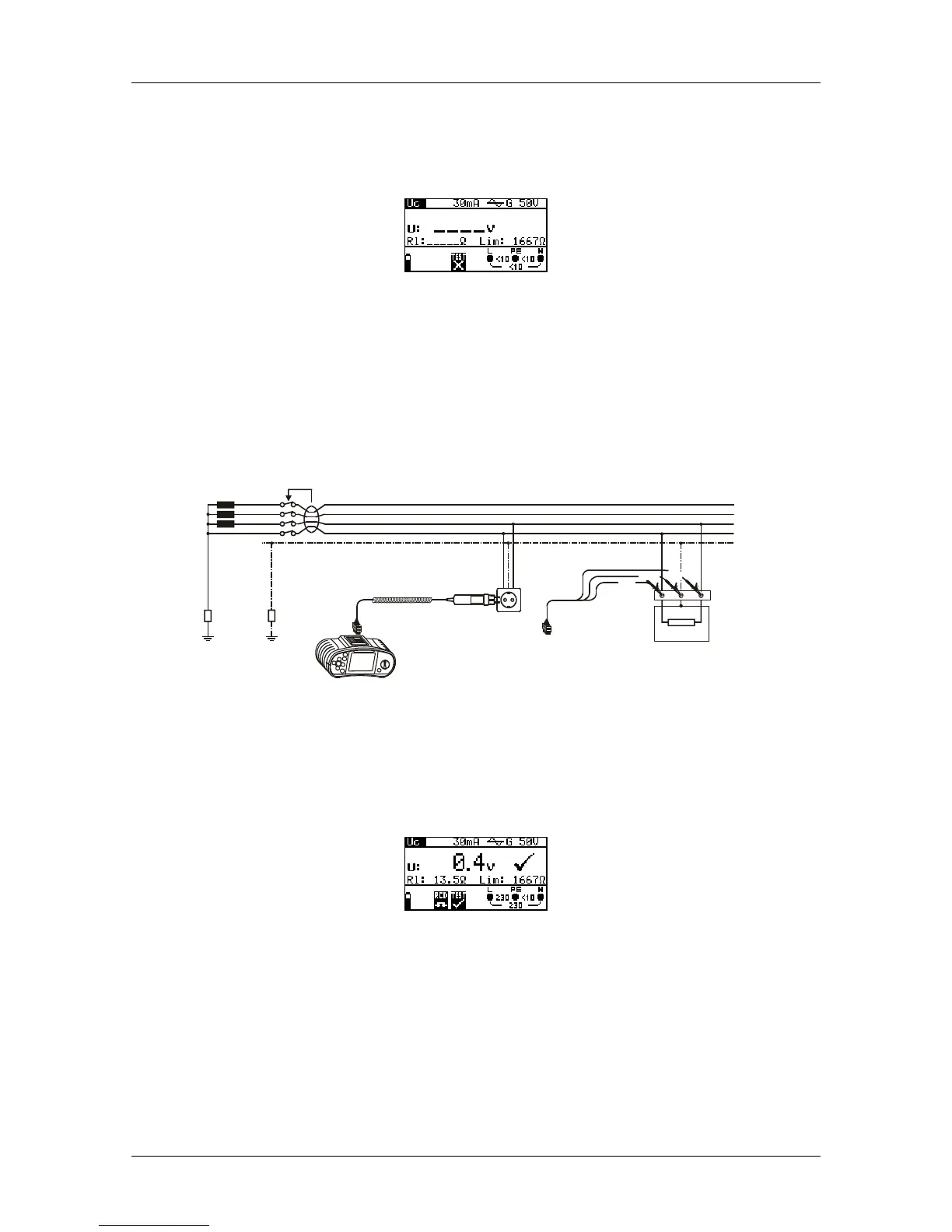
Step 3 Connect the test leads to the instrument and follow the connection diagram
shown in figure 5.15 to perform contact voltage measurement.
L1
L2
L3
N
PE
R
E
Ro
LPEN
L
/
L
1
N
/
L
2
P
E
/
L
3
Figure 5.15: Connection of plug test cable or universal test cable
Step 4 Check for any warnings and check the online voltage/terminal monitor on the
display before starting the measurement. If everything is ok, press the TEST
key. After performing the measurement, the results will be displayed along
with a PASS/FAIL indication.
Figure 5.16: Example of contact voltage measurement results
Displayed results:
U.............Contact voltage.
Rl............Fault loop resistance.
Lim .........Limit earth fault loop resistance value according to BS 7671.


 To Next Page
 Loading...