AirConditioning
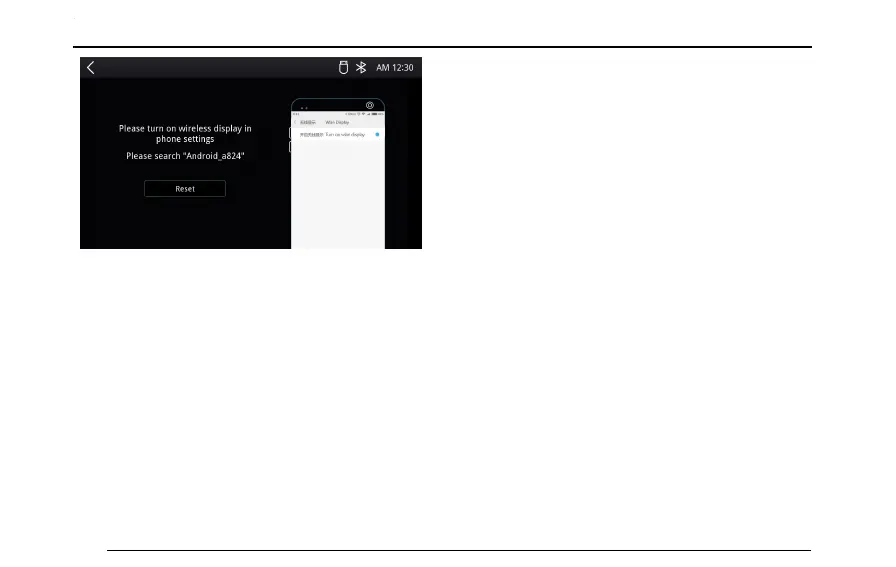
2EnableWLANdisplayfunctionontheAndroidmobile
phone.
3SearchforthedevicenameintheMainframeinterface
fromthemobilephone,andconnecttoit.
4Aftertheconnectioniscompleted,relevantsecurity
messageappears,touch[OK]tocompletethe
connection.
5Aftertheconnectionissuccessfullycompleted,the
screenandsoundintheAndroidmobilephonewill
beoutputtotheonboardmainframe.
AndroidAuto
AndroidAutocanrealizetheinterconnectionbetween
Androidfunctions(Map,Music,PhoneCalletc)andthe
onboardmainframe.
ConnectionMethod
1MakesurethattheAndroidAutohasbeen
downloadedandthefunctionisturnedon.
2UseaUSBconnectingwiretoconnectthemobile
phonetotheonboardentertainmentsystem
mainframe.
3T ouch[AndroidAuto]inthemaininterfaceto
activateAndroidAuto.
4Afterthevehicleandmobilephonearesuccessfully
connected,youcanoperatetheAndroidonthe
systemmainframe.
128



 To Next Page