© Microhard Systems Inc. 17
2.3 Getting Started with WiFi
This Quick Start section walks users through setting up a basic WiFi AP (Access
Point). For additional settings and configuration considerations, refer to the appro-
priate sections in the manual. This walkthrough assumes all setting are in the fac-
tory default state.
2.3.1 Setting up WiFi
Use Section 2.2 Getting Started with Cellular to connect, power up and log in
and configure the Carrier in a IPn4G.
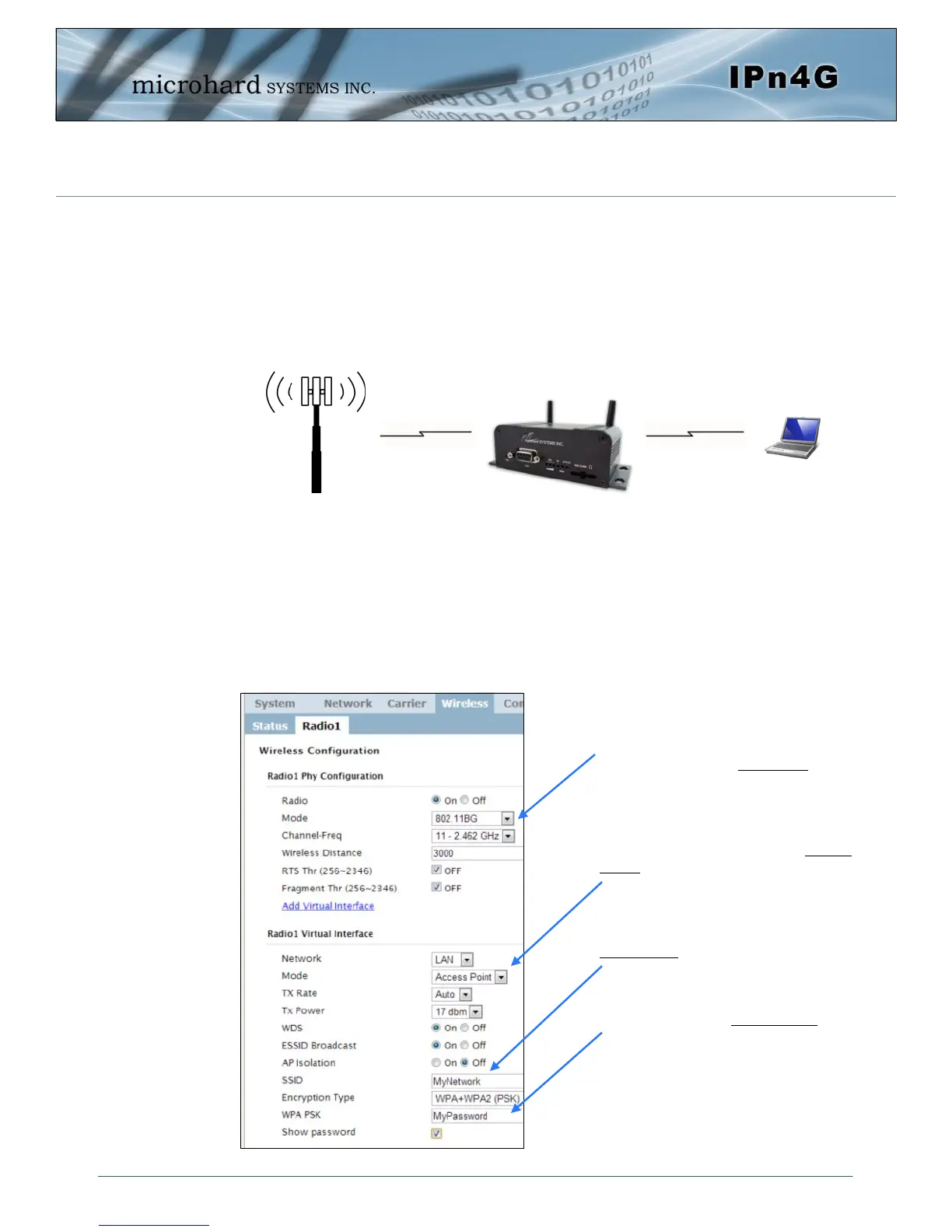
Click on the Wireless > Radio1 Tab to setup the WiFi portion of the IPn4G.
Cell Tower
2.0 Quick Start
4G LTE
802.11b/g
In Radio1 Phy Configuration, ensure
the mode is set for 802.11BG.
In the Radio1 Virtual Interface, en-
sure that the Mode is set for Access
Point.
Enter a name for the Wireless Network
under SSID. This example uses
MyNetwork
(Optional) Set a password for the WiFi,
this example uses MyPassword
Click Submit.



 To Next Page