Connecting to the I/O Interface
System Components
2
HAWK MV-4000 Smart Camera Guide 2-35
Connecting a 2-Wire Proximity Sensor to an Input Signal
You can connect a 2-wire proximity sensor to a HAWK MV-4000 input signal in either a
sourcing or sinking configuration (that is, on a positive or negative power wire). Note that in
both cases, you will need to install an external bleeder resistor, to ensure that a minimum
amount of current flows into the proximity sensor in its on-state and in its off- state.
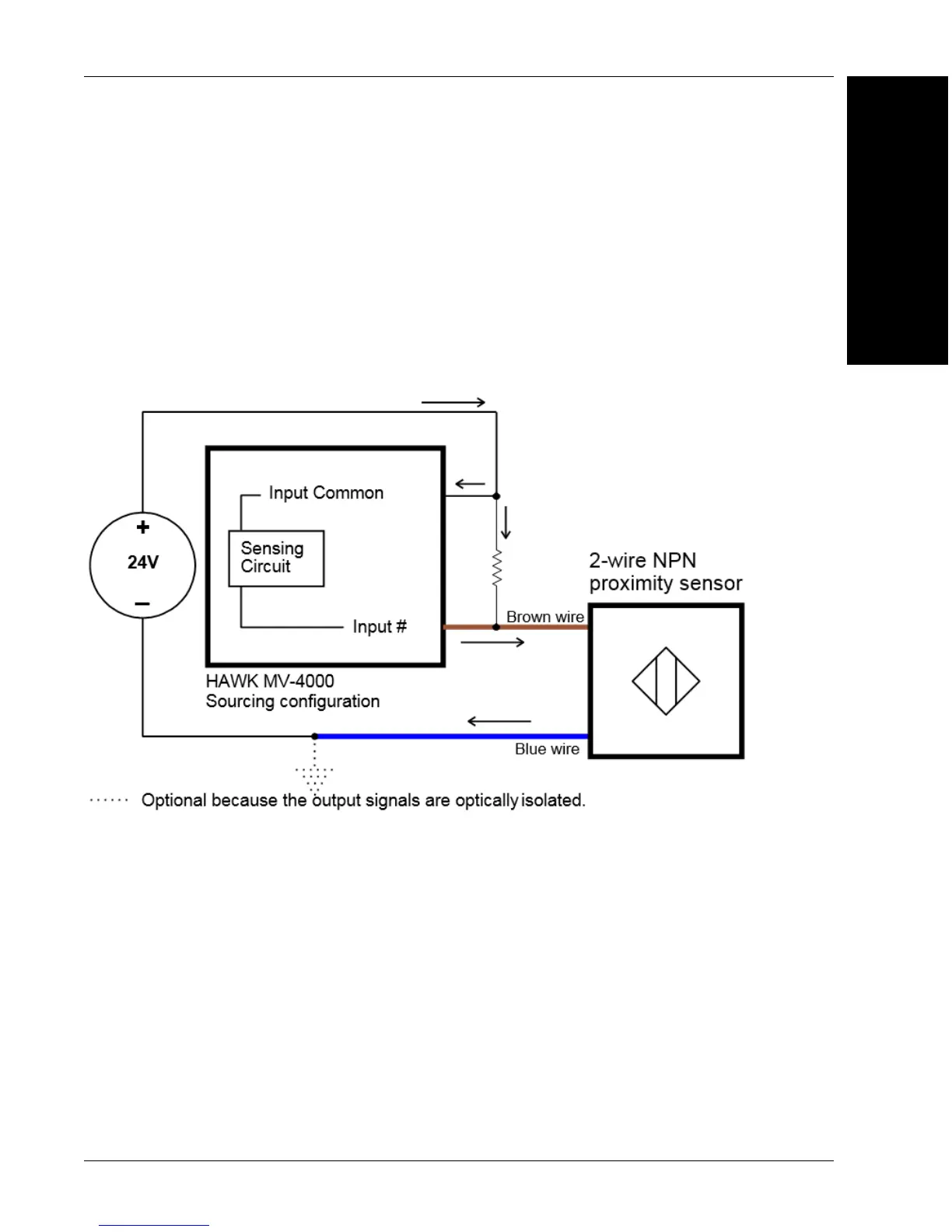
For the input signal to source the current (that is, to connect an input signal on a positive
power wire), connect the 2-wire device to the input signal as shown below.
You must also install an external bleeder resistor between the Input Common pin and
brown wire of the proximity sensor.
(Equivalent circuit only.)
The bleeder resistor’s value should guarantee that the minimal required current is
provided to the connected sensor (the third-party device). For details regarding the
sensor’s minimum current requirements, refer to its documentation. Note that you should
use a bleeder resistor with an appropriate power rating for your circuit.
Note: You should use a resistor with an appropriate power rating for your circuit.



 To Next Page