Setup - 12 Midway Amusement Games, LLC
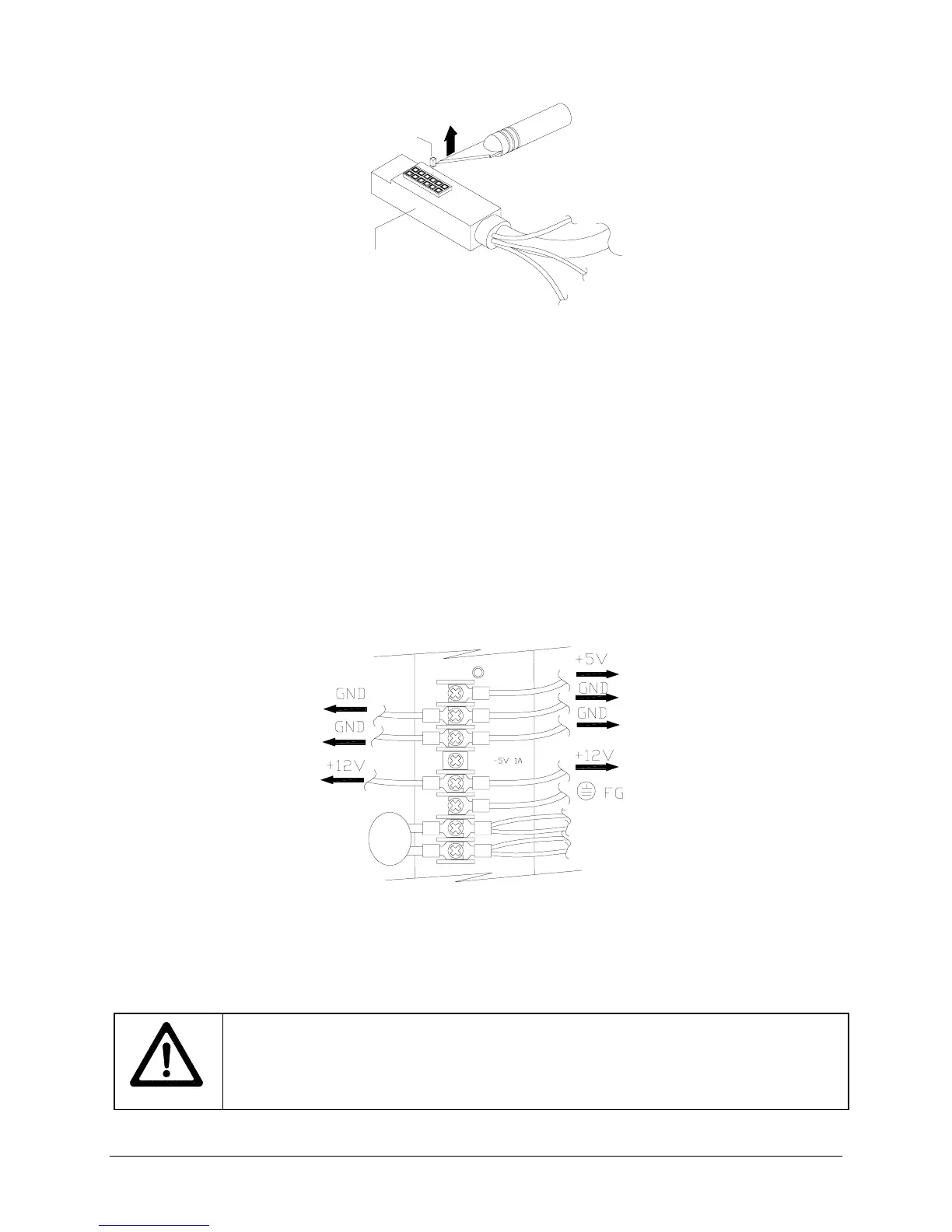
KEY
POLARIZING
TOUCHSCREEN
CONNECTOR
CABLE
REMOVAL OF POLARIZING KEY
6.
KEY REMOVAL
Inspect the sockets of the touchscreen connector cable for polarizing key. Remove
any keys with a sharp tool.
7.
CONTROL
Disconnect the 15-pin (or 9-pin, depending on your model) coin and control connector.
8.
FAN
Disconnect the 2-pin fan connector. Some models use an AC fan; no disconnection is needed.
9.
SPEAKER
Disconnect the 2-pin speaker connector.
10.
COIN LOCKOUT
If your VGM has a coin lockout connector, disconnect it.
11.
VIDEO
Locate the video connector where it attaches to the monitor board. Record the orientation of
the red wire, either toward the front or toward the rear of the cabinet. Detach the connector.
12.
POWER
Loosen, but do not remove, the top six screws on the power supply terminal strip by turning
one full turn with a screwdriver. Do not loosen the bottom two (AC) screws.
13. Remove the DC wires from +5, GND, -5, and +12 terminals. Leave the AC wires connected. If you
must disconnect a green and yellow striped AC connector to reach another connector, replace it.
REMOVAL OF DC WIRES FROM TYPICAL POWER SUPPLY
14. This is a typical view of the power supply connections. Verify the connections on your power supply.
15.
CPU BOARD ASSEMBLY
Slide the CPU board Assembly out of the cabinet with original wiring
attached. Make sure not to snag any hanging cables or wires. Store the CPU Board Assembly in an
anti-static bag.
WARNING: DO NOT SUBSTITUTE PARTS
Using inferior parts or modifying a VGM
could cause serious injury or equipment damage! Use only Midway authorized parts.
For safety and reliability, do not substitute parts or modify Midway products. Substitute
parts or modifications may void EMC directive or FCC type acceptance.












 To Next Page