Service - 6 Midway Amusement Games, LLC
NOTE: The battery is permanently attached to a memory circuit and cannot be replaced separately.
Replace only with the same or equivalent type recommended by the manufacturer. Dispose of used
batteries according to instructions printed on the module or its packaging.
♦
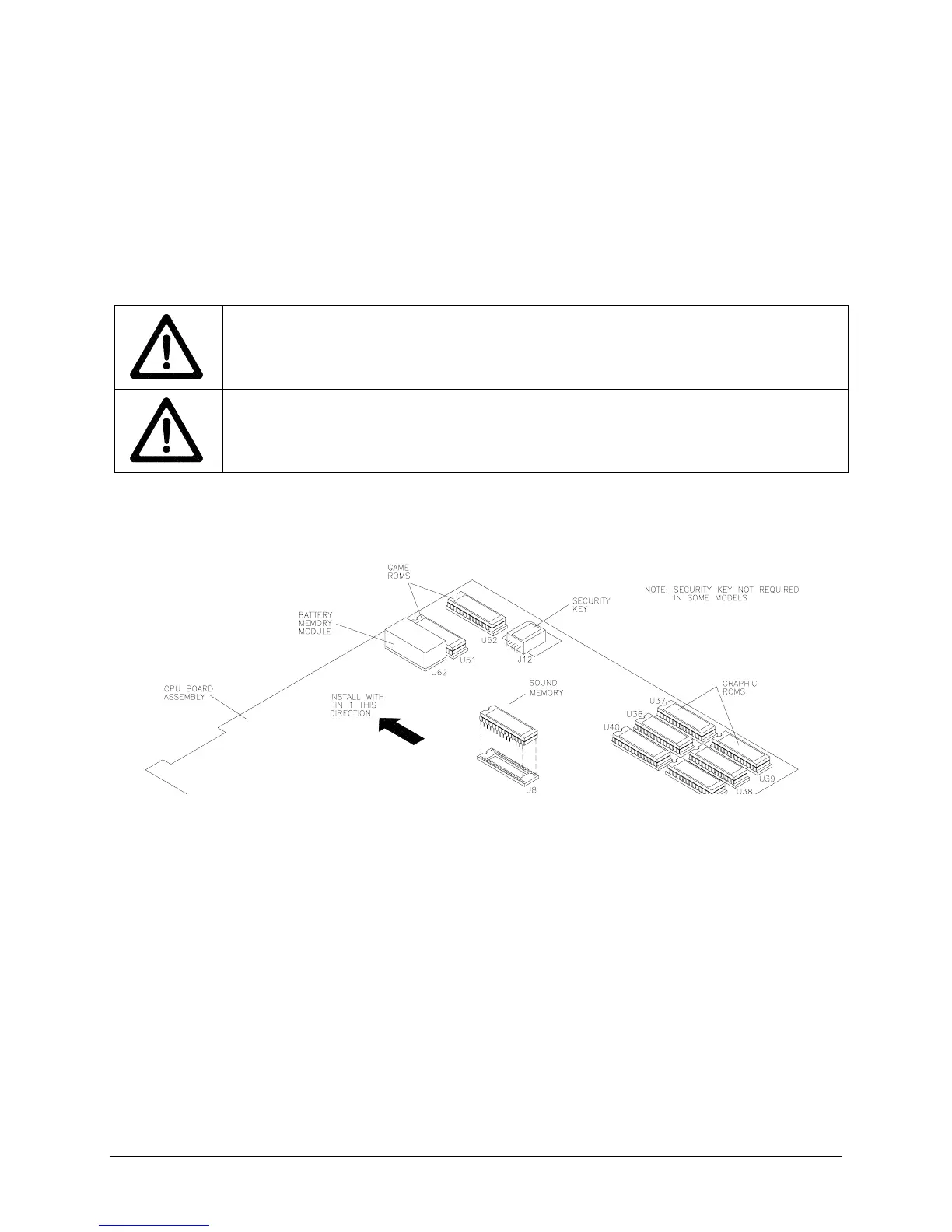
Memory and Security Key
The ROM (Read Only Memory) circuits contain the computer operating instructions. Memory devices
are especially sensitive to static charges. Use grounding precautions when handling these parts.
Switch off power to the VGM and unplug from AC power. Unlock and remove the top cover. Carefully
note position of each chip, then pull using a chip extraction tool (not needed for security key). Use a
rocking motion to avoid bending pins.
To reinstall memory circuits, orient a device over its socket and press firmly to seat pins.
WARNING: DO NOT FORCE PARTS.
If a component does not fit easily into its socket,
inspect the component and socket to ensure they are keyed properly and reorient the
component. Do not force components to fit, as you will damage them or the socket.
CAUTION: GROUND SELF BEFORE TOUCHING ELECTRONICS.
Discharge any
static electricity build up in your body by touching the metal chain lug. This must be done
BEFORE touching or handling any of the electronic assemblies.
ORIENTATION OF FIELD REPLACEABLE ELECTRONIC COMPONENTS












 To Next Page