User Manual
32
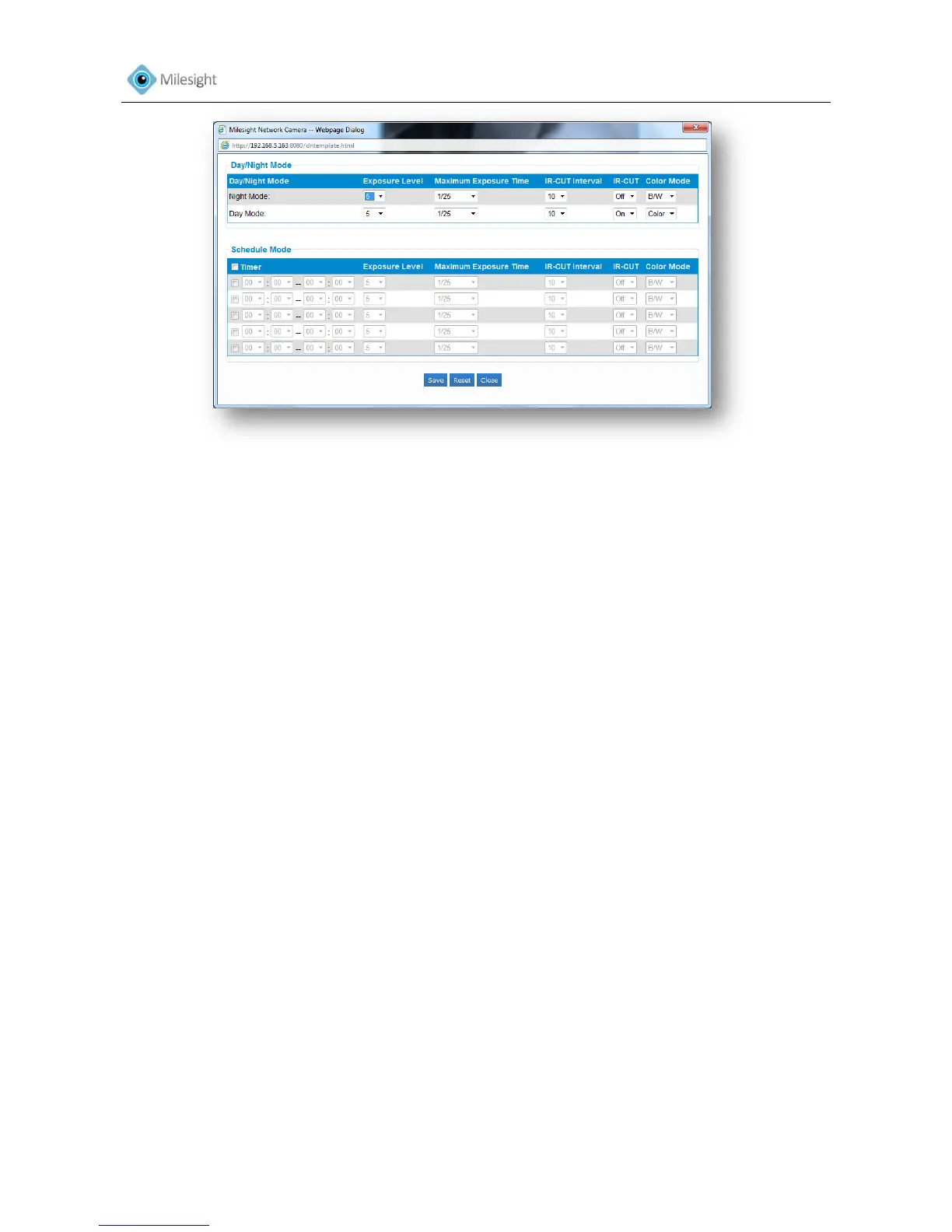
Figure 4-5
General Settings
Wide Dynamic Range This function enables the capture and display of both bright
and dark areas in the same frame, in a way that there are
details in both areas
Off Disable WDR function
On Enable WDR function
Customize Customize the time when the WDR function will be enabled
Exposure Region Full View, Custom, and BLC are selectable
Full view: Calculate the full range of view and offer appropriate light
compensation
Custom: This option enables you to add customized windows as
inclusive or exclusive regions manually
BLC (Back Light Compensation): This option will automatically add an inclusive region in the
middle of the window and give the necessary light
compensation
Outdoor/Indoor Mode Select indoor or outdoor mode according to your needs
Power Line Frequency 60HZ flicker for NTSC mode and 50HZ flicker for PAL mode
Auto Focus After Day and Night Mode switch, able to auto focus again.
Day/Night Mode Select Day/Night/Auto/Customize mode. Day and night will
auto switch under auto mode
Profile Set Day/Night Mode, here you can do different settings
under each mode
Exposure Level Set the exposure level to 0~10
Maximum Exposure Time Set the maximum exposure time to 1/5~1/100000
IR-CUT Interval IR-CUT switch time between each mode
IR-CUT Choose to turn on or turn off under the mode
Color Mode Here can choose B/W or color mode under Day/Night mode
Schedule Mode Here you can customize your special demands for different











 To Next Page