User Manual
36
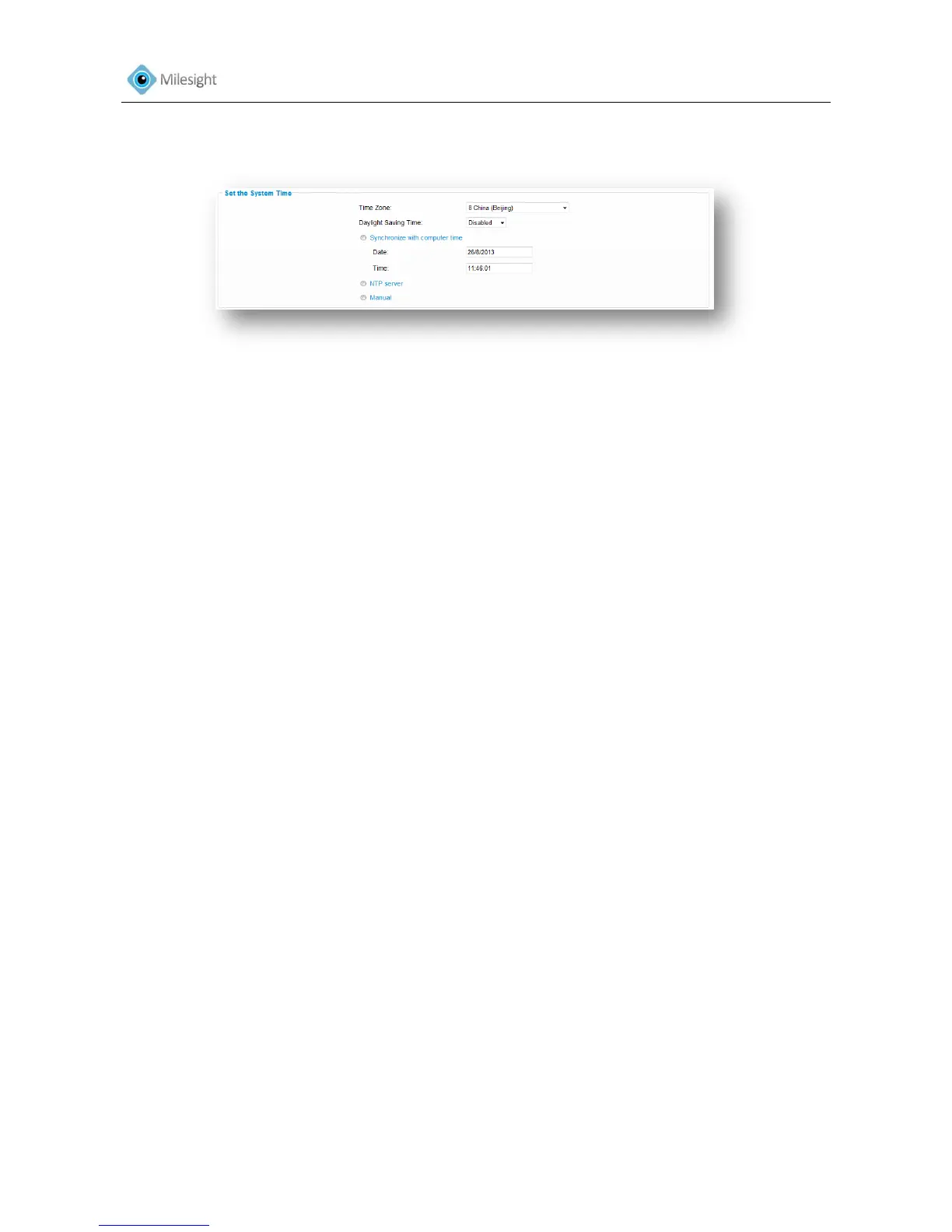
4.2.6 Date &Time
Figure 4-11
Current System Time
Current date &time of the system
Set the System Time
Time Zone Choose a time zone for your location
Daylight Saving time Enable the daylight saving time
Synchronize with computer time Synchronize the time with your computer
NTP server Synchronize the time with configured SNTP server and
selected time zone
Manual Set the system time manually
4.3 Advanced Settings
4.3.1 SIP
The Session Initiation Protocol (SIP) is a signaling communications protocol, widely used for
controlling multimedia communication sessions such as voice and video calls over Internet
Protocol (IP) networks.
This page allows user to configure SIP related parameters.
Milesight cameras can be configured as SIP endpoint to call out when alarm trigged; or allow
permitted number to call in to check the video if the video IP phone is used.
To use this function, the settings in SIP page must be configured properly.
SIP can be achieved in two ways to get the video, the one is to dial the IP address directly, the
other one is account registration mode, the details are as follows:
Method 1: IP Direct mode
Dial on the camera’s IP address directly through SIP phone, so you can see the video (note: SIP
phone and the camera should in the same network segment)
Method2: Account registration mode
(1) Before using the SIP, you need to register an account for the camera from the SIP server;
(2) Register another user account for the SIP device from the same SIP server;
(3) Call the camera User ID from the SIP device, you will get the video on the SIP device.











 To Next Page