14
4 Introduction to OLED display
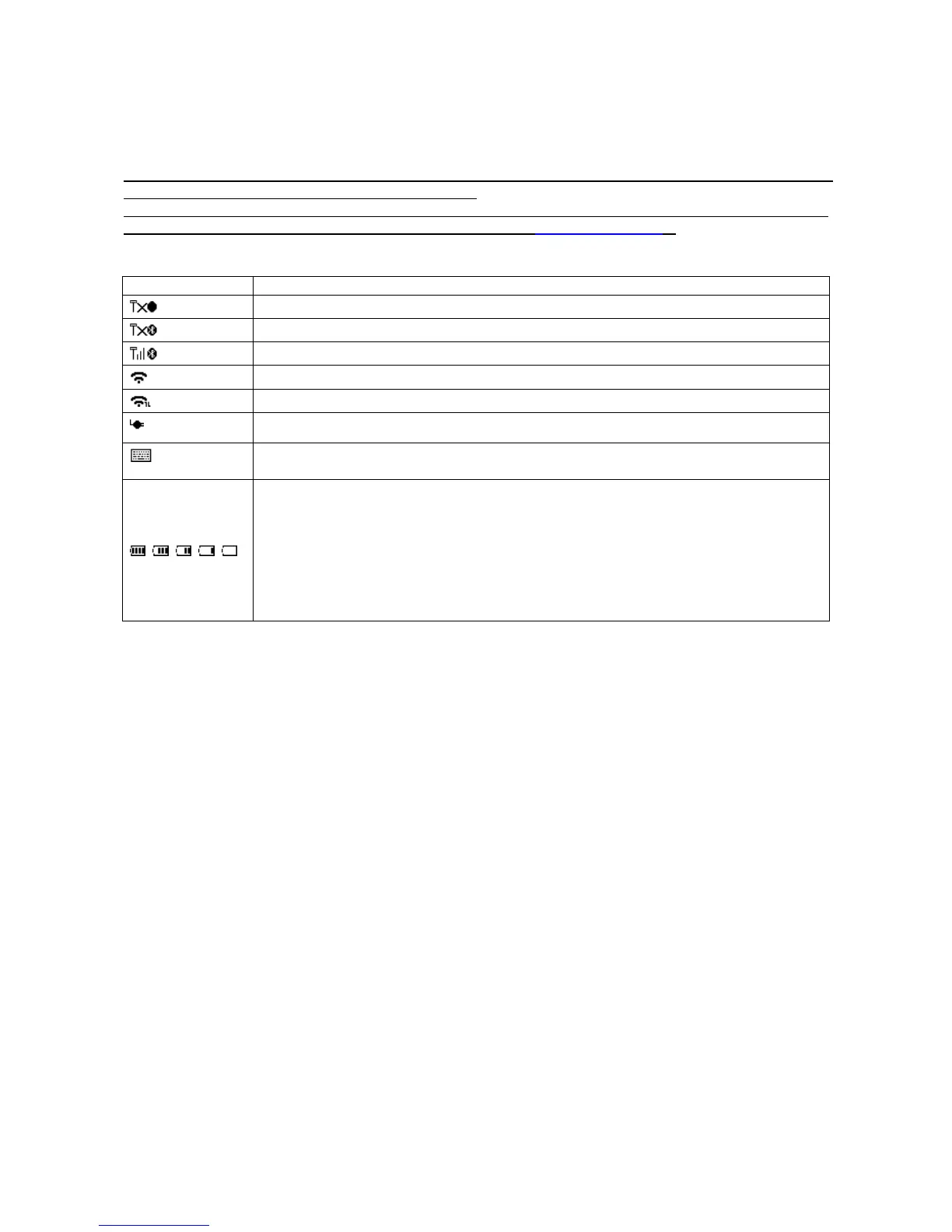
4-1 OLED display icons
Note1: The OLED screen is designed to display barcode scanning, Bluetooth/Wi-Fi network establishing,
data transfer, system setting and other information.
Note2: The display area is 64 dots (V) by 128 dots (H). The backlight will be switched off automatically if
time of no operation exceeds a programmable duration (see 5-3 System setting ).
Table 4-1 OLED display icons
Communicating with a Bluetooth device
Communicating with a Wi-Fi network
Terminal is connected to a PC (or other instrument) with USB cable.
Support for switching among the input of barcode scanning and the virtual
keyboard on Apple iOS, such as Apple ipad.
Battery capacity (from the left):
• Battery is fully charged (100% - 75% charge remains).
• 75% - 50% charge remains.
• 50% - 25% charge remains.
• 25% - 10% charge remains.
• 10% - no charge remains. When the battery capacity is lower than 10%, the
battery
icon blinks and an error tone sounds once every minute.



 To Next Page