Troubleshooting
7-2
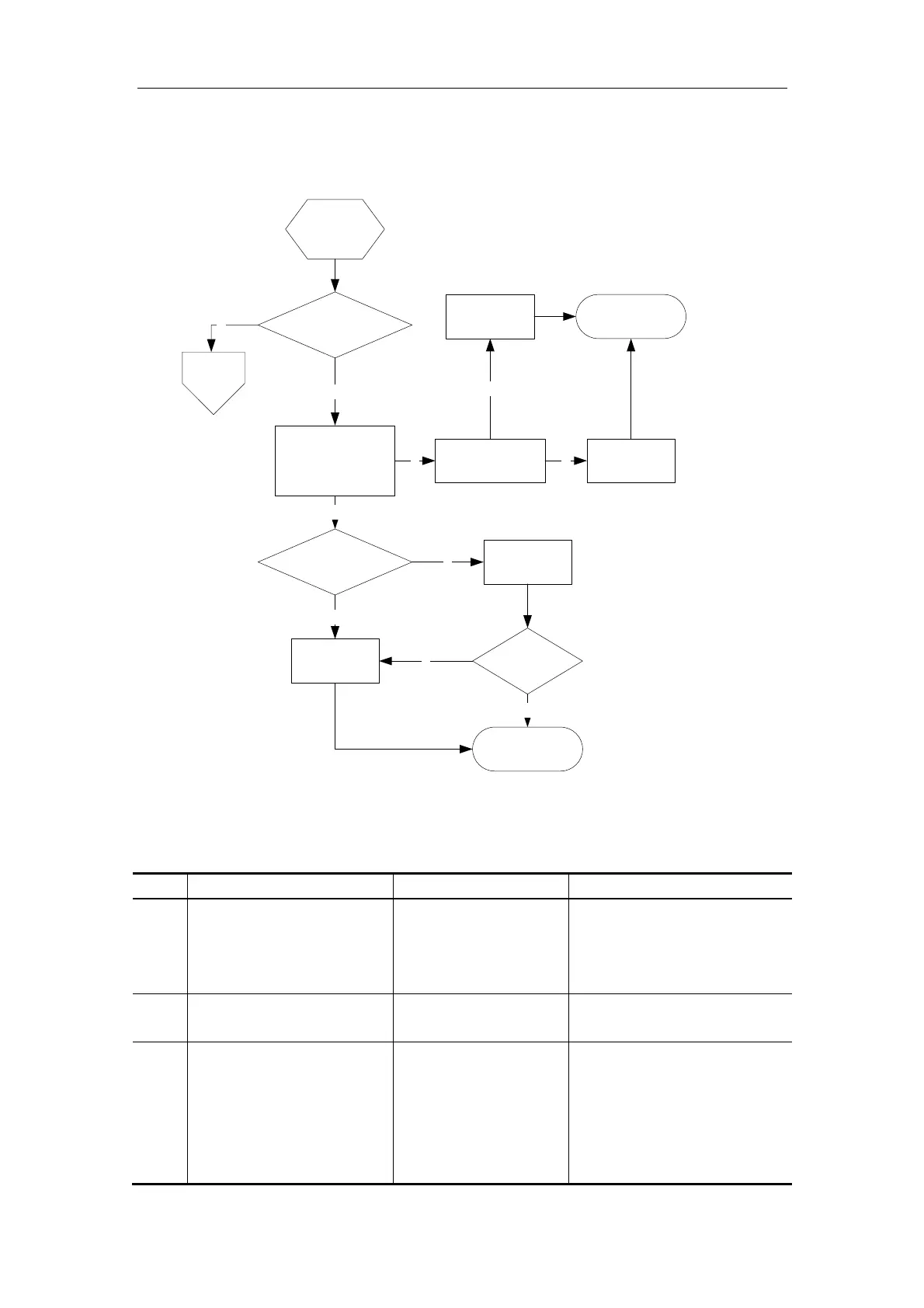
7.3. Troubleshooting of LCD Blank Screen
Does the system
succeed to boot?
Blank
screen
N
Work flow
of boot
failure
Remove the rear cover
of the LCD and test
whether the line-field
and VGA signal are
OK
Y
Y
Are the connections of LCD
power cord and VGA signal
cable OK?
Y
Replace the
LCD assembly
Reconnect or
replace the
cables
Blank screen?
Y
N
Check whether the
other end of the
VGA cable is OK
N
End
N
Replace the
main board
Y
End
Reconnect or
replace the
cables
N
7.4. Troubleshooting of Other Malfunctions of the LCD
No. Malfunction Potential Causes Measures
1 The image is located in
the wrong area, or lateral
and vertical strips appear
on the image.
The signal is
interfered abnormally
Try Auto Adjust under the
image without boundary.
2 The image color is
abnormal.
The signal is
interfered abnormally
Try Auto Color under the
black/ white image.
3 There is signal input, but
nothing displayed on the
screen.
The LVDS cable may
be loose
Check the socket of the
back-light board, check
whether LVDS is connected
well with PANEL, and
whether LVDS is properly
connected with J1 socket of



 To Next Page