3130 A
DVANCED SCANNING
ADVANCED SCANNING
This section covers the advanced scanning tools in the DiMAGE Scan Utility. The
basic scanning section on pages 14 through 21 should be read before continuing.
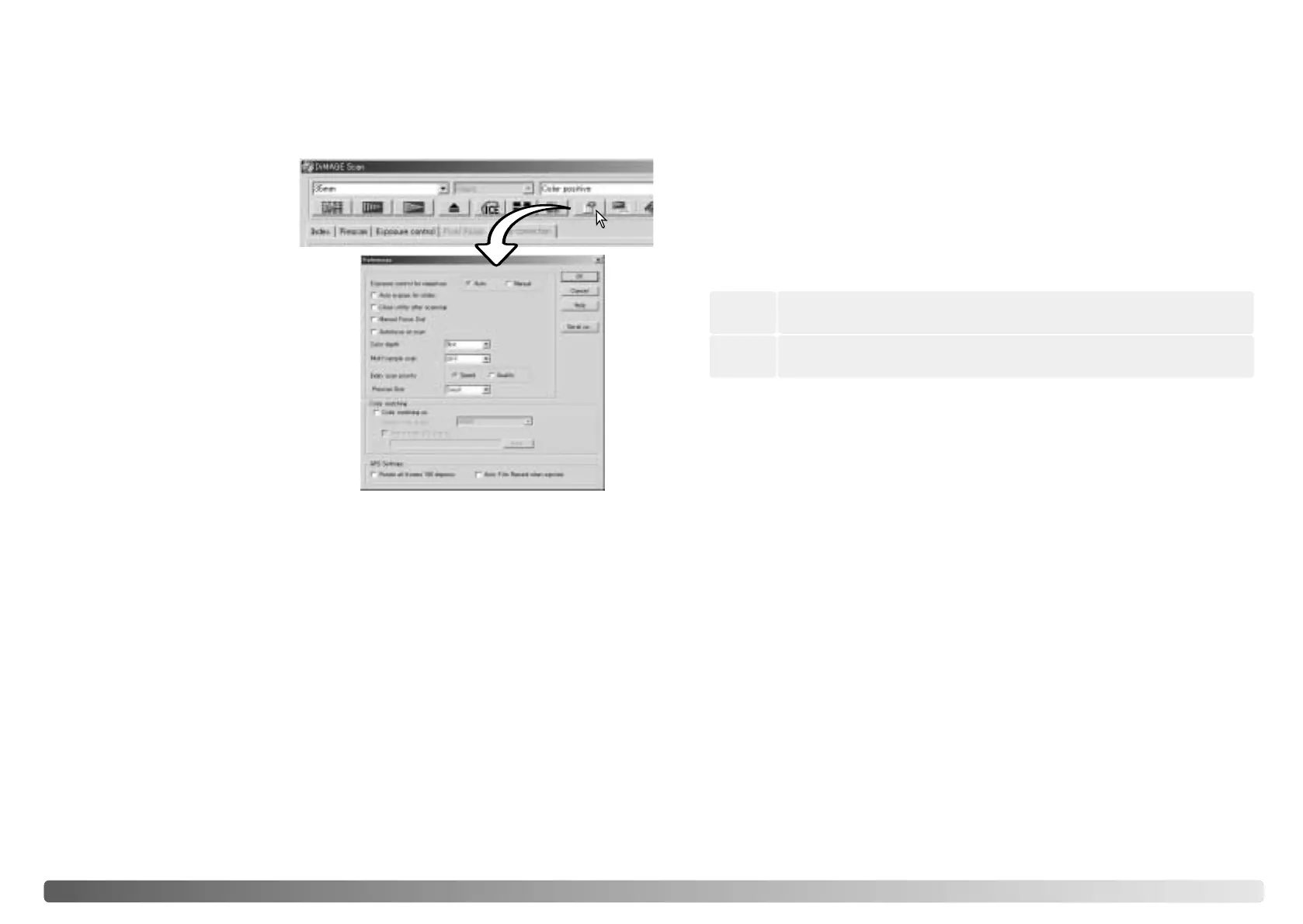
Setting scanner preferences
Auto-expose-for-slides check box: to use
autoexposure when scanning slides. Since the
density range of slides is relatively uniform,
adjusting the expose for each slide is usually
unnecessary. However, when scanning an
underexposed or overexposed slide, the autoexposure system can compensate for
the unusual image density. When using AE lock or AE area selection with slide film (p.
39), the auto-expose-for-slide box must be checked.
Exposure control for negatives:
autoexposure adjusts the scan to compensate
for the density of the negative. The manual
setting uses a fixed exposure regardless of the
density of the film. Manual exposure can show
the exposure difference in a bracket series.
When using AE lock or AE area selection with
negatives (p. 39), the auto function must be
selected.
Autofocus-at-scan check box: this option activates the autofocus function during the
prescan and final scan. When using Digital ICE, ROC, GEM, or Grain Dissolver, the
use of autofocus is recommended. The autofocus function increases the scanning
time.
Multi-sample list box: multi-sample scans reduce random noise in the image by
analyzing the data of each sample scan; 2, 4, 8, and 16 samples can be made. The
more samples taken, the less random noise in the image and the longer the scanning
time.
Index-scan-priority radio button: this option allows the selection of high-speed index
scans or a quality index scans with prescans. Simply click the appropriate radio
button.
Color matching: this controls color reproduction on output devices such as monitors
and printers. For detailed information, see the color matching section on page 66.
Rotate-all-frames-180-degrees check box: for scanners that can use the optional
APS film holder, refer to the scanner’s hardware manual. This option rotates all APS
index frames 180 degrees in the index scan window.
Cancel button: to cancel any settings made and close the window.
Help button: to open the help window.
OK button: to apply the preference settings and close the window.
Close-utility-after-scanning check box: this option closes the DiMAGE Scan Utility
after the final scan when using the scanner with an image-processing application.
Activate this function when individual images will be scanned and then processed or
retouched in another application. Uncheck the box when multiple images need to be
scanned before retouching.
Serial no. button: for the Dimage Scan Multi II scanner only. This routine allows the
scanning resolution to be increased to 2820 dpi when scanning medium-format film
and Digital ROC and GEM to be used. Click the serial-number button to open the
serial number window. Enter the serial number of the software and click OK to
complete the operation.
Color-depth list box: this option specifies the color depth of the scanned image
between 8 bit, 16 bit, and 16-bit linear for each RGB channel. Because 16-bit linear
color depth does not make any gamma corrections, the scan of a negative will produce
a negative image. 16-bit and 16-bit linear images can only be saved in the TIFF file
format. Some image-processing application cannot open 16-bit image files.
Prescan size: only available with certain model scanners, see the scanner notes
section in the hardware manual. To change the size of the prescan image.
Auto film rewind when ejected: for the Dimage Scan Multi and Multi II model
scanners when using the optional APS film holder. This option rewinds the film when
the eject button is used. Uncheck this box if switching between multiple holders when
the same APS film will be scanned.
Click the preferences button in the
main window to open the
preferences dialog box. Select
preferences options to customize
scanner operations.
Manual Focus Dial: for scanner models with a manual focus dial. See hardware
manual for compatibility and use. When the manual focus dial is active, autofocus and
Point AF cannot be used.
Makes an index thumbnail and prescan of each image. Scanning time is
increased.
Quality
Only makes index thumbnails. Autofocus is disabled during the index
scan.
Speed








 To Next Page