7574 A
PPENDIX
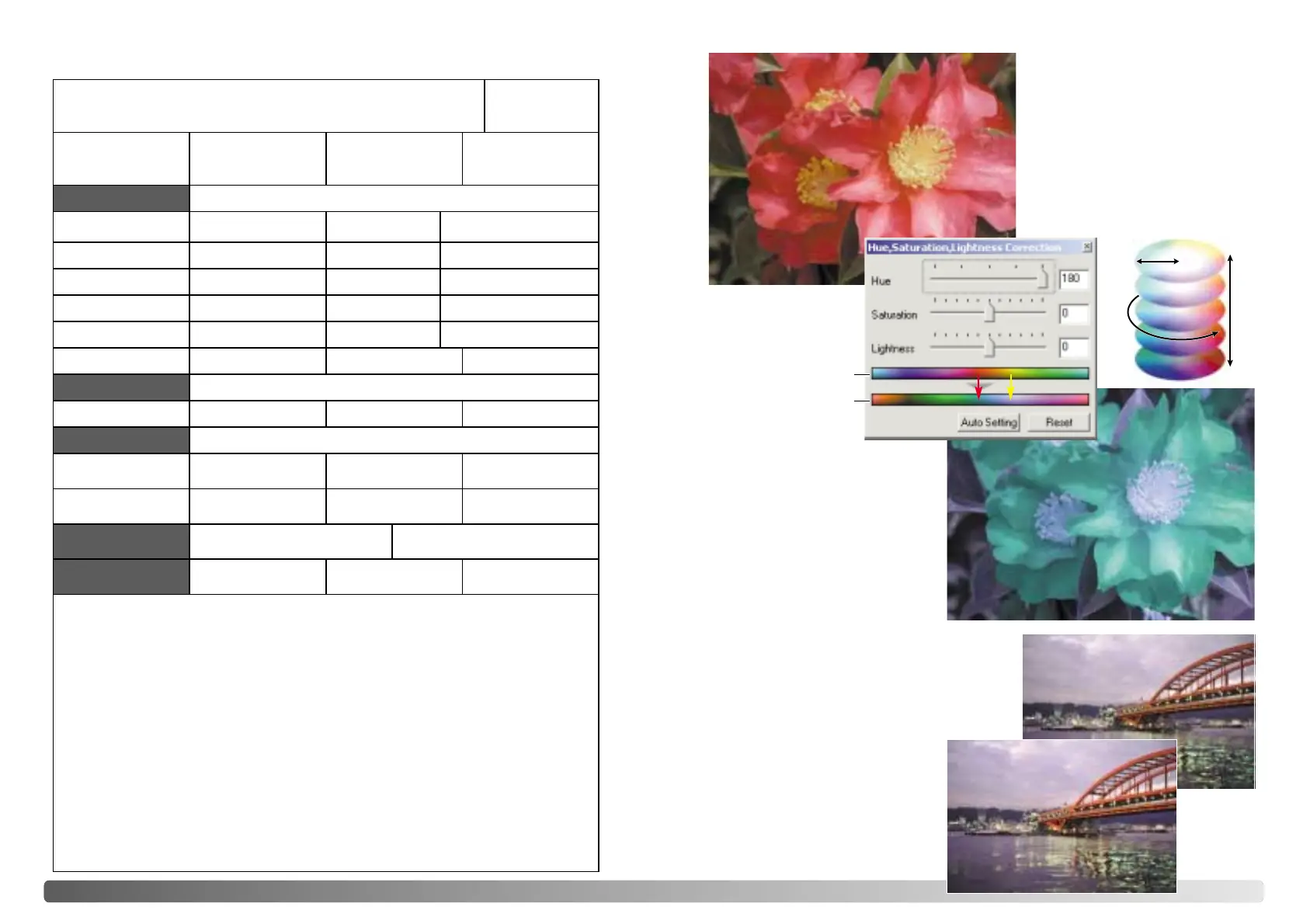
Changes in hue rotate the original
color values though a color space
and reassigns a new hue based on
the new position in that space. In
this example, the original image
was rotated 180°. For more on the
hue, saturation, and brightness
palette, see page 56.
Two color spaces are displayed at
the bottom of the palette. The top
bar indicates the color space of the
original image. The bottom bar
displays the relative shift to the
Original color space. In the
example, the reds have been
shifted to green and the yellows to
lavender.
Original color space
New color space
Selective-color palette
Before
In the original image, the colors
were muted making the whole
scene flat. By subtracting cyan
from the red channel, the bridge
and faint details in the clouds could
be accentuated. The cloud detail
was further enhanced by
subtracting yellow from the blue
channel. For more on the selective-
color palette, see page 57.
Hue corrections
After
Saturation
Lightness
Image: Date:
Film: Exposure: Filtration: Processing:
Image processing
Brightness, contrast, &
color balance palette
Hue, saturation & light-
ness palette
Selective-color paletteUnsharp mask
Brightness:
Contrast:
Red:
Green:
Blue:
Hue:
Saturation:
Lightness:
Cyan:
Magenta:
Yellow
Black:
Amount:
Radius:
Threshold:
Shadow:
Image-correction Job:
Digital ICE: Digital ROC: Digital GEM:
Exposure control
Exposure-control setting file:
Master: Red: Green: Blue:
Scan settings
Job name:
Input resolution:
Input size (W): Input size (H): Magnification:
Output resolution:
Output size (W): Output size (H): Unit:
Color space: ICC profile:
Color matching
Auto exposure:
Color depth: Multi-sample scan:
Preferences
Notes:
R/ G/ B/ C/ M/ Y/
R/ G/ B/ C/ M/ Y/
R/ G/ B/ C/ M/ Y/
R/ G/ B/ C/ M/ Y/
Image Data Sheet
Minolta
Hue








 To Next Page