1514 B
ASIC SCANNING
BASIC SCANNING
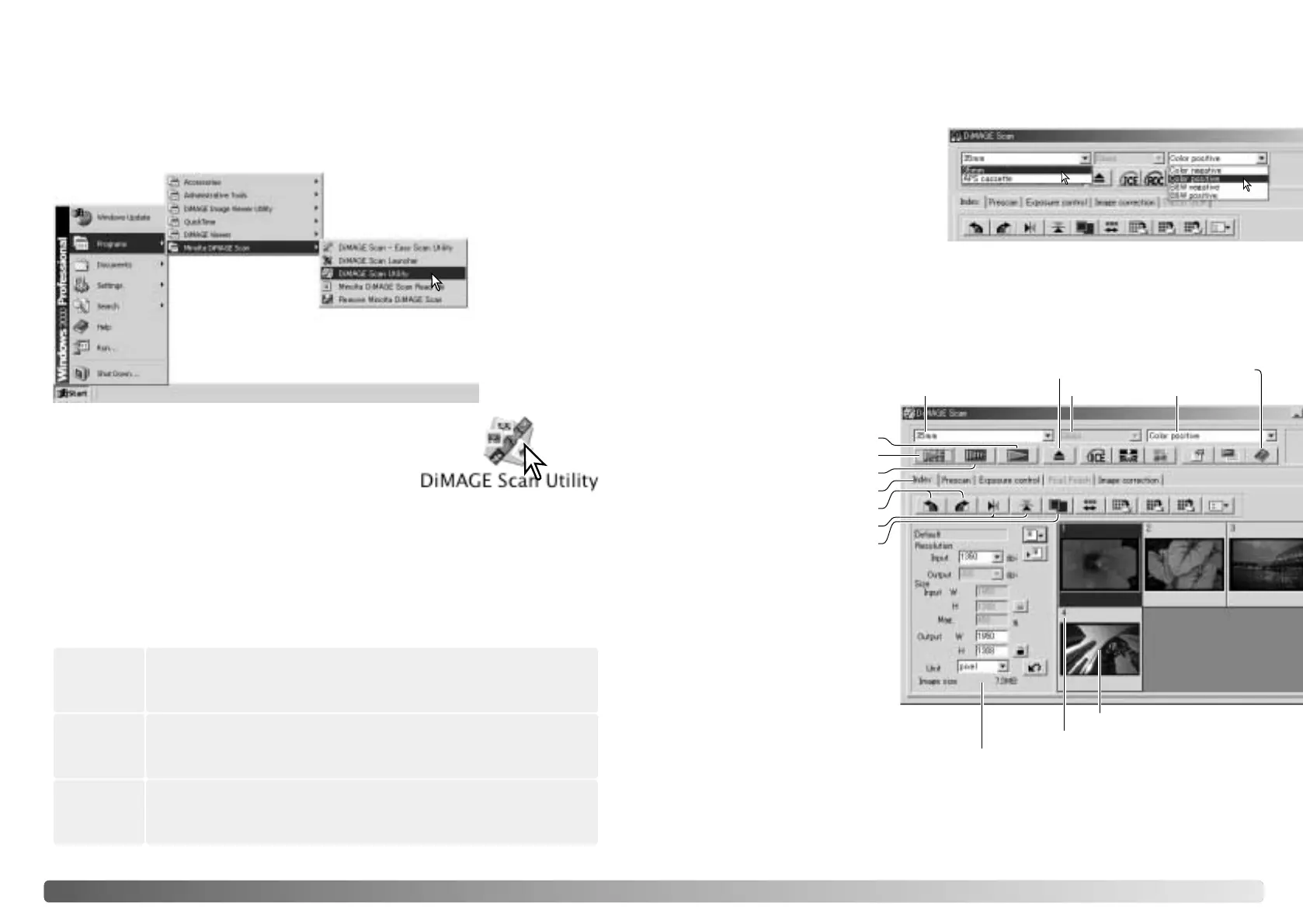
Open the DiMAGE Scan folder, and double click the
DiMAGE Scan Utility icon. See page 70 when using
multiple scanners.
Launching the DiMAGE Scan Utility
Select DiMAGE Scan Utility from the Minolta DiMAGE Scan folder
in the program option of the start menu. See page 70 when using
multiple scanners.
Windows
Macintosh
Scanning basics
Please read the basic scanning section in its entirety before moving on. Before any
scan is made, the film holder must be loaded and inserted into the scanner. Refer to
the scanner hardware manual for instructions as well as film handling tips.
Three types of scans can be made singularly or in combination depending on the
workflow and degree of processing:
Scanner setup
Before making a scan, the film format and type must be specified. Refer to the film
format and type settings section of the hardware manual for more information.
Film format and type are selected
from the drop-down menus in the
top left corner of the main window.
If the holder and selected film
format do not match, a warning will
be displayed and the scan will not
be made.
Some model scanners use both glass and glassless film holders, see the scanner
notes section in the hardware manual. This must be set with the holder type drop-
down list.
Main window and index scan tab
Film format Film type
Index scan button (p. 16)
Prescan button (p. 18)
Scan button (p. 20)
Help
Index tab
Rotate buttons (p. 17)
Flip buttons (p. 17)
Fit-to-window button
(p. 17)
Scan-setting window (p. 20)
Index thumbnail
Frame number
The utility window can be
resized by clicking and
dragging the bottom right
corner.
Holder type
Do not launch the utility with a film holder in the scanner. If the scanner model has a
manual front door, the door must be closed. The utility can also be launched from an
image-processing application. See the Windows and Macintosh installation section.
Scan
To display a preview of a specific image. A prescan allows an image
to be cropped or corrected using the DiMAGE Scan’s image-
processing tools.
Prescan
To display thumbnails of each image in the 35mm or APS film holder.
An index scan is useful when scanning multiple frames on one film
strip or for selecting a specific frame among similar images.
Index scan
To save and export an image. Image size, resolution, and file format
are specified with this scan.
Eject button








 To Next Page