3736 A
DVANCED SCANNING
More prescan functions
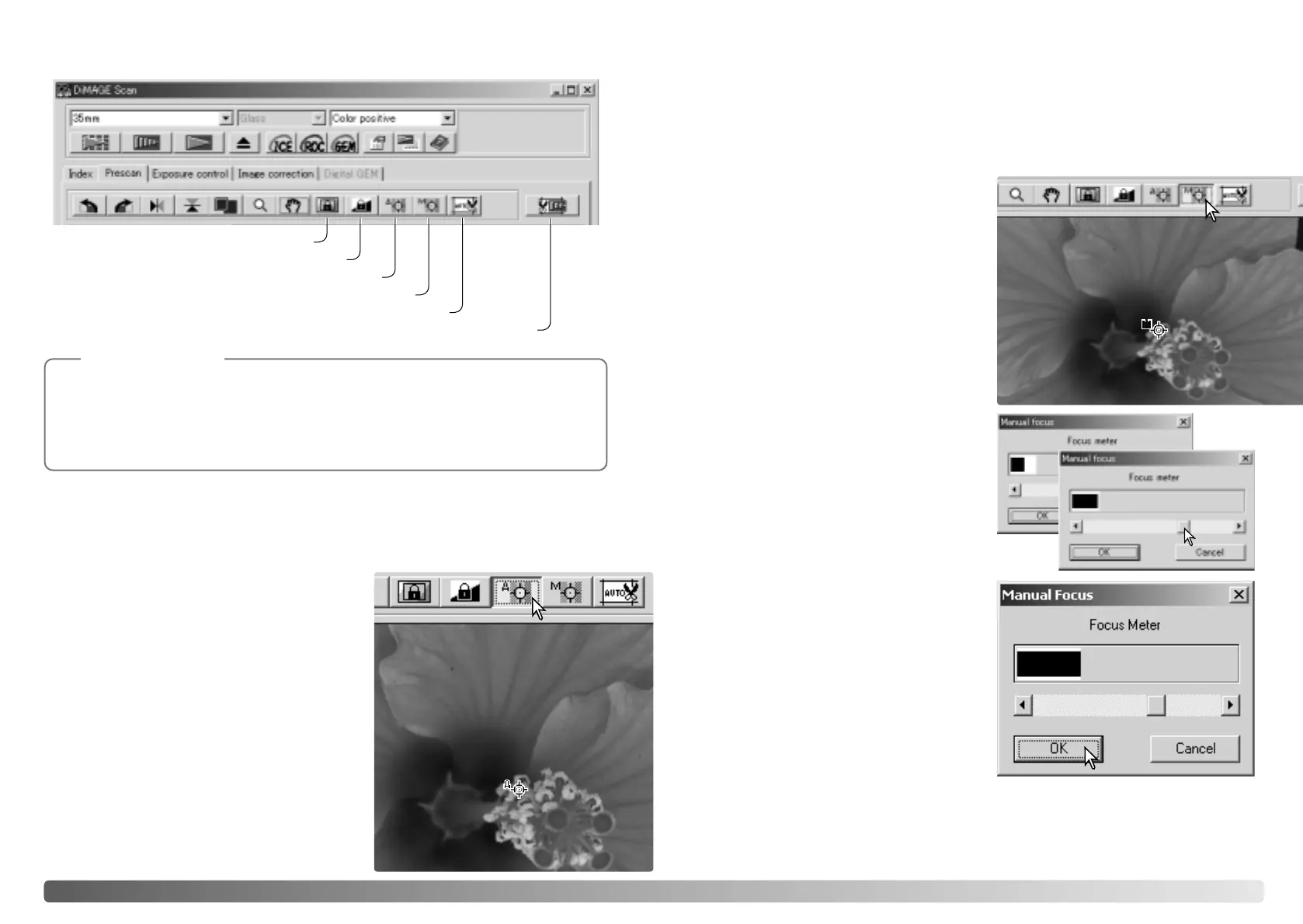
Manual-focus button (p. 37)
Point-AF button
Crop-prescan button (p. 38)
AE lock button (p. 39)
Auto-cropping button (p. 38)
AE-area-selection button (p. 39)
Point AF (Autofocus)
Manual focus
For best results when using point AF, select an area within the image with contrast or
detail. The point AF function cannot focus on a low-contrast area such as a cloudless
or overcast sky.
Click the manual-focus button. The mouse
pointer will change to the manual-focus
cursor. To cancel the function, click the
manual-focus button again.
Click on the area of image to be used for
focus. The focus meter window will appear.
Adjust the slider using the mouse until the
black and white bars are at their longest
extension. The black bar indicates the
change in focus. The white bar indicates the
longest extent of the black bar and the point
of sharpest focus.
Click OK to set the focus. A new prescan
will start and replace the previous image.
Click the point-AF button. The mouse pointer will
change to the point-AF cursor. To cancel the
function, click the point-AF button again.
Click on the area of image to be used for focus.
Autofocus will begin and a new prescan will be
displayed.
The DiMAGE Scan autofocus system uses the CCD sensor to focus the scanner.
When the autofocus-at-scan option is selected in the preferences window, the
autofocus system uses the center of image to determine focus. This normally results
in an excellent scan when the film plane is flat. However, if the film is warped or curled,
the scanner can be focused using point AF or manual focus.
Scanner Notes
The scanner can be focused manually using the focus meter. For best results, select
an area within the image with contrast or detail. The manual focus functions cannot
focus on a low-contrast image such as a cloudless or overcast sky. Some scanner
models can be focused with a manual focus dial, see the hardware manual for
compatibility and instruction.








 To Next Page