6.2 Brush Pressure Adjustment (Disk Models)
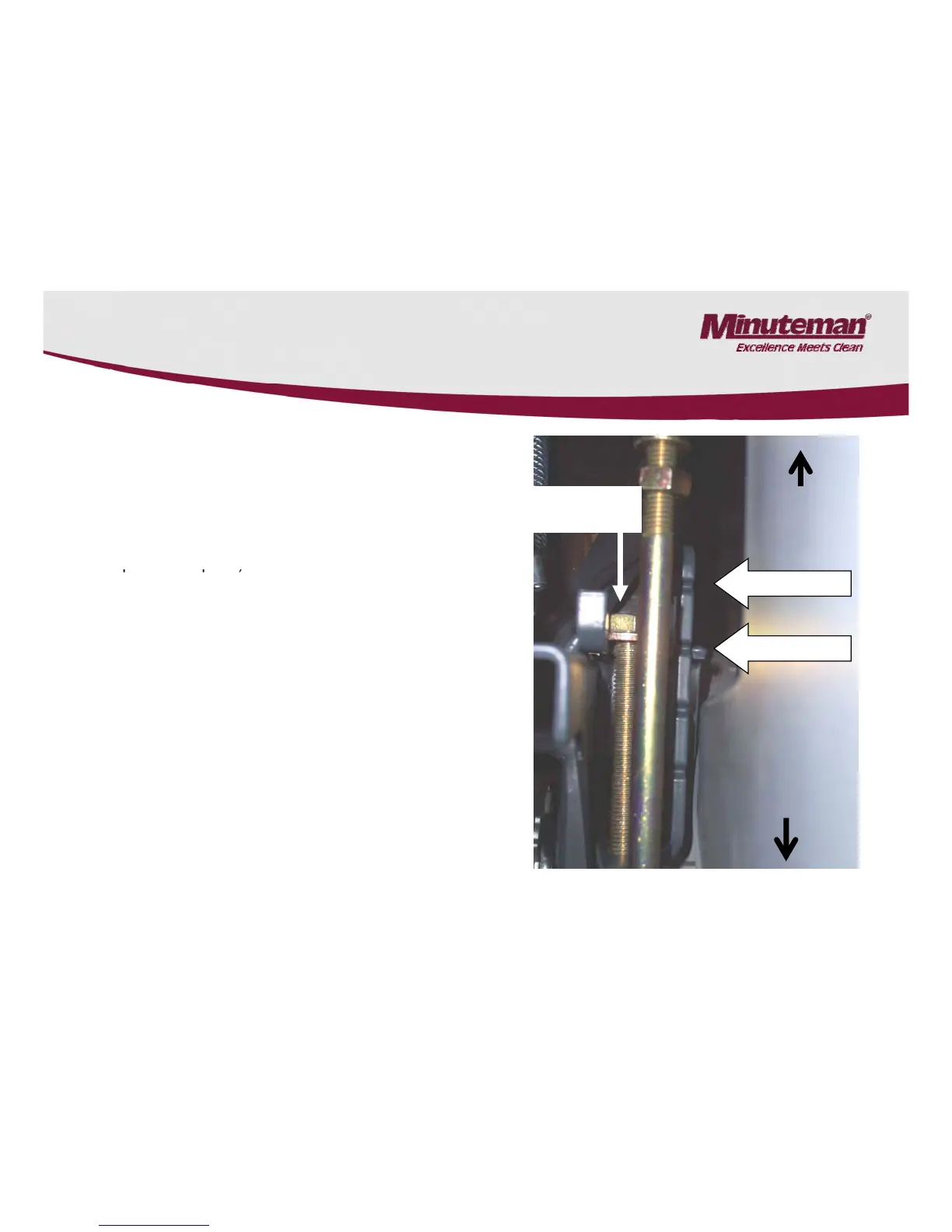
Brush Pressure Setting on Disk models.
•
The bolt on the left can be adjusted to increase or
decrease the brush pressure.
•Models with 19 gallon tanks This pressure adjustment
will affect the models in the normal scrubbing mode. (no
extra
Adjustment
Screw
Increase
pressure
•Models with 30 gallon tanks. This pressure adjustment
will only affect the models in the heavy pressure mode
only (second foot lever activated).
The indicator on the right should never be set past the
second notch.
•NOTE: When making changes, the current draw should
be less than 30 amps. per motor on the 26 and 30” disk
decks under load maximum 40 amps max on 33
.
•Lower settings are recommended for longer motor life,
longer run time and traction.
•Verify the current with brushes under load, with a digital
Decrease
pressure
clamp-on meter.
•Only an authorized Minuteman Service Center should
make changes to the brush pressure setting.
23
Note: The factory setting
set at the second notch


 To Next Page