8
1.4 Using Your Device in a Vehicle
Using the Device Holder
CAUTION:
Select an appropriate location for the device holder. Never place the holder where the
driver’s field of vision is blocked.
If the car’s windshield is tinted with a reflective coating, an external antenna (optional) may
be needed to route the antenna to the top of the car through a window. When closing the
car window, be careful not to pinch the antenna cable. (Cars with an anti-jam window
design may automatically leave adequate space as needed.)
Use the device holder to mount your device in a vehicle. Make sure that the GPS
antenna has a clear view of the sky. (See the Quick Start Guide supplied with the
device for the installation instruction.)
NOTE: Depending upon the specific model purchased, the device holder supplied with your
device may not look exactly the same as the picture shown.
Connecting the In-Car Charger
The in-car charger supplies power to your device when you are using the device in
a car.
CAUTION: To protect your device against sudden surges in current, connect the in-car
charger only after the car engine has started.
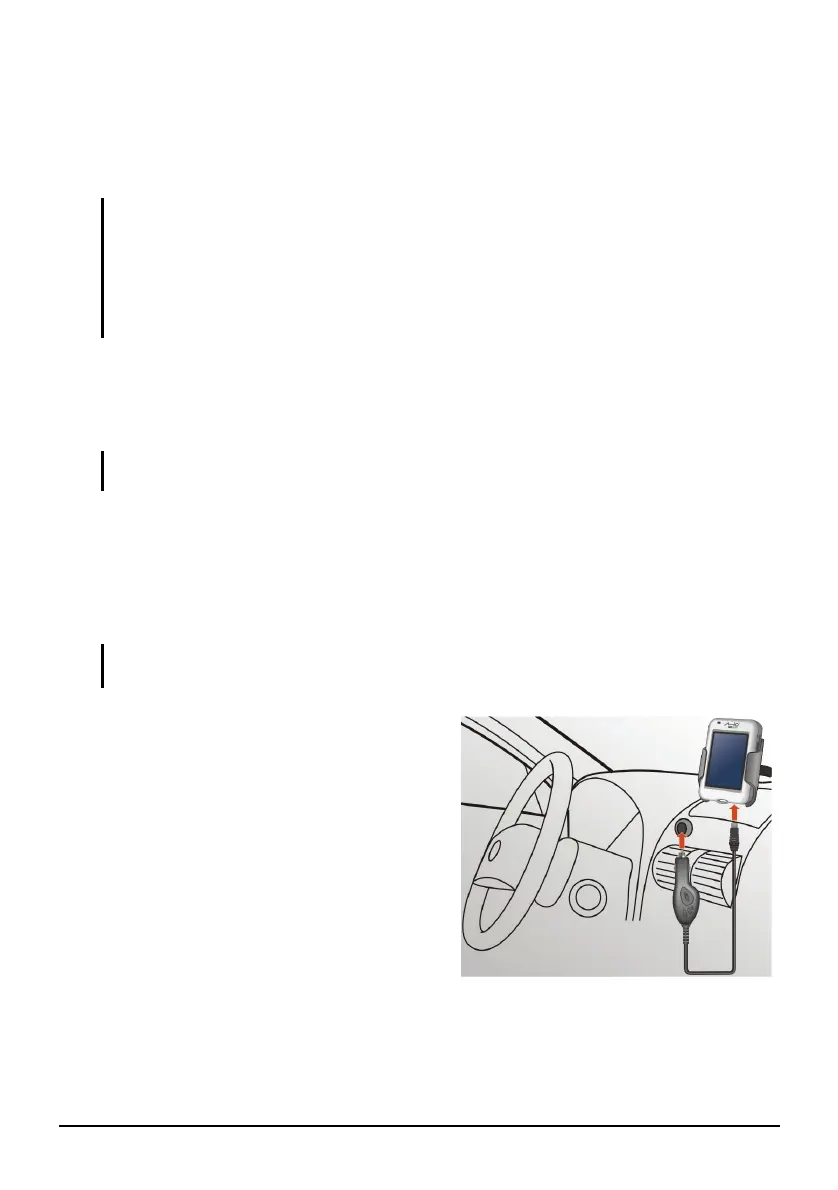
1. Connect one end of the in-car charger
to the power connector of your device.
2. Connect the other end to the 12-volt
cigarette lighter or power port to
power and charge your device. The
indicator light on the in-car charger
lights in green to indicate that power is
being supplied to your device.


 To Next Page