27
3.6 Measurements
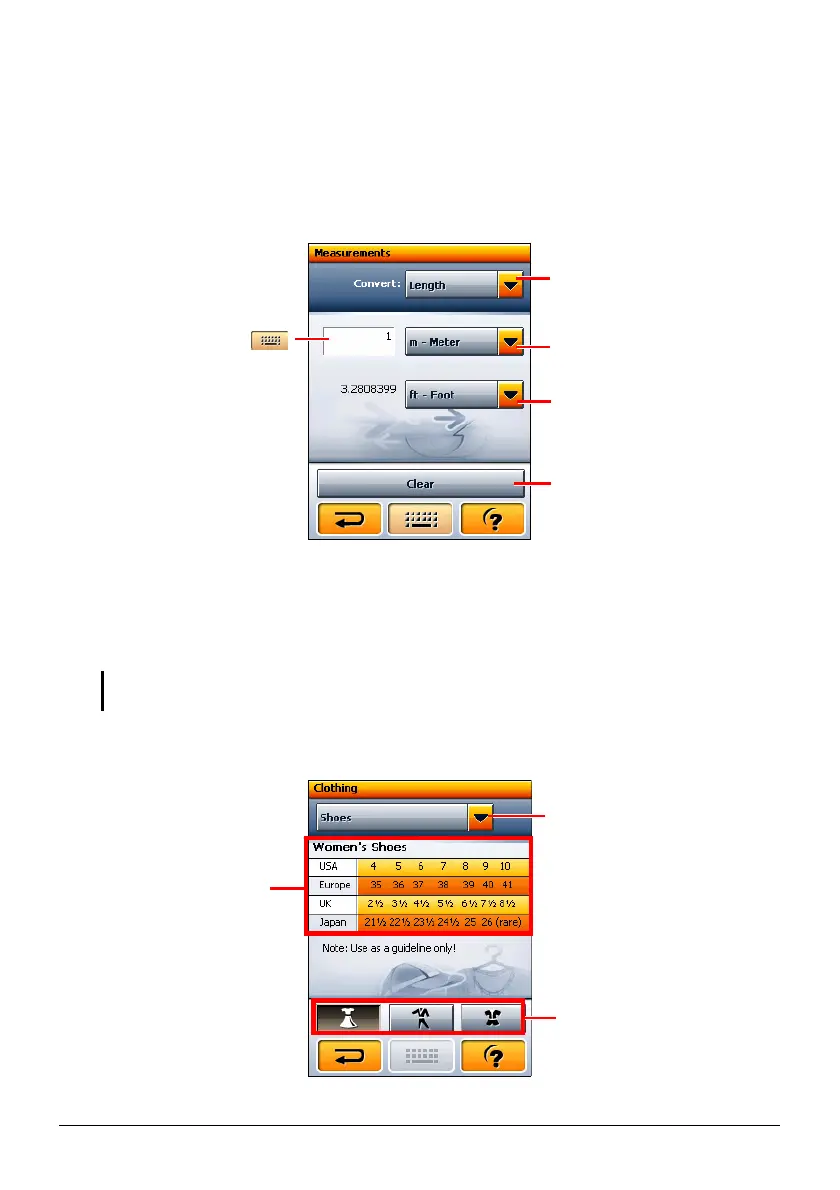
Use Measurements to convert measurements.
Tap the
Measurements button on the WorldMate main menu to open the screen as
shown.
3.7 Clothing
Use Clothing to view the size conversion tables for USA, Europe, UK, and Japan.
NOTE: Use the information as reference only. The actual size can vary among different
manufacturers.
Tap the Clothing button on the WorldMate main menu to open the screen as shown.
Tap to select the type of
measurements such as length
and areas.
Tap to select the unit to
convert from.
Tap to clear the input field.
Tap the field and tap
to enter the value. The
converted value is
displayed below.
Tap to select a clothing
category.
Conversion table for the
selected category and
gender/age.
Tap to select man,
woman, or child.
Tap to select the unit to
convert to.



 To Next Page