25
3.5 Currency Converter
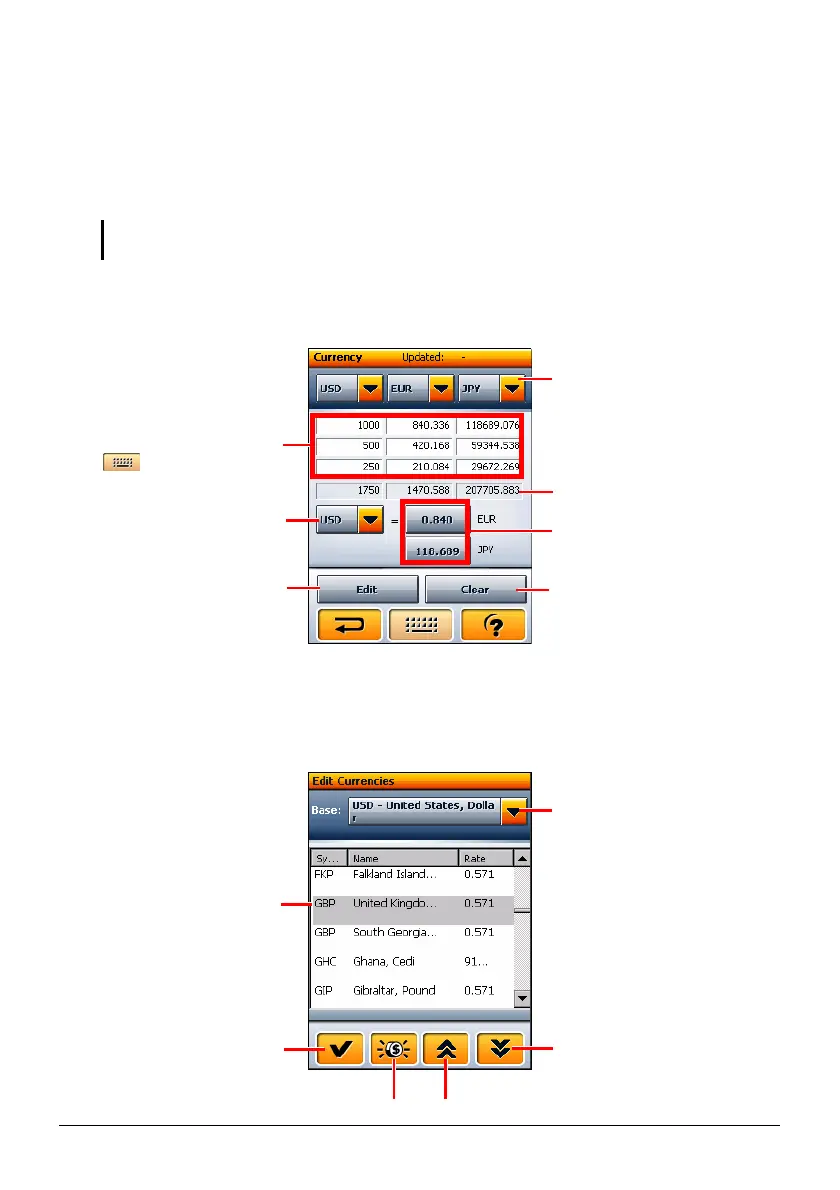
Use Currency Converter to convert currencies. Once you enter a value for a
currency, two other currency values are displayed simultaneously. You can enter
up to three values and the values will be automatically summed up.
NOTE: You can acquire the latest exchange rates through Internet and transfer the
information to your device. (See Section 3.12 for more information.)
Tap the Currency Converter button on the WorldMate main menu to open the screen
as shown.
Adding, Editing, or Deleting the Exchange Rate
Tap the Edit button on the Currency Converter screen to open the edit screen.
Tap to switch to anothe
currency.
Tap to change the
currency base.
Page down
Page up Add new currency.
Save and return to the
previous screen.
Tap an input field and tap
to enter the value.
Sum of the above
Three currencies are
displayed simultaneously.
Tap to select a different
currency.
Exchange rate.
Tap to edit the exchange rate.
Clear all the fields.
Edit the exchange rate. (See
later section for details.)
Tap to edit the exchange rate
for the selected currency.



 To Next Page