52
6.4 Video Playback Controls
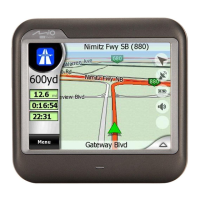
Use the onscreen control buttons to control the playback.
To return to the video file list, tap
.
Pause/Play
Playback mode:
Repeat
Single
Back
Rewind
Stop
Forward
You can tap on a point along the
track bar to move directly to a
different location for the playback.
Tap to watch the video
in full screen.
Increase the volume
Decrease the
volume.
Volume indicato


 To Next Page