22
Setting the Alarm
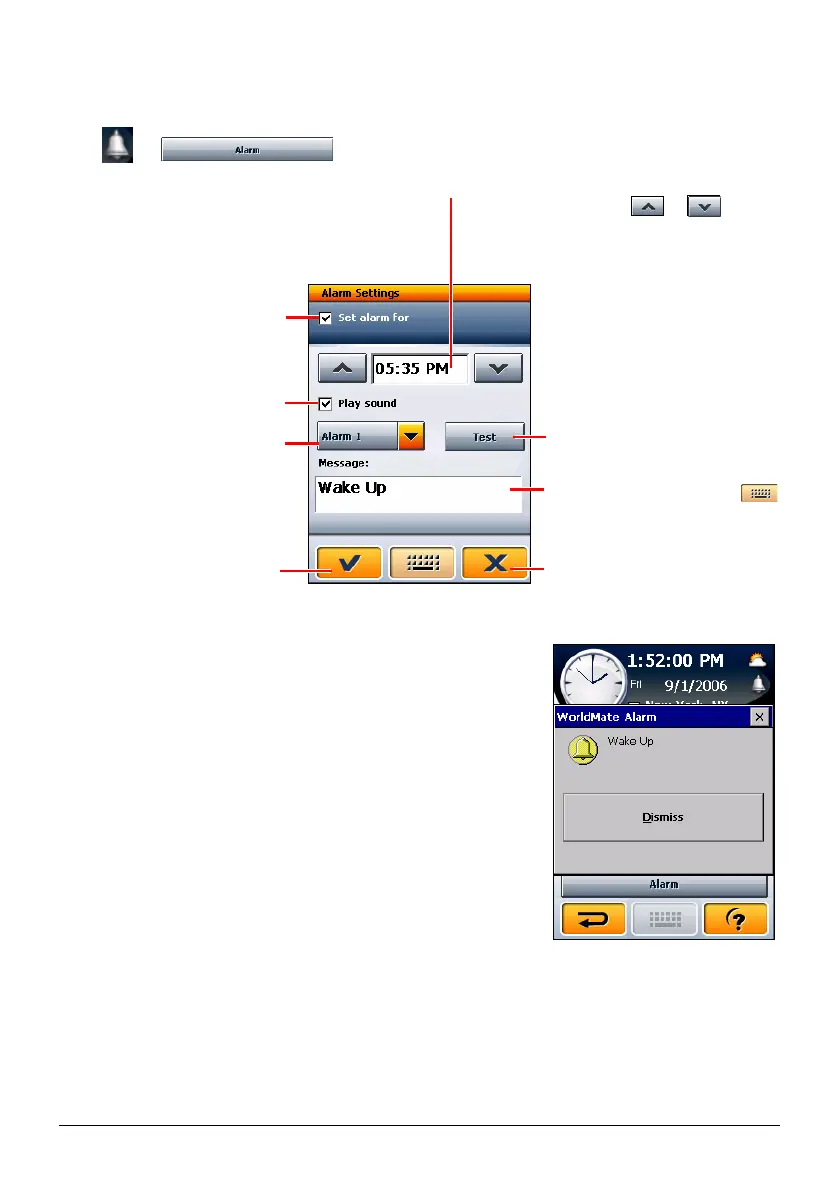
Tap or
to open the alarm setting screen.
When the alarm goes off, a window pops up along
with a sound if you have set one.
You can tap the
Dismiss button to close the Alarm
and turn off the sound.
Cancel and return to the
previous screen.
Save and return to the
previous screen.
Tap to activate the alarm (with
a check in the checkbox).
Tap Hour/Minute and tap
or
to
increase or decrease the value. Tap AM
or PM to switch to the other one.
Tap to select the alarm sound.
Tap to hear the sound.
Tap the input field and tap
to enter the message.
Tap to activate the sound (with
a check in the checkbox).


 To Next Page