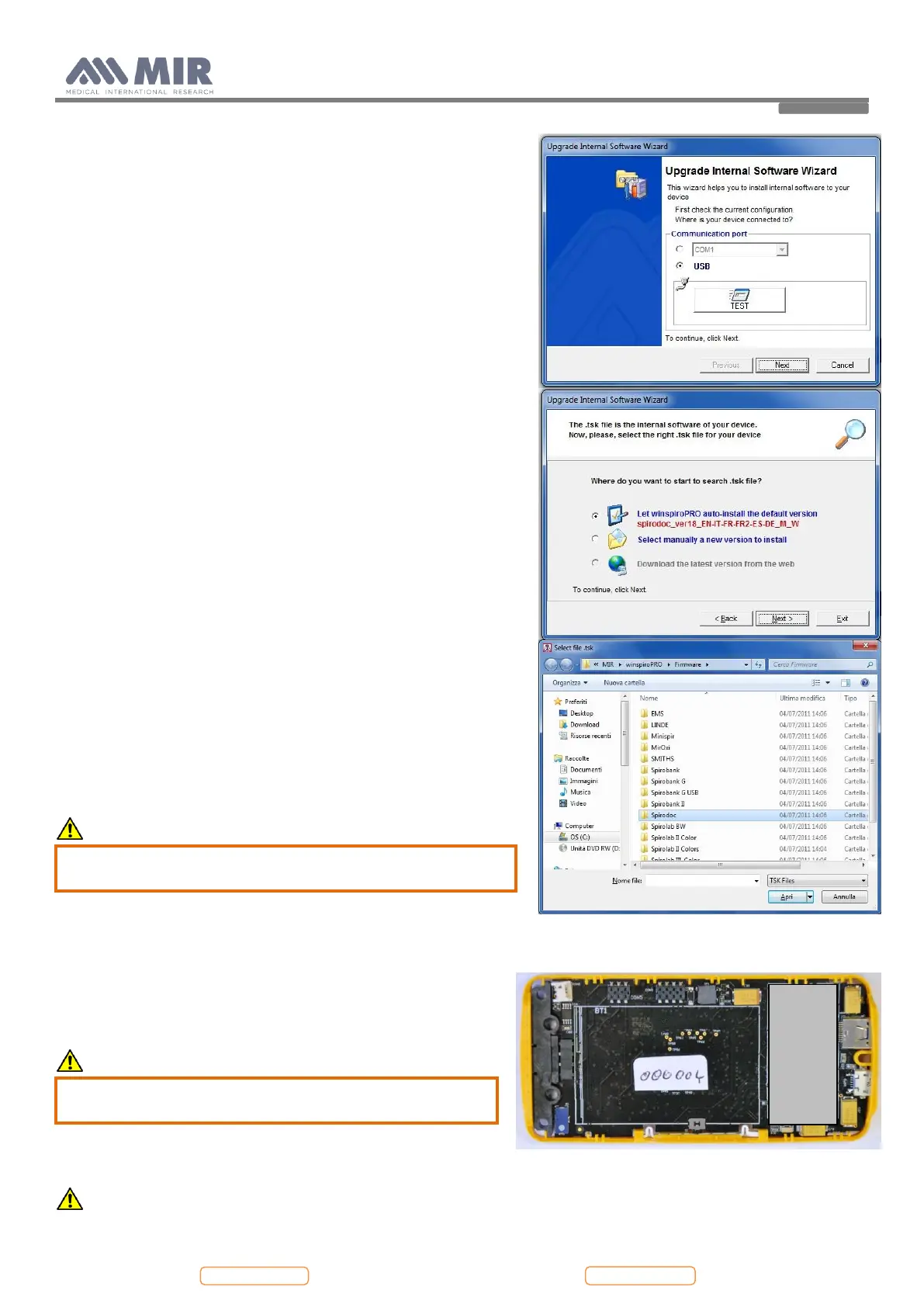
This wizard helps the user to select the method used to connect the
device to the PC and then, with the “TEST” icon, the user can check
the connection (see image).
Search for the .tsk file to be downloaded into the spirometer. Choose
either auto-install or manual file search; browse system resources
through list of folders, select .tsk file and then click on Next.
From the “Select file .tsk” search window select the firmware of your
device; click on the spirodoc folder and then on the selected file to
automatically launch the upgrading procedure of the internal software
of the spirometer.
4.4. Oximeter module
To check the oximeter module used on the device, refer to Annex 4.
CAUTION
Make sure before operating on the oximetry module to
switch off the device or disconnect the battery charger.
4.4.1. Replacing of the oximetry module
Open the device as described in point 4.2.1 up to point 6. The
visible face of the PCB shows on the right the housing of the
oximetry module.
Remove the oximetry module using the hand.
CAUTION
The module is fixed to the PCB so move gently until the
module is completely removed.
Replace the oximetry module.
CAUTION


 To Next Page