INSTALLATION & SETUP
Mirage 2000/4000/6000 User’s Manual
2-17
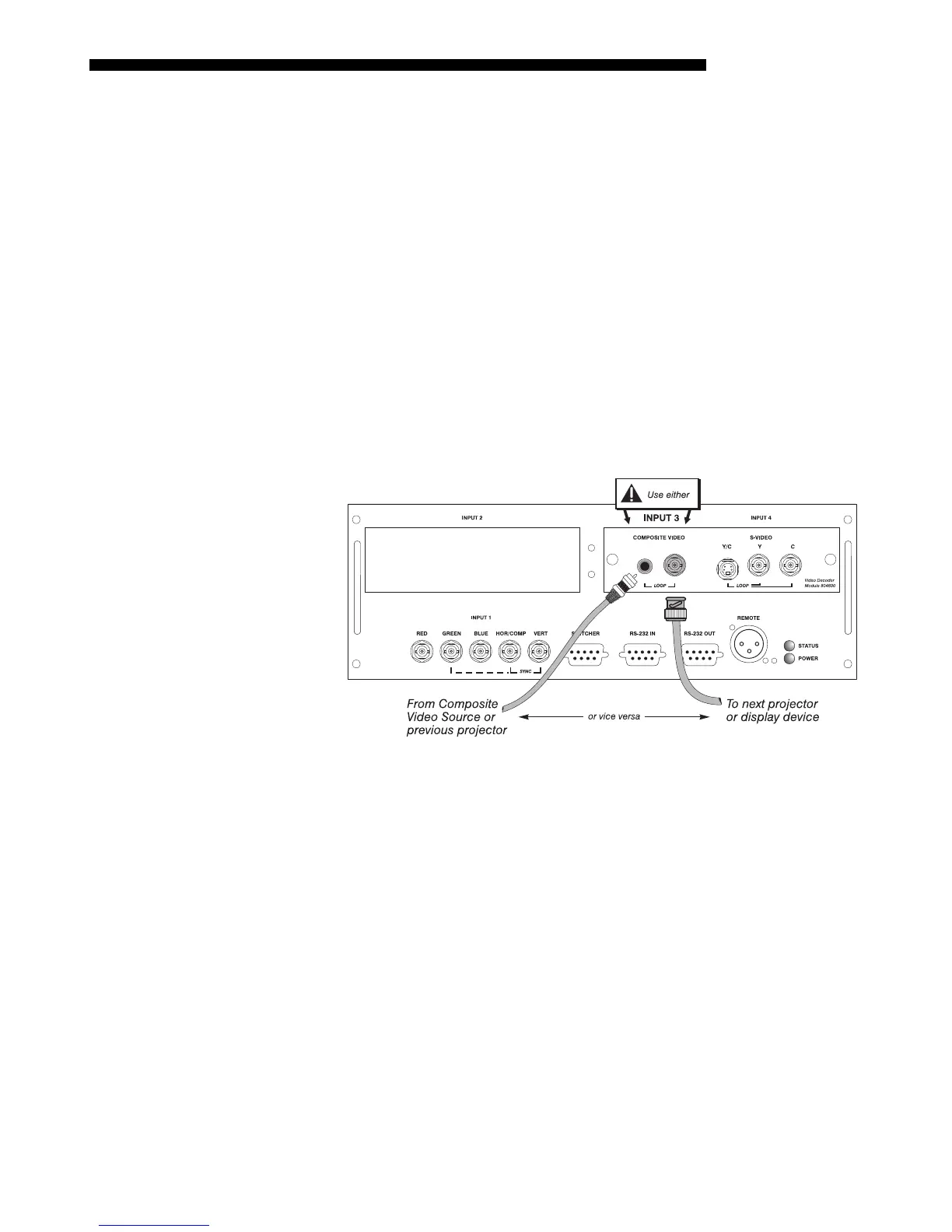
To loop a single incoming video signal input (connected at the video decoder)
through to another projector or display device, use the empty connector(s) adjacent to
this same input as described below.
Composite Video Loop Through
CONNECTIONS:
See Figure 2.17. From your source, connect a composite video signal
to
INPUT 3
using either the small phono plug or the adjacent BNC. Connect a second
cable from whichever
INPUT 3 connector is free to one of the composite video inputs
of the next display device or projector. Continue this looping method for each
projector, using either the phono plug or the adjacent BNC as input into
INPUT 3,
then using the other connector as an output (i.e., loop through). Whether you use the
BNC or the phono plug as input or output depends on the type of cable you have on
hand and what type of connectors are on each end.
VIDEO TERMINATION: In the Video Options submenu, make sure “Video
Termination” is checked for the final projector only. All other projectors must have
this option unchecked in order for the signal to continue. For other types of display
devices in the chain, typically a “Hi-Z” switch position is needed.
Figure 2.17. Connections for Composite Video Loop Through
Video Loo
Throu
h
'



 To Next Page