INSTALLATION AND SETUP
2-32
Mirage 22000/4000/6000User’s Manual
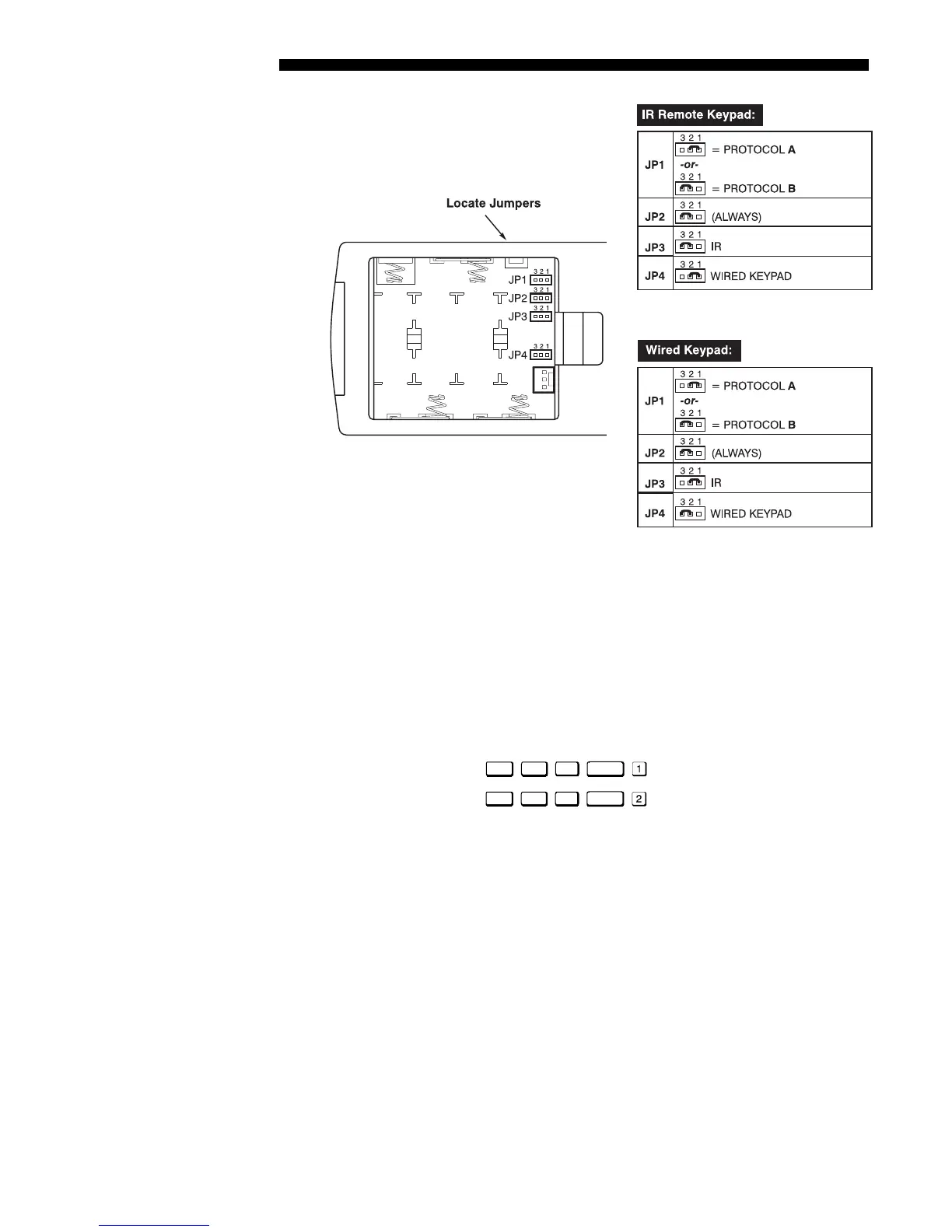
Figure 2.32. Locating and Setting the Jumpers
NOTE: A wired keypad can be converted into an IR remote keypad, and vice versa.
Follow the settings shown above, adding or deleting the cable and batteries as required.
The cable with 3-pin XLR connector is available separately from your dealer.
SHORTCUT METHOD:
You can also issue software protocol settings through the keypad. These software
commands will be lost when the keypad is either unplugged or when a battery is
removed — the keypad will revert back to the hard-wired jumper settings (see above)
until you enter the software commands again.
Press
Input1
Color
Pixel
Position
= Protocol “A”
Press
Input1
Color
Pixel
Position
= Protocol “B”
NOTE: If you change any keypad to a new protocol and the projector stops
responding, the projector may be set to a conflicting protocol. Use the projector's
built-in keypad to access the Communications menu. Under “Front IR” or “Back
IR” or "Wired Keypad", select the protocol that matches the new protocol of the
keypad at hand. The projector should now respond properly.



 To Next Page