114 Mitel 6940 SIP
eud-1765/2.0 – R6.0 – 06.2018
Reception phone
Reception phone
Your phone becomes a reception phone if your system administrator
has defined the phone in the system as a reception phone and has
configured the basic settings.
If your phone is configured as a reception phone, it can also work as
an operator console. The system administrator can configure up to
six operator keys on your reception phone. Contact your system
administrator for more information. Once an operator key is config-
ured on the reception phone and there is an incoming call to the
operator key, the icon showing the number of calls in the operator
queue appears in the top status line of the phone. For more informa-
tion about how to operate an operator phone, see the section "Opera-
tor phone", page 104.
As a receptionist, it is your responsibility to ensure that a guest checks in
and checks out without any problem. You can manage check-in, check-
out, and many other settings and actions for your guest on your phone.
Your reception phone provides you with a room list, options for managing
wake-up calls, do not disturb, and notifications along with options that facil-
itate a number of general hotel administrative tasks.
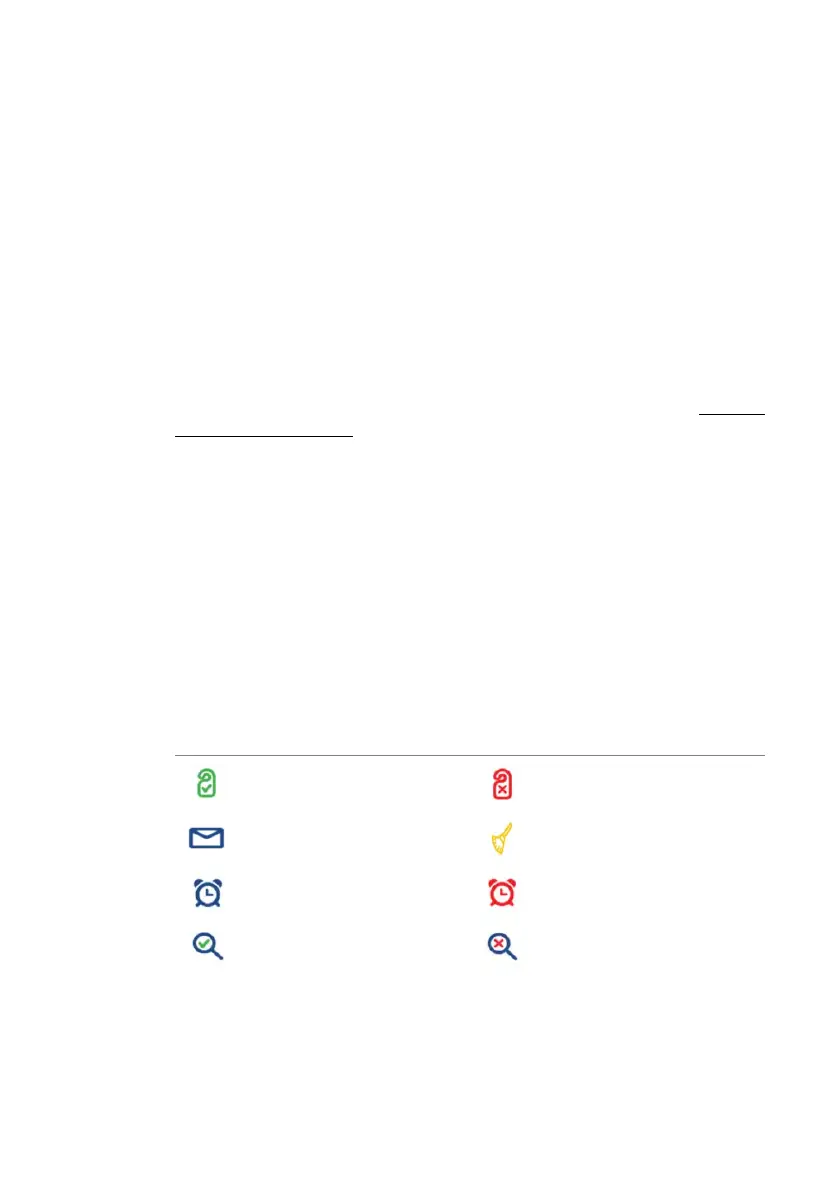
Display symbols
The reception phone displays a host of informative icons. Following are
the icons displayed and their descriptions.
Icon Description Icon Description
Room free Room occupied
Notification Room not cleaned
Wake-up call pending Wake-up call expired
Room cleaned and inspected Room cleaned but not
inspected



 To Next Page