Operating Instructions MG3 Digital
How to …?
76609409EN-BA-MG3D-V1_6.docx 38/82 2010-08-02
5.5 Configuring Display Window for the Various Types of
Measurement Categories
Representation of the measured values in four, freely configurable display windows
(quadrants).
Every display window can be operated in four different display modes.
Preparations
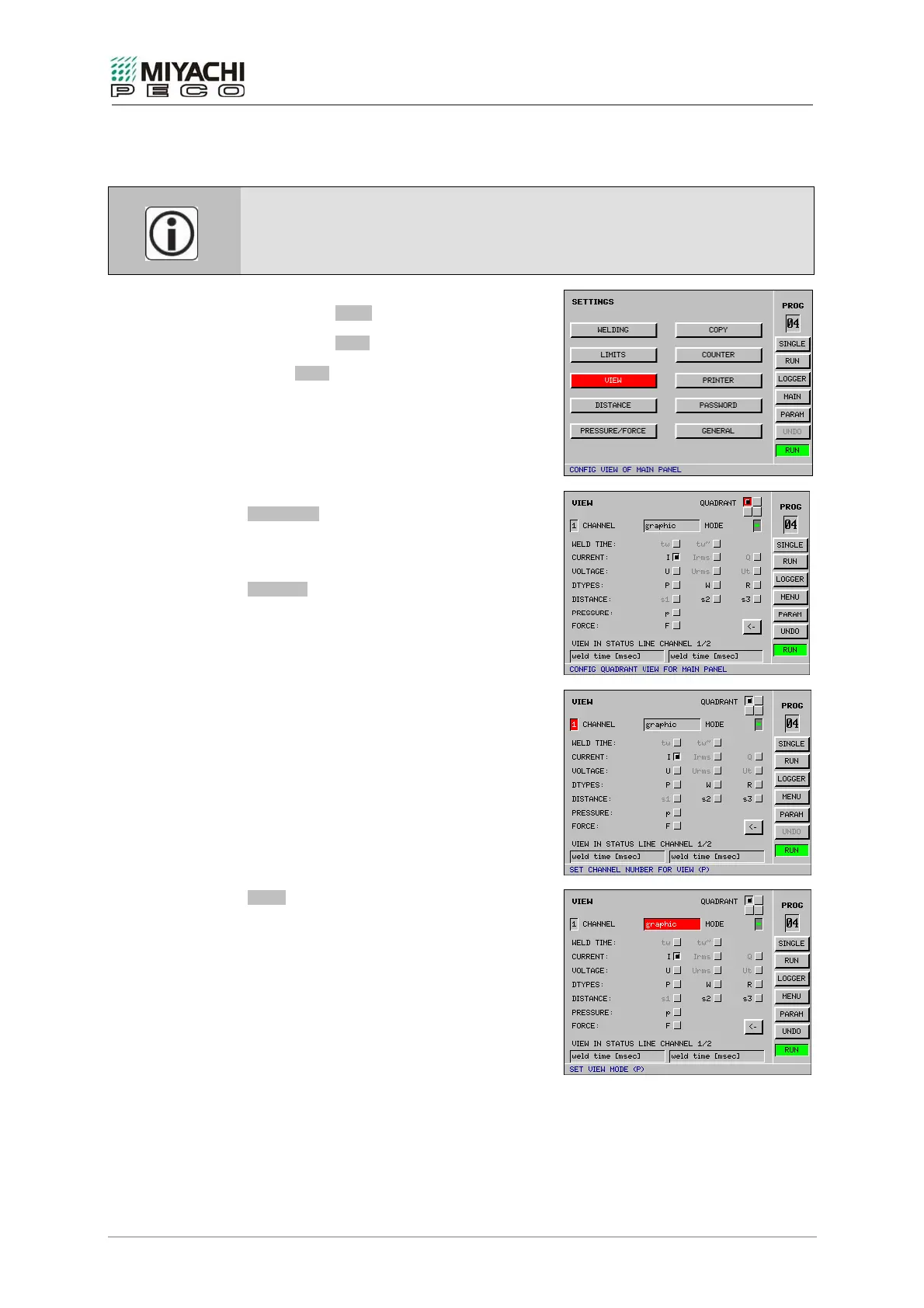
Select button MENU with the knob/pushbutton
combination and depress button.
Select button VIEW with the knob/pushbutton
combination and depress button.
Screen VIEW opens, and now you may perform
all necessary settings.
Setting the display window
QUADRANT
Here you select the display window 1…4
(quadrant) to be configured.
CHANNEL
The channel number set determines the
channel that shall be represented in the display
window selected.
Only one measured categories can be selected
per channel and window in each case.
MODE
You determine in this selection field how the
measured categories shall be represented.
Possible types of representation:
numeric
graphic
(using graphic representations, you may select
color of the graphs in addition)
SPC*-Chart
SPC*-Values
SPC: Statistical Process Control


 To Next Page