Operating Instructions MG3 Digital
How to …?
76609409EN-BA-MG3D-V1_6.docx 59/82 2010-08-02
5.15 Configuring the Logger
Procedure
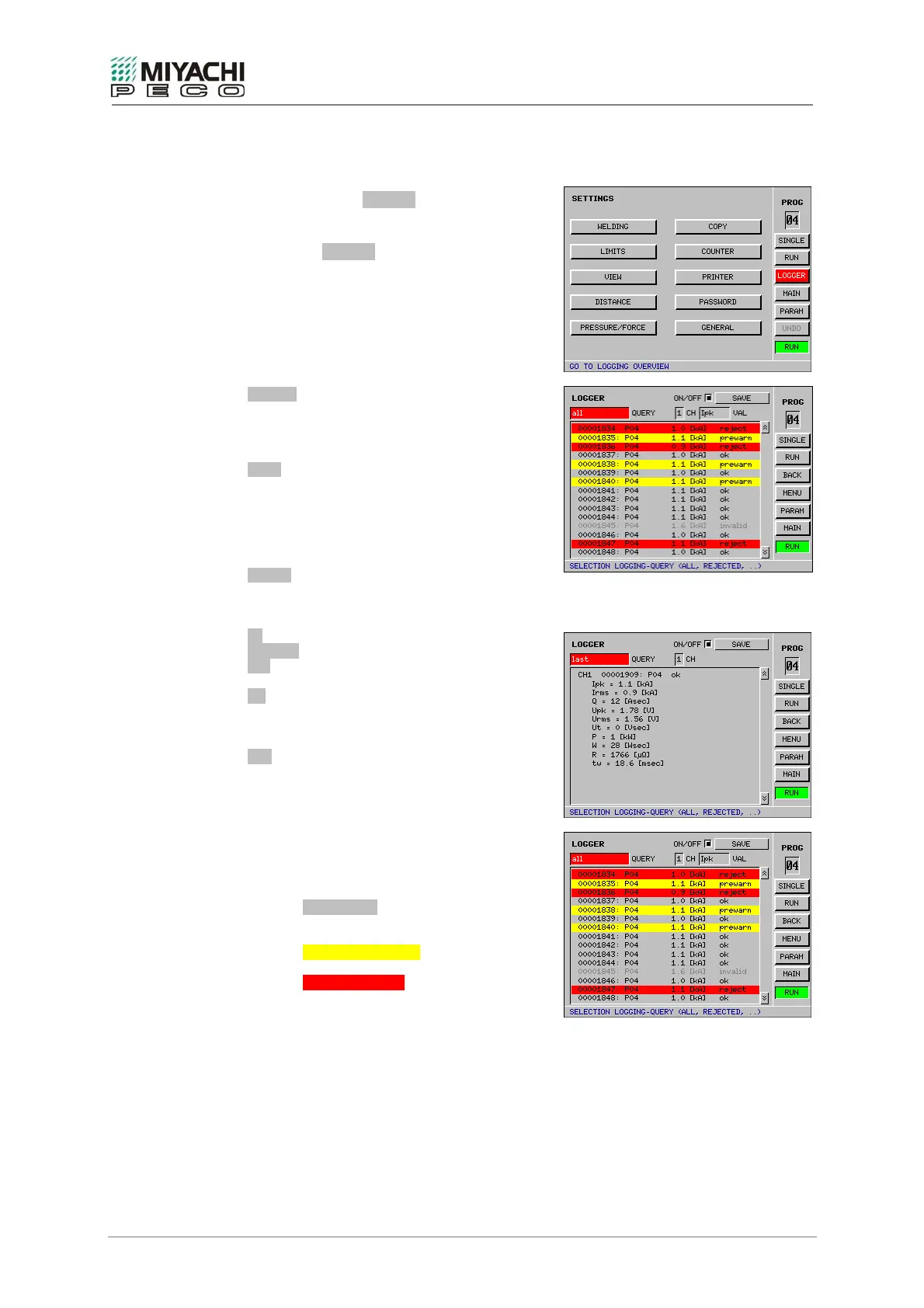
• Select button LOGGER with the
knob/pushbutton combination and depress
button.
• Screen LOGGER opens, and now you may
perform all necessary settings.
ON/OFF
When you enable this button, data acquisition
will be enabled (data logging) for the shown
canal.
SAVE
Pressing this button saves all values logged to
this point in time on the CompactFlash card or
MicroDrive.
If the compact flash card is nearly full you will
be asked to change the card.
QUERY
The display mode for logged data is determined
with this selection field.
Possible display modes are:
all measurements
rejected measurements
last measurement (detailed)
CH
Select between channel 1, 2 or 1 / 2 (only for
mode “last measurement”)
VAL
Select here the value that you want to be
shown.
Notes
• The overall status of a measurement is
illustrated with the following background
colors:
- Gray letters
= invalid measurement (range
overflow)
- Yellow background
= beyond the warning limit (n)
- Red background
= exceeded limit value
• The double arrows are used to scroll
forwards and backwards through the
logging history.


 To Next Page