© Copyright MOBA Mobile Automation Australia Pty Ltd
Working with Sensors
37
5.3.3 TO TRANSFER CURRENT SENSOR
VALUE INTO REFERENCE/OFFSET
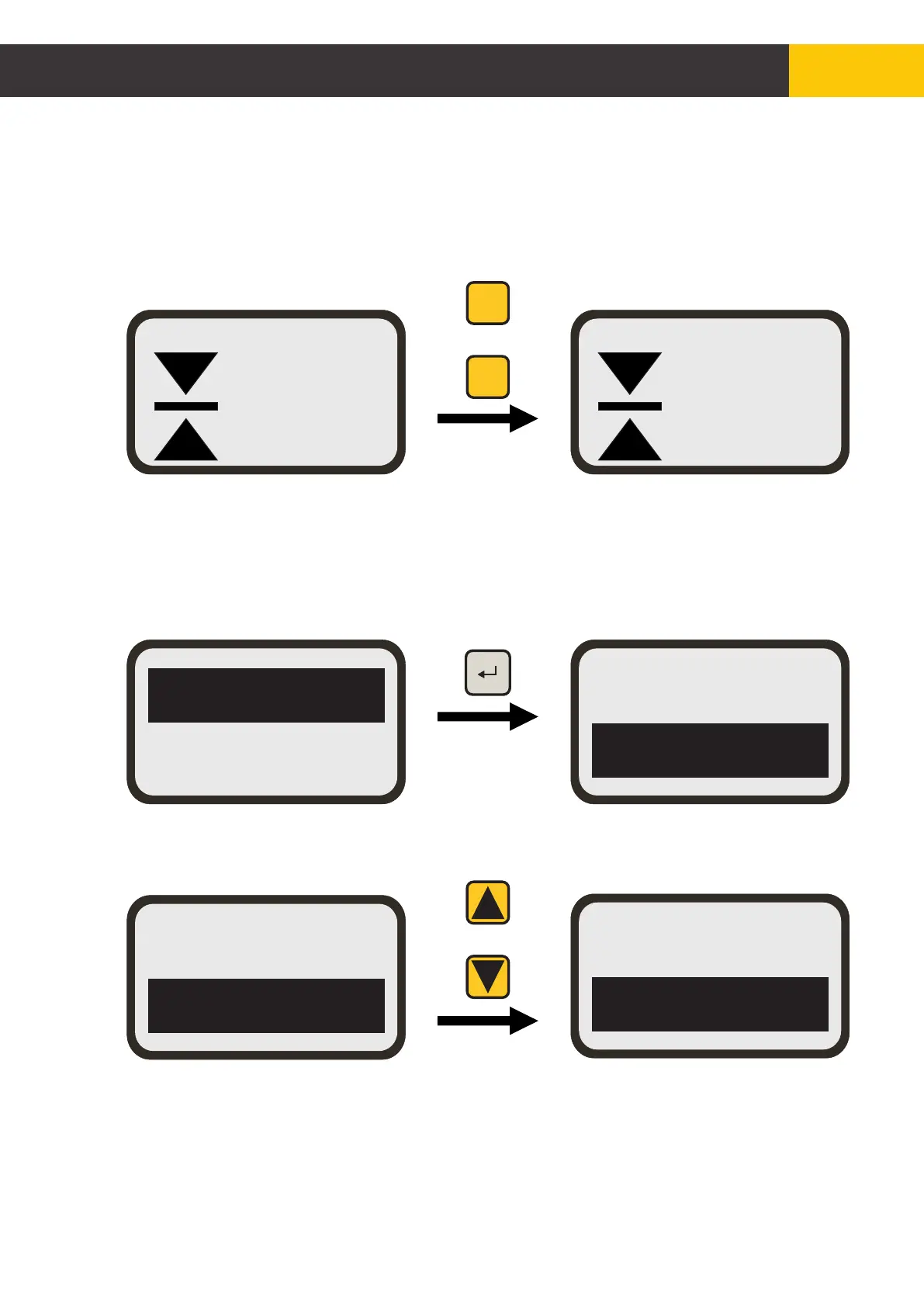
From the working screen, press the [FUNC] key’s Up and Down buttons together to set
reference/offset value to be the same as the current sensor value.
5.3.4 TO ZERO REFERENCE/OFFSET VALUE
Use the [AUX] key to highlight the reference, then press the [ENTER] key, to edit the
Ref.
Press the [AUX] key’s Up and Dn buttons together to zero the Ref value.
The currently selected Ref can also be adjusted from the Standard Screen without
entering Ref menu. Simply press [FUNC] key’s Up or Down button to adjust the value.
Ref2 = +1.25
Ref3 = +2.15
Ref1 = +0.50
Ref2 = +1.25
0.82
Ref = 0.82
Slope [%]Slope [%]
MAN
0.82
Ref = 0.50
Slope [%]Slope [%]
MAN
FUNC
F1
F2
Ref2 = +1.25
Ref3 = +2.15
Ref2 = +1.25
Ref3 = +0.00
AUX
Figure 5.3.3.1
Figure 5.3.4.1


 To Next Page