© Copyright MOBA Mobile Automation Australia Pty Ltd
Working with Sensors
47
To set the job direction enter the position of the two reference points A & B using the
following instructions.
Note: For the single & dual slopes provide a minimum distance of 10m between
reference points A & B to define accurately the orientation of slope targets.
5.4.4.3 GNSS JOB TYPE SELECTION & SETUP
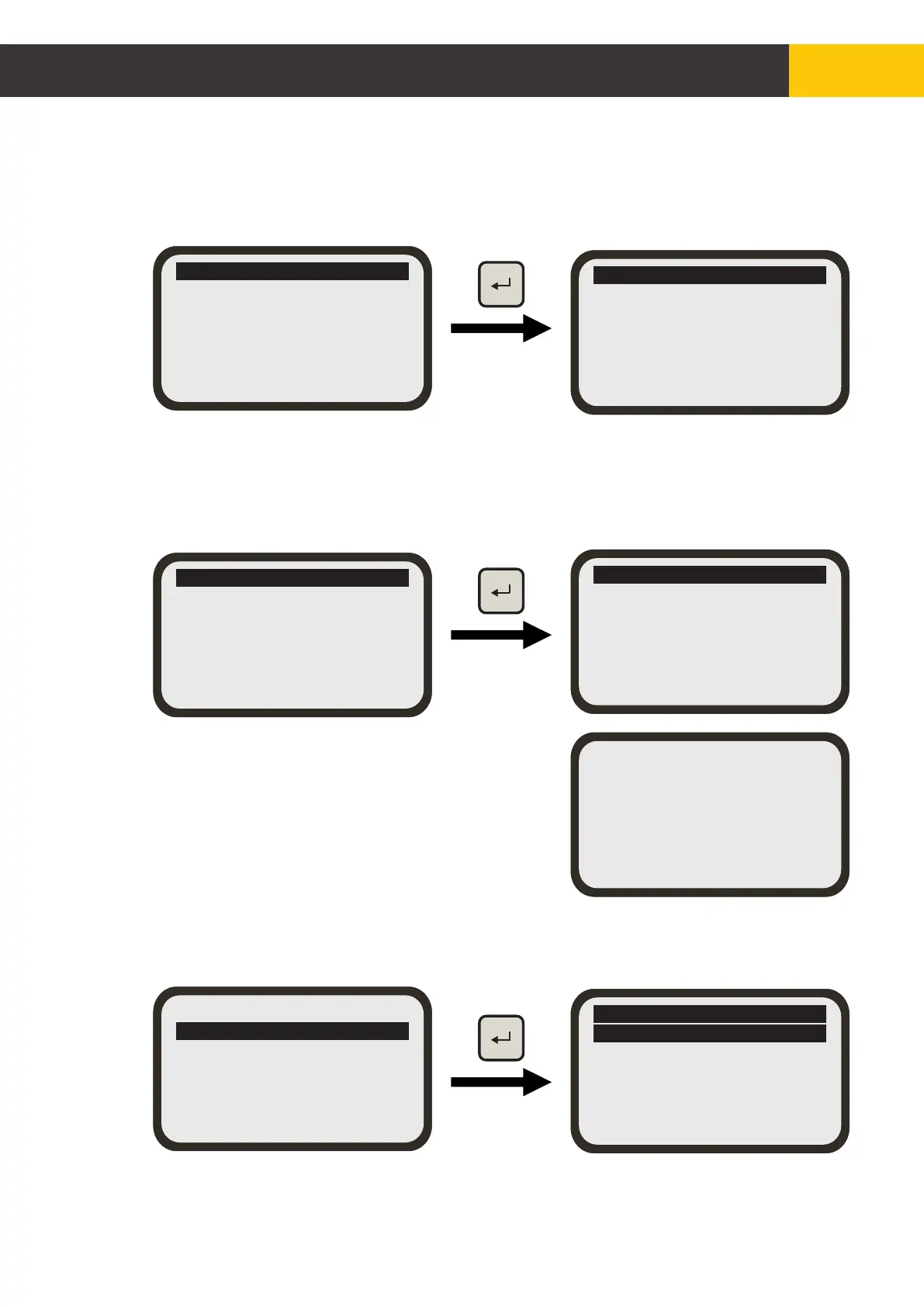
Press the [ENTER] key to bring up the job selection menu. Select the job type and
follow instructions to setup the job direction.
Job Type [Slope]
Job Target Settings
Exit
Flat bed?
Single Slope
Dual Slope
Exit
Set up a new job
Setting Ref Point A
Set up a new job
Please drive to
Ref Point A
then press Enter
Job set up complete
Continue with these same steps to set up
reference point B.
Confirm that the job setup has been
successfully completed.
For Single Slope and Dual Slope go to the job target settings and dial using the
[AUX] key to configure the required slope settings.
Job Type [Slope]
Job Target Settings
Exit
GPS Single Slope
Slope = +0.000%
Exit
Figure 5.4.4.3.1


 To Next Page