© Copyright MOBA Mobile Automation Australia Pty Ltd
Joystick Type
53
8 JOYSTICK TYPE (Optional)
CB.D2.CAN supports multiple types of joysticks, so it is very important to select the right type
of joystick connected to the system.
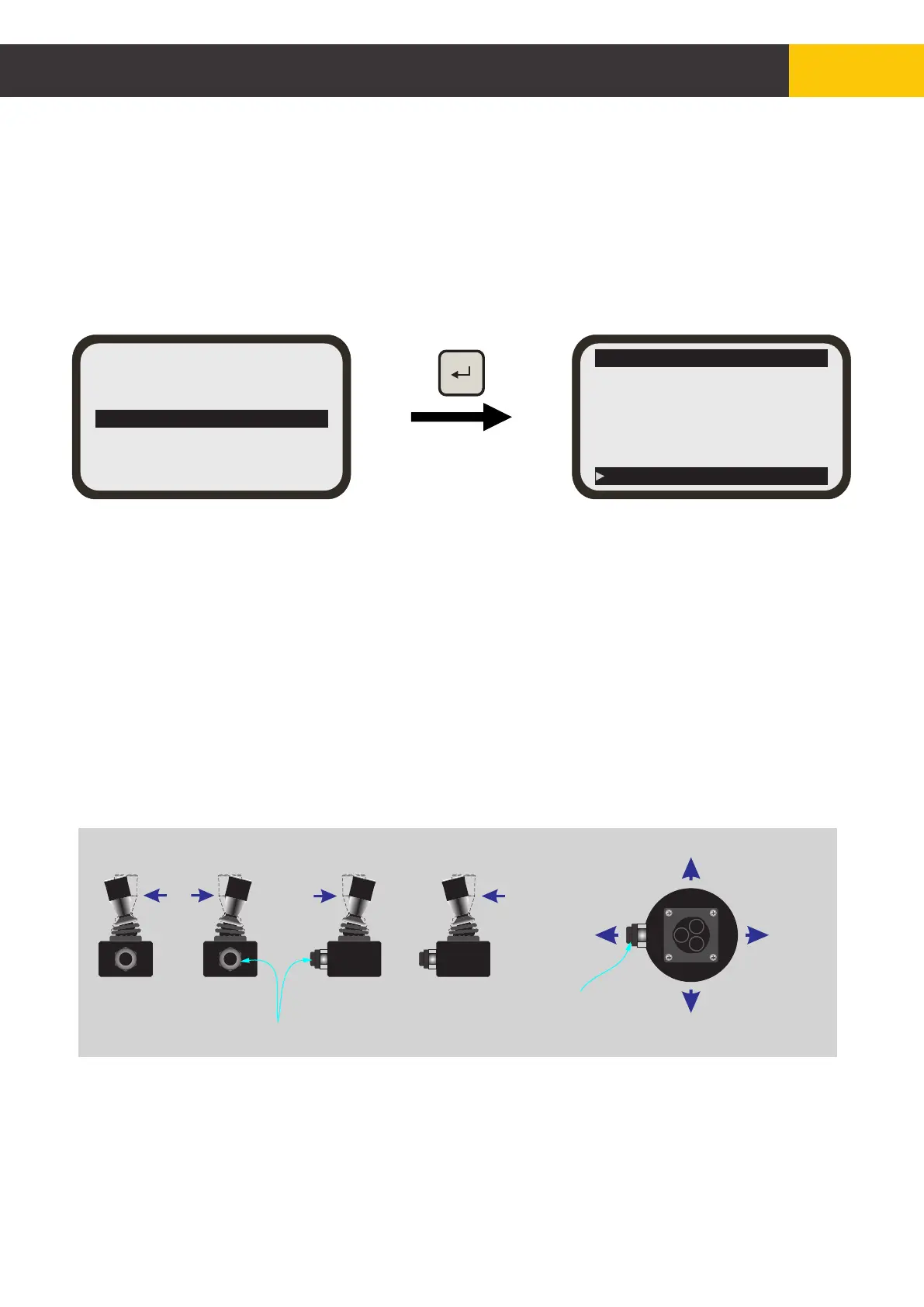
From the main menu screen, use [AUX] key to select ‘Joystick’ submenu then press [ENTER]
key. From the joystick submenu, press [AUX] up or down to scroll through different joystick
types. Once the desired joystick is selected, press [ENTER] key to select. Press [MENU] key
to go back to the working screen.
LEFT
RIGHT
Note gland position
UP DOWN
Joystick Types
(a) Proportional Mini Stick
(i) Hydraulic up and down activations are located on the same axis on the joystick handle.
(ii) Hydraulic activation is proportional to handle position.
(iii) Includes 3 buttons for switching between Auto and Manual as per side mini stick.
(b) Proportional Aux Mini Stick
(i) Moving the joystick in up/down direction (Y axis) activates the hydraulics.
(ii) Moving the joystick in sideways direction (X axis) activates the auxiliary.
(iii) Moving the joystick left activates aux down; moving joystick right activates aux up.
(c) On Off Mini Stick
(I) hydraulic up and down activations are located on the same axis on the joystick handle.
(ii) Hydraulic activation is not proportional to handle position. Simple ON/OFF activation.
(iii) Includes 3 buttons on top for switching between Auto and Manual (see fig. 63 on page 49).
UP
DOWN
LEFTRIGHT
UP
DOWN
GLAND
A/M
A/M
Figure 8.1
Figure 8.2
Hydraulic Settings
Sensor Settings
Accessory Sensors
Joystick
LCD/LED Settings
Advanced Settings
Exit
Joystick
Auto/Man Stick
Prop Toggle Stick
On Off Toggle Stick
Remote
Prop Mini Stick
On Off Mini Stick


 To Next Page