-32-
Revision 7/F3512
© Moffat Ltd, January 2005
E35 Turbofan Ovens
6.4.3 DOOR SETTING ADJUSTMENT
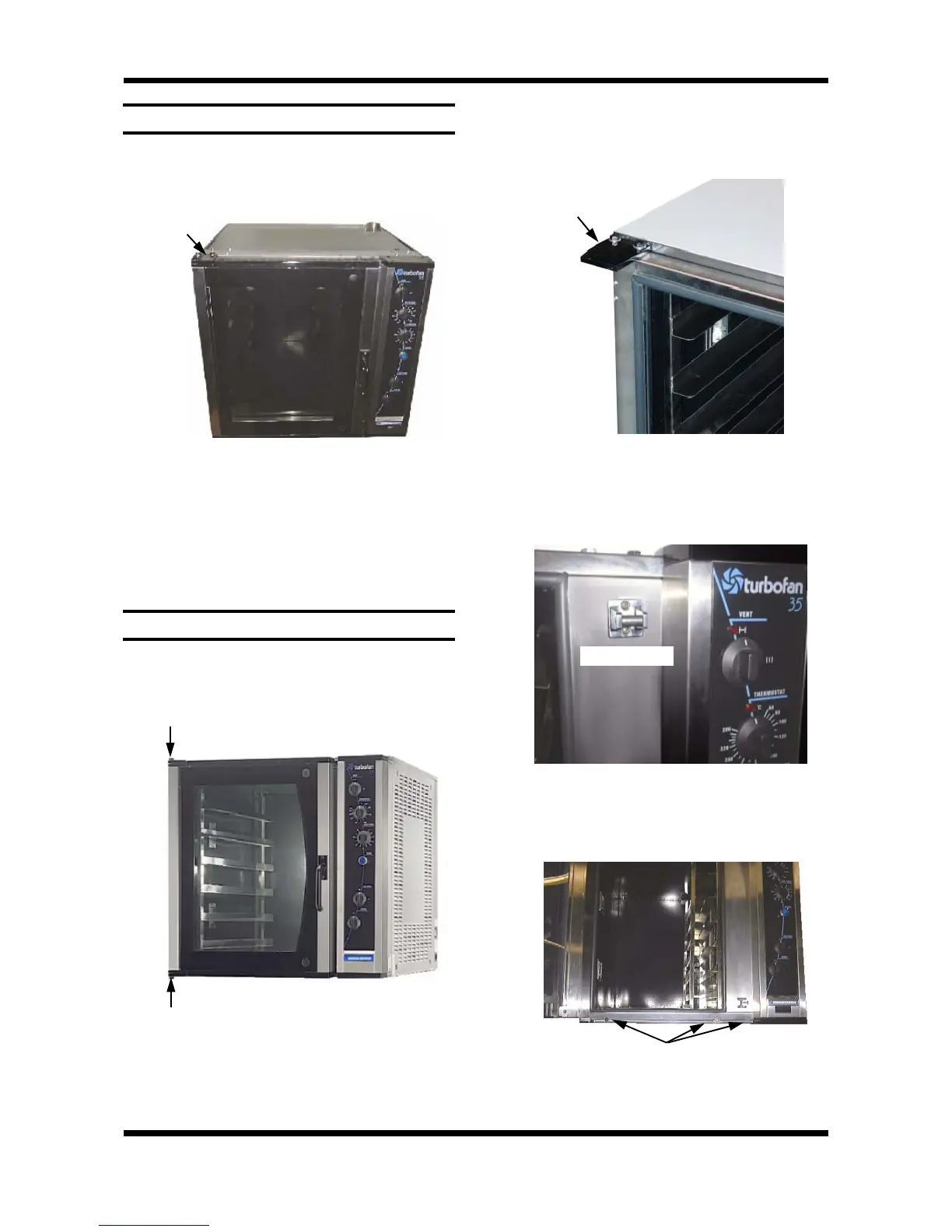
1) Open oven door.
2) Loosen the two bolts securing the top door
hinge plate to the oven.
Two Bolts
Figure 6.4.4
3) Adjust oven door position and tighten two
bolts.
4) Check door operation. Repeat steps 2 and 3
as necessary to ensure that door closes and
latches evenly.
6.4.4 REVERSING THE DOOR
1) Open the oven door.
2) Undo the top and bottom door hinge pivot
pins (whilst supporting the door). Remove the
oven door.
Figure 6.4.5
3) Undo the bolts securing the top hinge plate
and bottom hinge plate to the left hand side of
the oven door opening and remove.
4) Remove the bolt catches (secured by two
screws each) from the right hand side of the
door frame, and secure to the left hand side of
the door frame.
5) Remove the microswitch nut, and undo the
three screws securing the microswitch cover
panel to the bottom of the oven.
Figure 6.4.6
Figure 6.4.7
Figure 6.4.8
Top Hinge Plate
Three Screws
Bolt catch (top)


 To Next Page