MONOGRAM
REFRIGERATORS
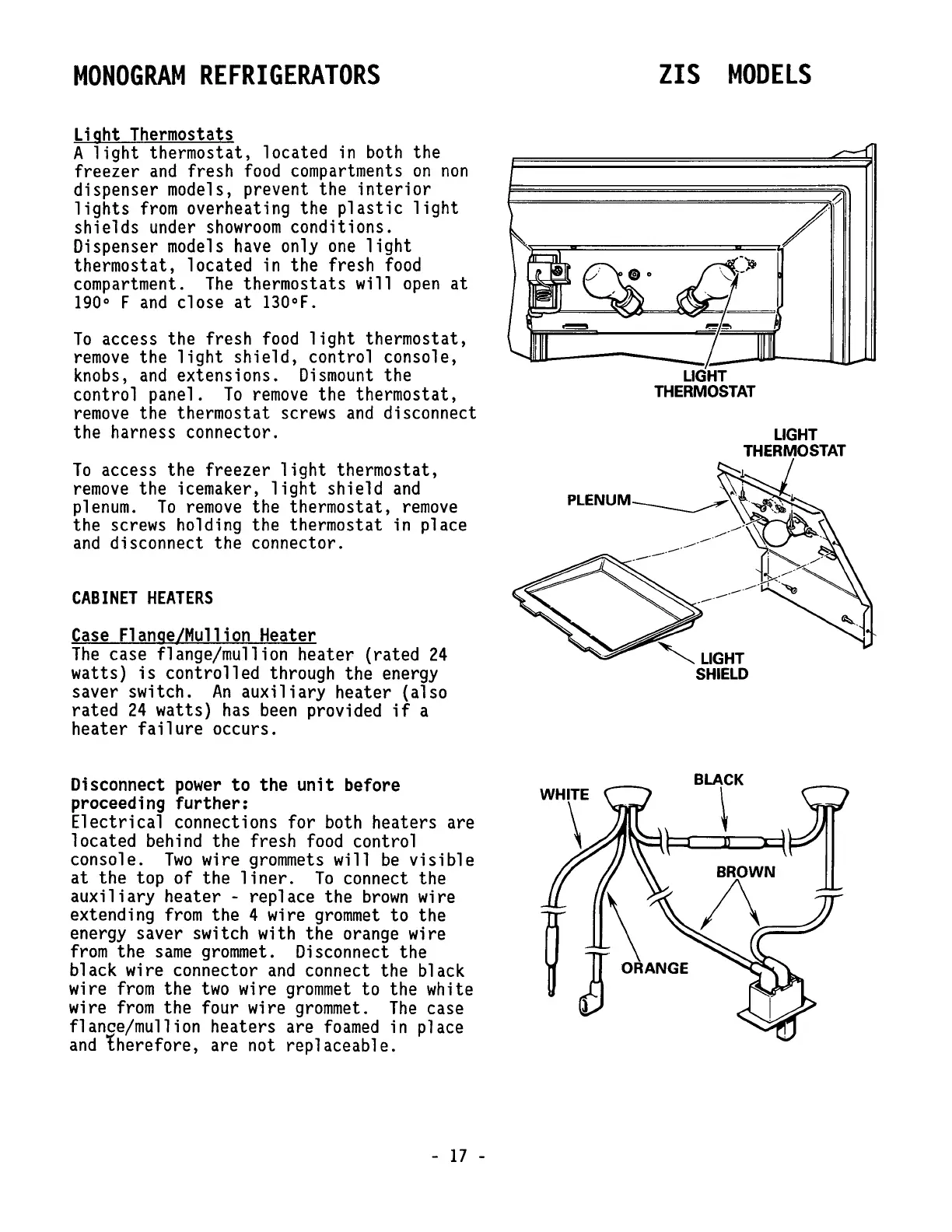
Light Thermostats
A
light
thermostat, located
in
both
the
freezer
and
fresh
food
compartments
on
non
dispenser models, prevent the
interior
lights
from
overheating the
plastic
light
shields under
showroom
conditions.
Dispenser
models
have
only
one
light
thermostat, located in the fresh
food
compartment.
The
thermostats will
open
at
190
0
F
and
close
at
130°F.
To
access the fresh
food
light
thermostat,
remove
the
light
shield,
control console,
knobs,
and
extensions.
Dismount
the
control panel.
To
remove
the thermostat,
remove
the thermostat screws
and
disconnect
the harness connector.
To
access the freezer
light
thermostat,
remove
the icemaker,
light
shield
and
plenum.
To
remove
the thermostat,
remove
the screws holding the thermostat in place
and
disconnect the connector.
CABINET
HEATERS
Case
Flange/Mullion Heater
The
case flange/mullion heater (rated
24
watts)
is
controlled through the energy
saver switch.
An
auxiliary
heater (also
rated
24
watts)
has
been
provided
if
a
heater
failure
occurs.
Disconnect
power
to
the
unit
before
proceeding
further:
Electrical
connections for both heaters are
located behind the fresh
food
control
console.
Two
wire
grommets
will
be
visible
at
the top of the
liner.
To
connect the
auxiliary
heater - replace the
brown
wire
extending
from
the 4 wire
grommet
to the
energy saver switch with the orange wire
from
the
same
grommet.
Disconnect the
black wire connector
and
connect the black
wire
from
the
two
wire
grommet
to the white
wire
from
the four wire
grommet.
The
case
flanse/mullion heaters are
foamed
in place
and
therefore, are not replaceable.
-
17
-
ZIS
MODELS
F===========================~~/
UGHT
THERMOSTAT
'UGHT
SHIELD







 To Next Page