9
5. Setting up the device
Menu level Parameterisation level
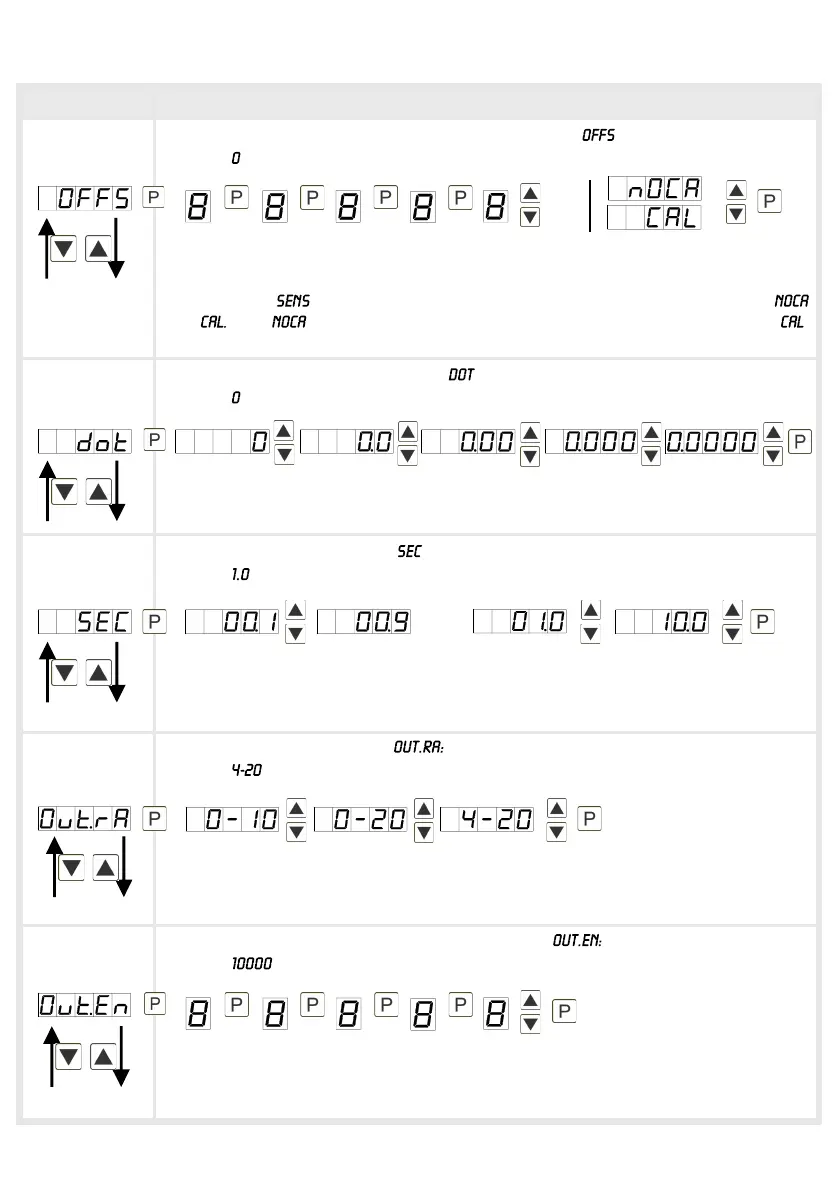
Setting up the measuring range start/offset value, :
Default:
Enter the start/offset value from the smallest to the highest digit with [▲] [▼] and
confirm each digit with [P]. After the last digit the display switches back to the
menu level. If was selected as input option, one can only select between
and With , only the previously set display value is taken over, and with ,
the device takes over both the display value and the analogue input value.
Setting the comma/decimal point, :
Default:
The decimal point on the display can be moved with [▲] [▼] and confirmed with
[P]. The display then switches back to the menu level again.
Setting up the display time, :
Default:
The display time is set with [▲] [▼]. The display moves up in increments of 0.1 up
to 1 second and in increments of 1.0 up to 10.0 seconds. Confirm the selection by
pressing the [P] button. The display then switches back to the menu level again.
Selection of analog output,
Default:
Three output signals are available: 0-10 VDC, 0-20 mA and 4-20 mA, with this
function, the demanded signal is selected.
Setting up the final value of the analog output,
Default:
The final value is adjusted from the smallest digit to the highest digit with [▲] [▼]
and digit by digit confirmed with [P]. A minus sign can only be parameterised on
the highest digit. After the last digit, the device changes back into menu level.
then


 To Next Page