10
5. Setting up the device
Menu level Parameterisation level
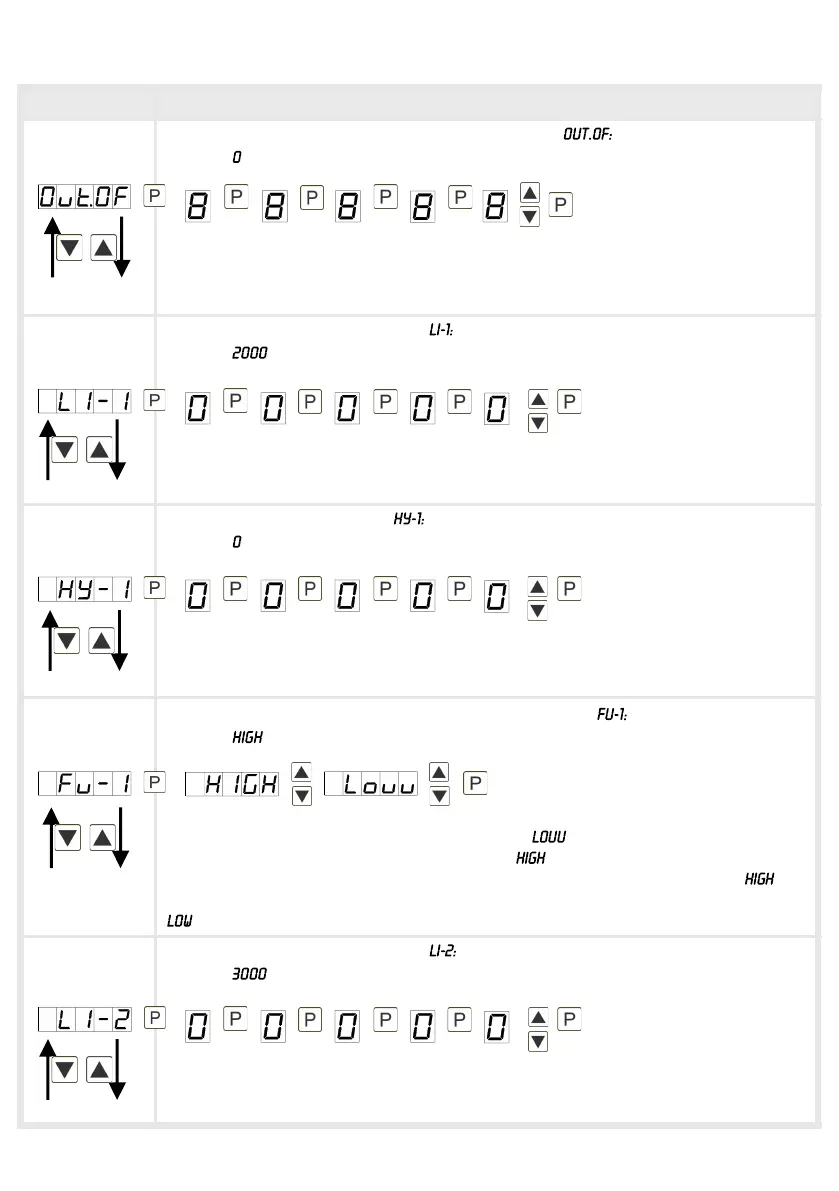
Setting up the initial value of the analog output,
Default:
The final value is adjusted from the smallest digit to the highest digit with [▲] [▼]
and digit by digit confirmed with [P]. A minus sign can only be parameterised on
the highest digit. After the last digit, the device changes back into menu level.
Threshold values / limit values,
Default:
This limit value defines the threshold, that leads to an activation / deactivation of
the alarm.
Hysteresis for limit values,
Default:
The difference to the threshold value that causes the delay of the actuation of the
alarm, is defined by the hysteresis.
Function if display falls below / exceeds limit value,
Default:
The limit value undercut can be selected with (LOW = lower limit value) and
limit value exceedance can be selected with (HIGH = upper limit value). If e.g.
limit value 1 is on a switching threshold of 100 and occupied with function , the
alarm will be activated by reaching the threshold. If the limit value is allocated to
, an alarm will be activated by undercut of the threshold.
Threshold values / limit values,
Default:
This limit value defines the threshold, that leads to an activation / deactivation of
the alarm.


 To Next Page