11
5. Setting up the device
Menu level Parameterisation level
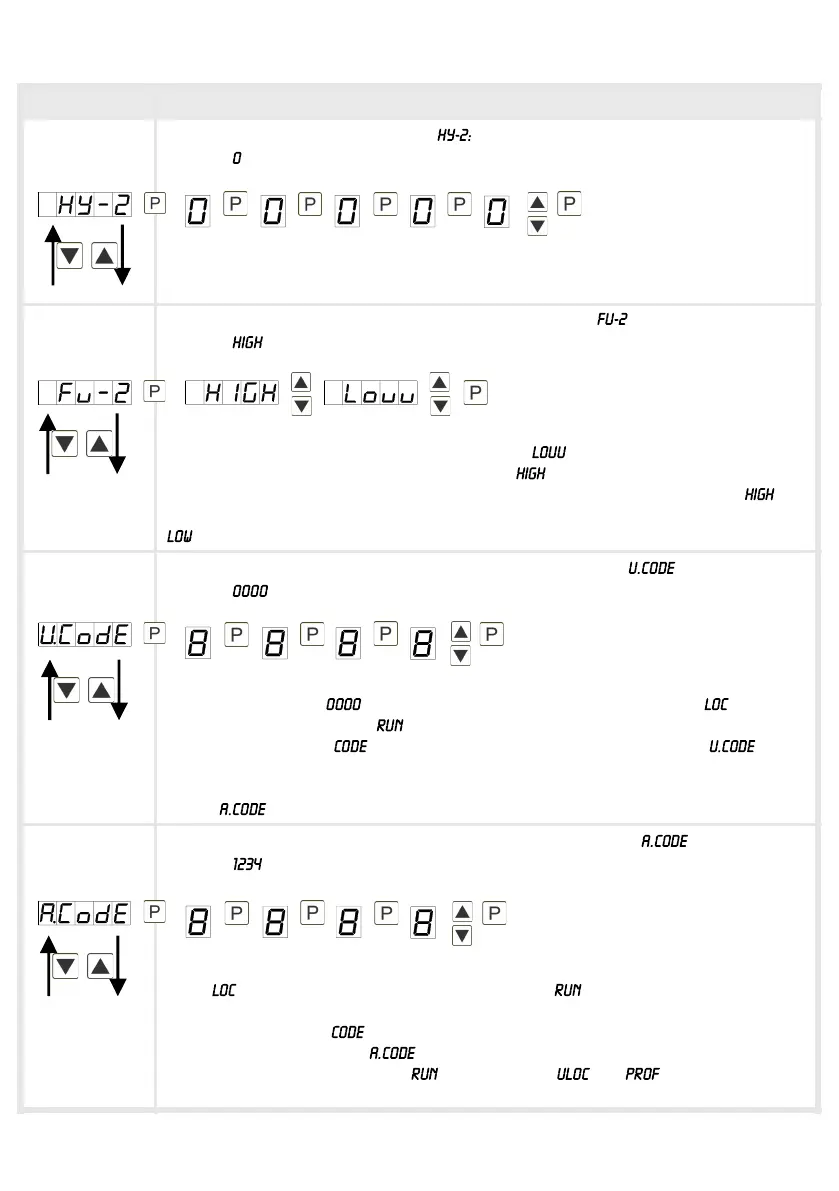
Hysteresis for threshold values,
Default:
The difference to the threshold value that causes the delay of the actuation of the
alarm, is defined by the hysteresis.
Function if display falls below / exceeds limit value,
Default:
The limit value undercut can be selected with (LOW = lower limit value) and
limit value exceedance can be selected with (HIGH = upper limit value). If e.g.
limit value 1 is on a switching threshold of 100 and occupied with function , the
alarm will be activated by reaching the threshold. If the limit value is allocated to
, an alarm will be activated by undercut of the threshold.
User code (4-digit number-combination, free available), :
Default:
If this code is set (> ), all parameters are locked for the user, if has been
selected under menu item . By pressing [P] for approx. 3 seconds in operation
mode, the message is shown in the display. Enter the preset to get
access to the for the user unlocked set of parameters. The code needs to be
entered bevor each try of parameterisation, as long as all parameters are released
by the (Master code) again.
Master code (4-digit number-combination free available), :
Default:
After has been activated under menu item , this code can be used for
unlocking all parameters. By pressing [P] for approx. 3 seconds in operation
mode, the message is shown in the display and offer the user access to all
parameters by entering . While leaving this parameterisation it can be
unlocked permanently under by selecting or . So, at an anew
pressing of [P] in operating mode, an anew entereing of the code is not needed.


 To Next Page