5. Setting up the device
13
Menu level Parameterisation level
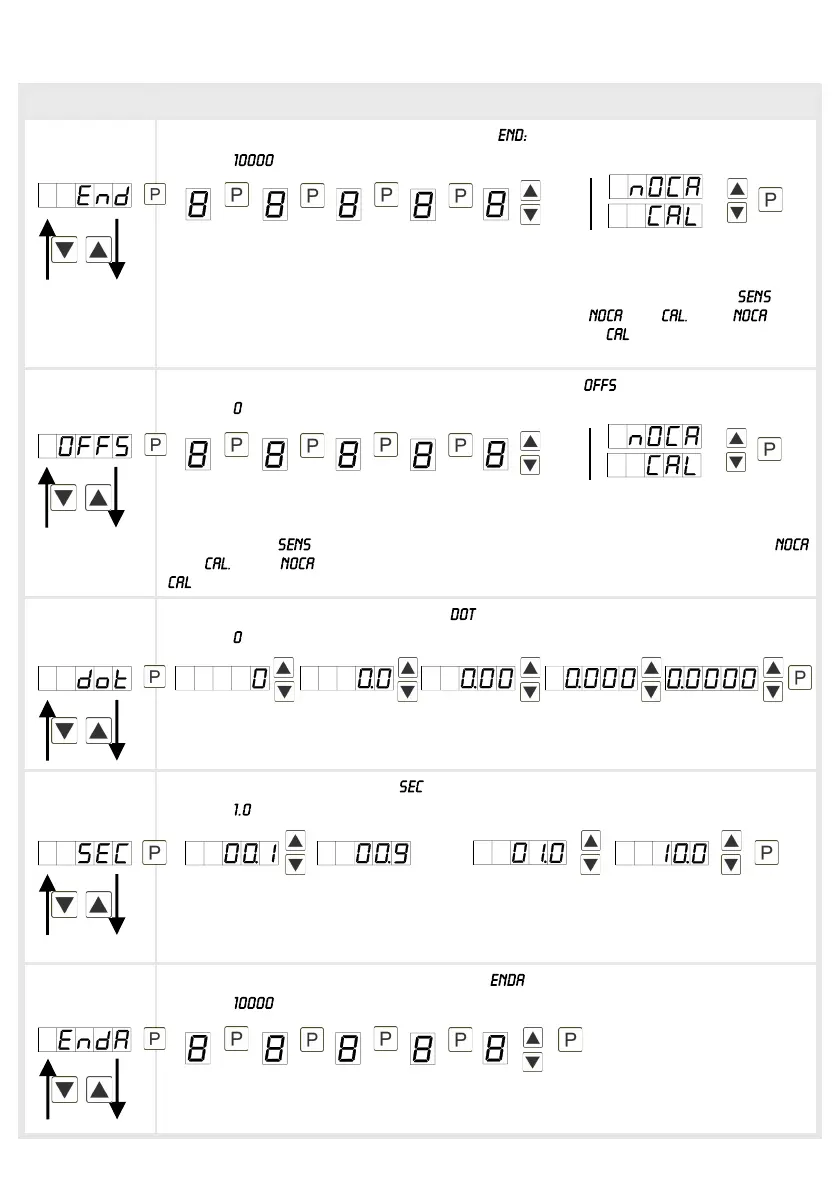
Setting the measuring range end value,
Default:
Set the end value from the smallest to the highest digit with [▲] [▼] and confirm
each digit with [P]. A minus sign can only be parameterized on the highest value
digit. After the last digit, the display switches back to the menu level. If was
selected as input option, one can only select between and With , only
the previously set display value is taken over, and with , the device takes over
both the display value and the analogue input value
Setting up the measuring range start/offset value, :
Default:
Enter the start/offset value from the smallest to the highest digit with [▲] [▼] and
confirm each digit with [P]. After the last digit the display switches back to the
menu level. If was selected as input option, one can only select between
and With , only the previously set display value is taken over, and with
, the device takes over both the display value and the analogue input value.
Setting the comma/decimal point, :
Default:
The decimal point on the display can be moved with [▲] [▼] and confirmed with
[P]. The display then switches back to the menu level again.
Setting up the display time, :
Default:
The display time is set with [▲] [▼]. The display moves up in increments of 0.1 up
to 1 second and in increments of 1.0 up to 10.0 second. Confirm the selection by
pressing the [P] button. The display then switches back to the menu level again.
Rescaling the measuring input values, :
Default:
With this function, rescale the input value of e.g. 19.5 mA (factory setting) without
applying a measuring signal.
then


 To Next Page