5. Setting up the device
20
Menu level Parameterisation level
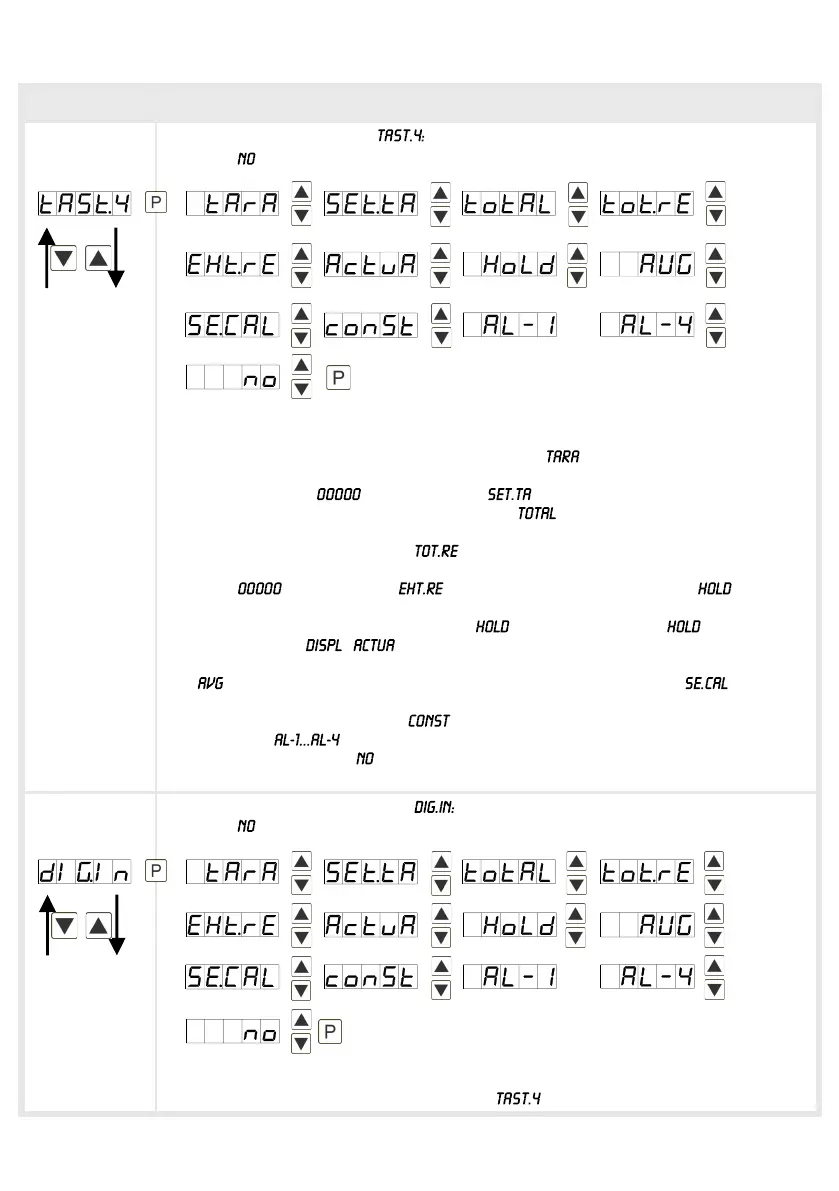
Special function [O]-key,
Default:
For the operation mode, special functions can be deposited on the [O]-key.
Activate this function by pressing the key. With the device is set temporarily
on zero and saved permanently as offset. The device acknowledges the correct
taring by showing in the display. switches into the offset value and
can be adjusted via the navigation keys. Via the current value of the totaliser
can be displayed for approx. 7 seconds, after this the device switches back on the
parameterised display value. If was deposited, the totaliser can be set back
by pressing the navigation keys [▲] [▼], the device acknowledges this with
showing in the display. deletes the min/max-memory. If has been
selected, the moment can be held constant by pressing the [O]-key and is
updated by releasing the key. Advice: is activated only, if was selected
under parameter . shows the measurand for approx. 7 seconds, after
this the device switches back on the parameterised display value. The same goes
for , here the sliding average value will be displayed. Via a sensor
calibration is done by pressing the zero key, the operating diagram is shown in
chapter 8. The constant value can be called up via the key or adjusted digit
per digit. At an output can be set and therewith can e.g. a setpoint
adjustment be done. If is selected, the [O]-key is without any function in the
operation mode.
Special function digital input,
Default:
For the operation mode, the above shown parameters can be laid on the optional
digital input, too. Function description see .
…
…


 To Next Page