www.miinet.com Moore Industries-International, Inc.
- 22 -
User’s Manual
225-748-00P
August 2024
Security Settings
The default security password is 1. This is valid until the password is changed to another
value.
To change or defeat the security password, please contact our Customer Support department.
Password Setting
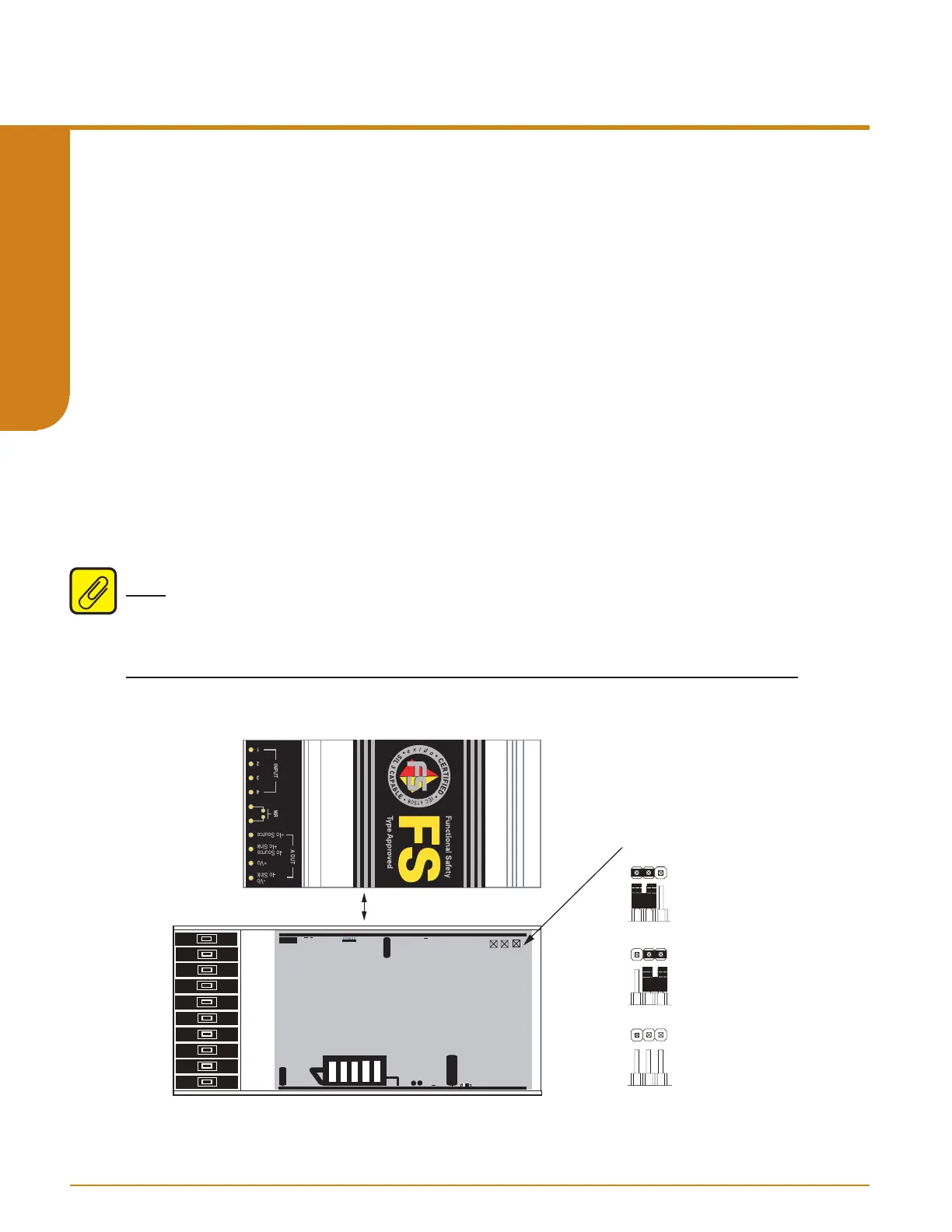
The STA can operate in one of three password modes (default is set to Password Required).
Full Access – Complete access to the STA configuration menu is permitted with no password
required for any read or write operations.
Password Required – A one to four-digit access code is required to gain access to the STA
configuration menu. If the correct code is entered, full read and write operation is permitted. If an
incorrect code is entered, “WRONG PASWD” will appear for 3 seconds, and return user to View
menu, with read-only access to the View menu (see Figure 4.1).
No Access – The user is limited to read-only access to the View menu. “SYS LOCK” will appear
if user attempts to enter Main menu by entering “SEL”. Enter “SEL” a second time to return to
View Menu.
Note: These security settings are only applicable to access via the front panel pushbuttons.
Security can be bypassed using the PC Conguration Software. See PC Conguration Software
section for more information.
REMOVE PANEL
BY UNSCREWING
TOP FOUR SCREWS
SET PASSWORD SECURITY
PASSWORD SECURITY
IS OFF. NO PASSWORD
REQUIRED.
PASSWORD SECURITY
IS ON. PASSWORD
REQUIRED.
NO ACESS.
BACK
STA (TPRG) TOPSIDE
FRONT
Figure 3.6. Setting the Internal Jumper for Password Security
Programmable RTD, T/C, Ohms, mV and Potentiometer Safety Trip Alarm
STA
TPRG
SECTION 3



 To Next Page