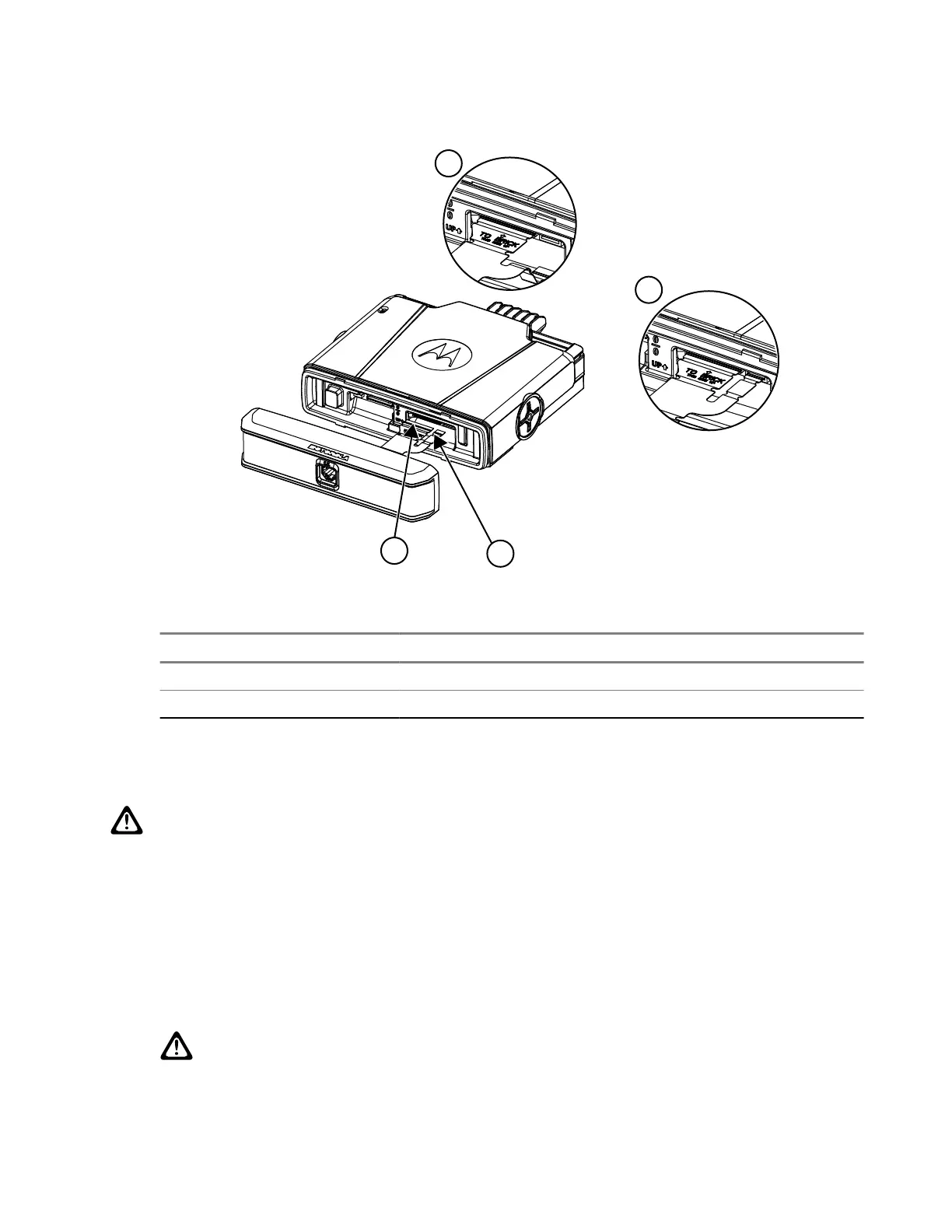
Figure 10: Single Remote Expansion Head (SREH) Connector
Table 40: SREH Flex Connectors
Number Description
1 Y-Flex, PA003639A01 (18-pin flex tail)
2 Y-Flex, PA003639A01 (6-pin flex tail)
5.4.2
Assembling the Dual Remote Expansion Head Flex
CAUTION: The flexes are not designed for multiple insertions. Please inspect for abnormalities on the
flexes before reassembly or when troubleshooting.
Procedure:
1. Connect the 40 pos flex from the Dual Remote Expansion Head (DREH) to the 40 pos connector in
the terminal on the left. Ensure that the gold pads on the flex are facing upwards on the terminal top
cover, with the '1' legend on flex aligned next to the '0' on the terminal chassis. The flex must be fully
inserted into the connector.
2. Connect the 18 pos flex from the DREH to the 18 pos connector in the terminal on the right. Ensure
that the 'THIS SIDE UP' legend on the flex is facing upwards to the terminal top cover and the flex is
inserted fully into the connector.
CAUTION:
Do not insert both connectors at the same time.
MN009999A01-AA
Chapter 5: Maintenance
71


 To Next Page