5.4.4
Troubleshooting SREH or DEH Y-Flex
When troubleshooting, ensure that the connectivity of ithe Interface Y-Flex is good.
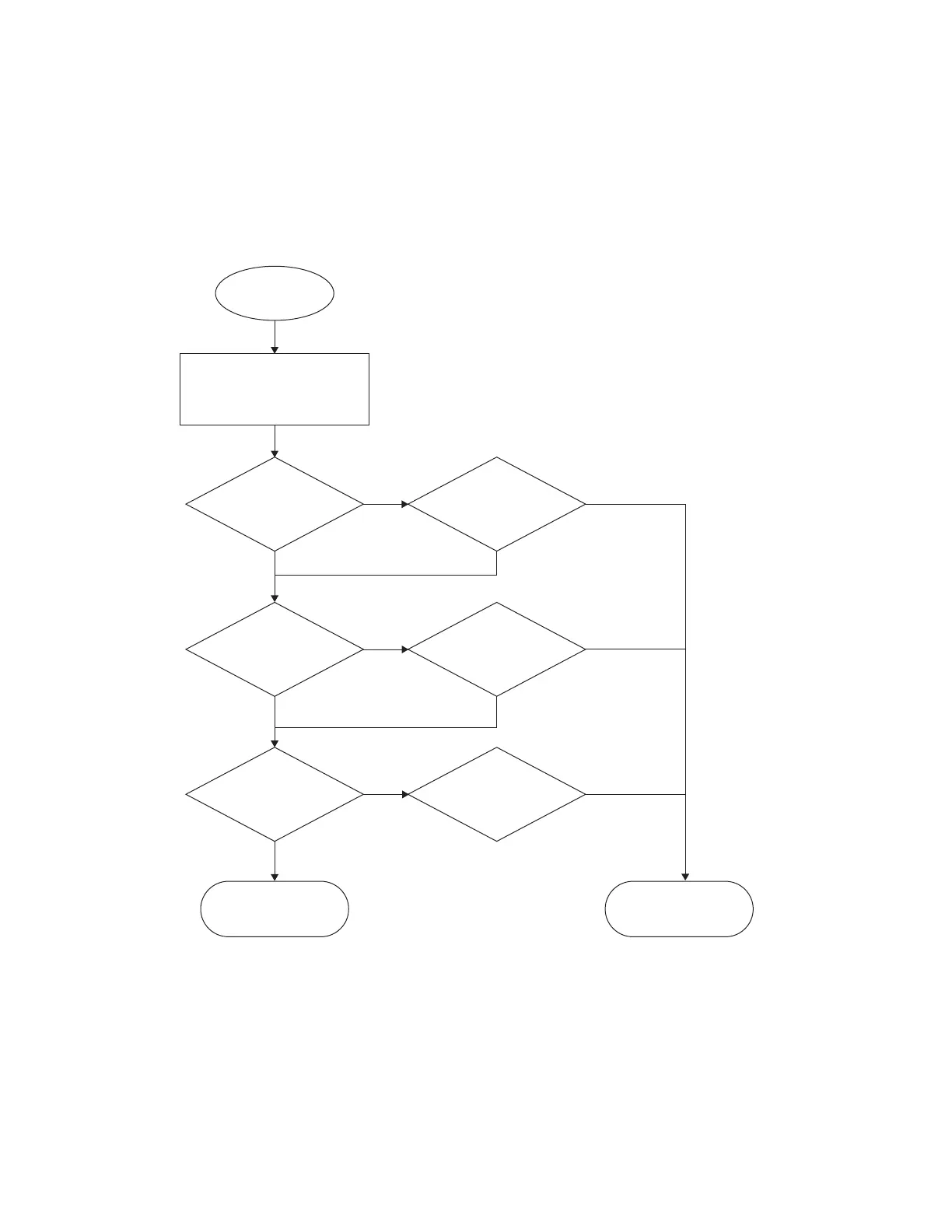
Figure 13: Single Remote Expansion Head (SREH) or Databox Expansion Head (DEH) Y-Flex
Troubleshooting Chart
Remove the Y-flex from
Transceiver/Expansion Heads
and inspect the 18 pins, 6 pins,
and 30 pins contact
Y-flex
Yes
Yes
Yes
No
Abnormality to
18 pin contacts?
Check
with multimeter if
the pin to pin continuity
is good
Yes
No
Abnormality to
6 pin contacts?
Check
with multimeter if
the pin to pin continuity
is good
Yes
No
Abnormality to
30 pin contacts?
Check
with multimeter if
the pin to pin continuity
is good
Y-flex is OK
Y-flex
replacement
P/N PA003639A01
No
No
No
MN009999A01-AA
Chapter 5: Maintenance
74


 To Next Page