• Select required talkgroup from the TalkGroup List.
The display shows one of the following delivery reports:
• Status Sent.
• Status Failed.
Contacts
This sub-menu stores all your contact numbers. Each entry requires the following information:
• Name — if you store more than one number to one contact, this entry is required.
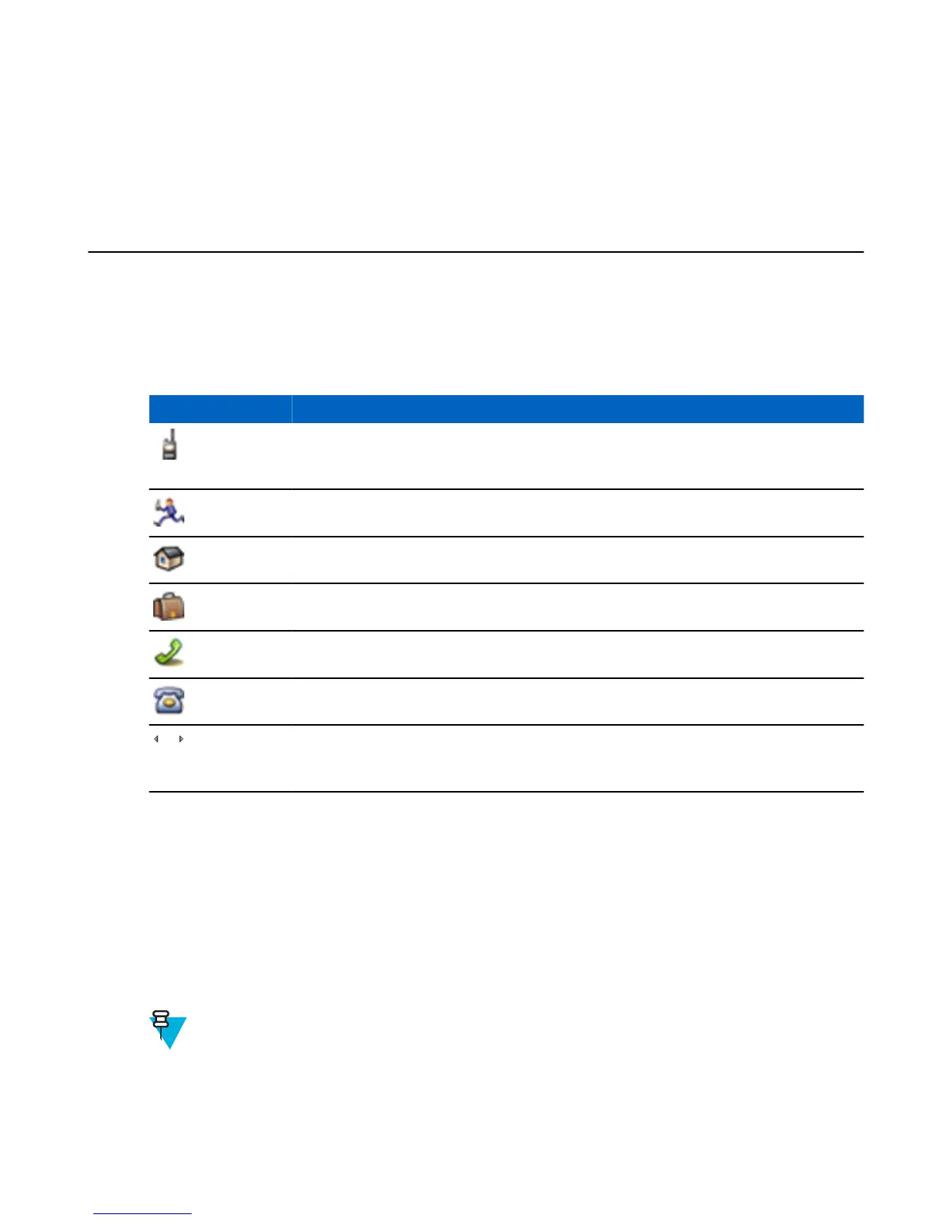
• Type — each contact must be assigned to one of the following types:
Table 17: Contact Types
Contact Icon Description
Private
Cannot have a speed dial number.
Mobile
Home
Work
PABX
Other
Pickers
Indicate more than one number in a contact.
• # (number) — each contacts entry must contain a number.
• Speed # — accept the default Speed Dial number or change it.
Creating Contacts
Procedure:
1 From the home screen, select Contcs.
2 Select [New Contact].
3 Highlight Name and press Change. Enter the name of your contact and press Ok.
4 Highlight Type and press Change. Select the required type of your contact.
Note: You can use the left and right NAVIGATION keys to select the type of your contact from the
Contact Details screen.
5 Highlight # (number) and press Change. Enter the number of your contact and press Ok.
6 If needed, highlight Speed # and press Change. Enter the speed dial number (1– 1000) of your contact and press
Ok.
64 | Main Menu
Send Feedback | |




 To Next Page