Repair Section
52
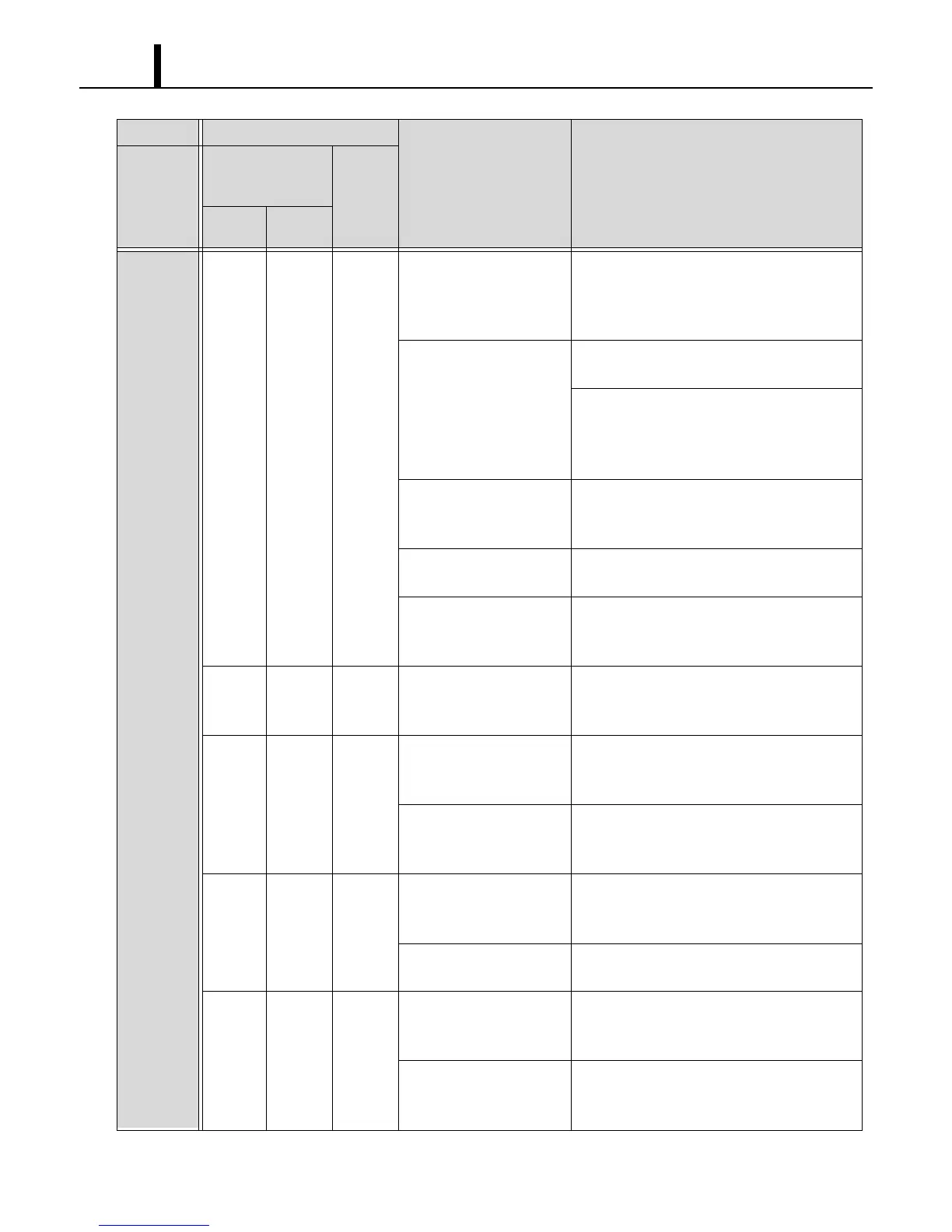
LCD
displays
self-
diagnostic
codes.
HP HP 4 Operating outside of the
operating temperature
range.
Check environmental condition. Do not
operate the unit outside the operating
condition range. (See page 9.)
RESET the controller
*1
.
Insufficient air volume. Clean air filter.
RESET the controller
*1
.
Check ducting of intake and exhaust air, and
make sure there are no objects preventing air
flow.
RESET the controller
*1
.
Loose high-pressure
switch connection.
Reconnect the high-pressure switch and
check the connection.
RESET the controller
*1
.
Defective high-pressure
switch (short or open).
Replace high-pressure switch.
RESET the controller
*1
.
Refrigerant is over
charged.
Charge correct amount of refrigerant.
(See page 86.)
RESET the controller
*1
.
E01 E01 2 Defective RTS1
thermistor (short or
open).
Replace the WMC.
E02 E02 2 Loose RTS2 thermistor
connection.
Reconnect the RTS2 thermistor and check
the connection.
RESET the controller
*1
.
Defective RTS2
thermistor (short or
open).
Replace RTS2 thermistor.
RESET the controller
*1
.
E03 E03 2 Loose ODS thermistor
connection.
Reconnect the ODS thermistor and check
the connection.
RESET the controller
*1
.
Defective ODS thermistor
(short or open).
Replace ODS thermistor.
RESET the controller
*1
.
E04 E04 2 Loose CTS1 thermistor
connection.
Reconnect the CTS1 thermistor and check
the connection.
RESET the controller
*1
.
Defective CTS1
thermistor (short or
open).
Replace CTS1 thermistor.
RESET the controller
*1
.
Condition Check Area
Possible Cause Remedy
Unit does
not
operate.
Self-Diagnostic
Codes
(WMC)
Buzzer
Pattern
User
Mode
Service
Mode
*1 : To RESET the controller, press RESET button, then press ON/OFF button.



 To Next Page