Repair Section
72
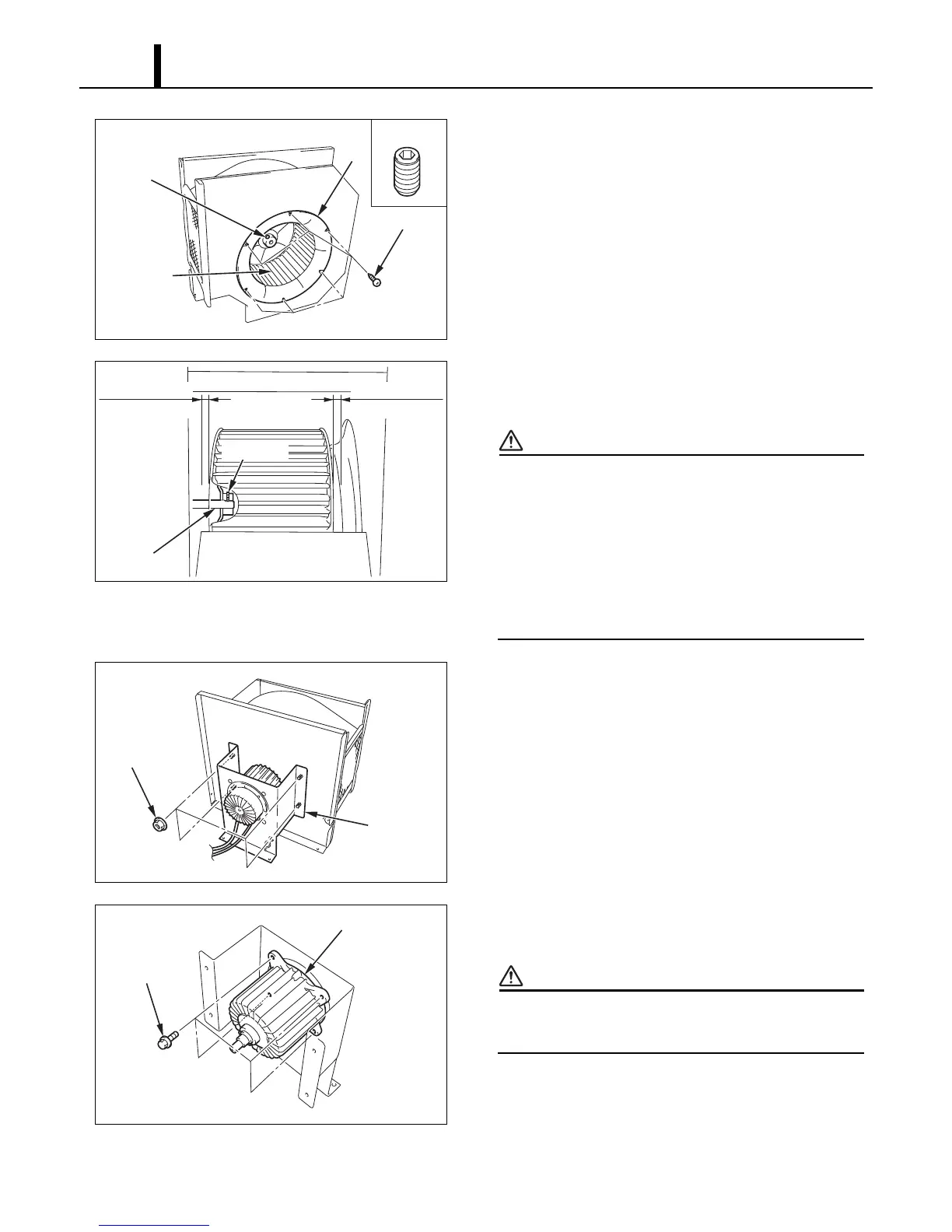
3) Take out the six (6) screws, and then remove the
ring. Loosen the set screw with an Allen wrench
and remove the fan.
4) When assembling the fan, ensure that the screws
align with the motor axis positioning holes.
CAUTION
• Tightening torque:
- 10.0 ± 1.0 ft•lbf (14.0 ± 1.4 N•m)
• Verify the clearance between the fan and case
ring. After installing the fan and fan motor,
ensure that the clearance between the fan and
case ring is at least 0.12 inch (3 mm).
5) Take out the four (4) nuts, and then remove the
motor stay.
6) Take out the four (4) bolts, and then remove the
fan motor.
CAUTION
When assembling the motor, ensure that the
wire connection ends are facing down.
I003130
Screws (6)
Ring
Fan
Set Screw
Set Screw
I003131
Motor Axis
Set Screw
0.12 in (3 mm)
or more
0.12 in (3 mm)
or more
I003132
Nuts (4)
Motor Stay
I003133
Bolts (4)
Fan Motor










 To Next Page